Architecture & Code Structure¶
Overview¶
The ESPHome configuration is split into YAML packages imported by a single entry-point file (listed in section 1). This avoids a monolithic file that becomes impossible to navigate once you're past 1000 lines. Each package has a clearly defined responsibility and can be edited, tested, or replaced in isolation.
Data flow: HA pushes, the tablet sends events¶
The Tab5 never polls Home Assistant's state (ADR-0001). The "screen slots" blueprint and the tab5_* packages detect changes and call the firmware's ESPHome actions (tab5_maj_*, declared in Tab5/paquets/tab5-api-logic.yaml); the firmware parses the payload and updates LVGL in one pass. In the other direction the tablet calls no Home Assistant action: a tapped tile, a request (calendar month, announcement, console button) or its (re)connection becomes an esphome.tab5_* event, which the blueprint or packages/tab5_evenements.yaml turns into an action from a fixed whitelist (ADR-0025).
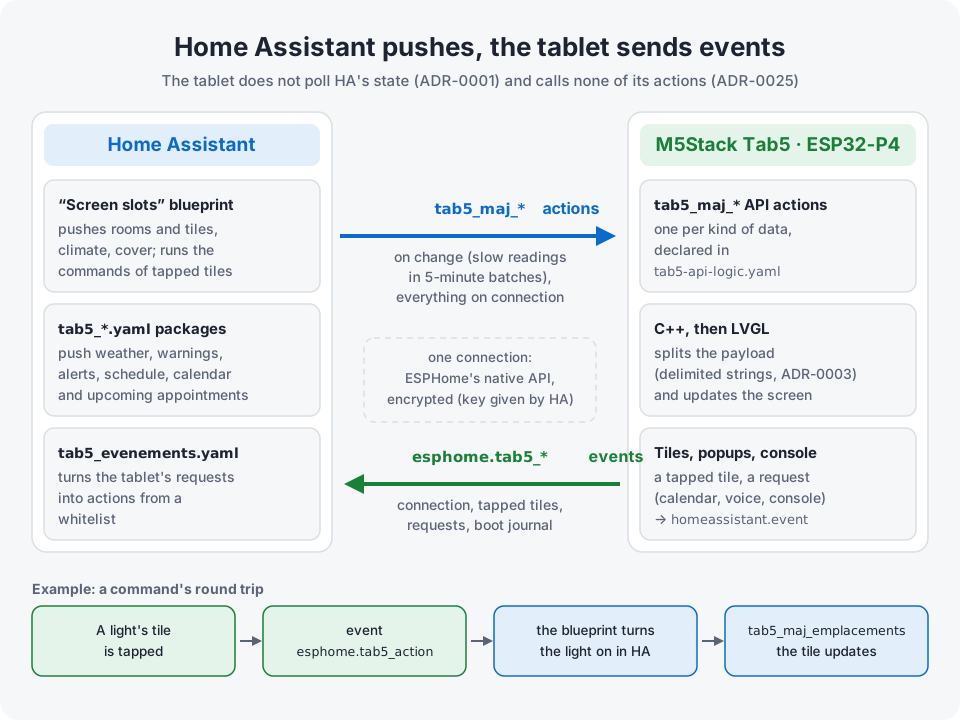
Key design decisions¶
- Push-only, zero polling. The device never requests state from Home Assistant. Automations on the HA side detect changes and push data to the screen via native ESPHome service calls. In the other direction the tablet sends events, never Home Assistant actions (ADR-0025). CPU stays near zero when nothing changes.
- Modular YAML. The ESPHome configuration is split across thirty-seven files by concern (tokens, board (hardware, screen revision, screen size), publication channel, diagnostics sensors, home-automation sensors, API logic, styles, globals, scripts, UI, arcade, calendar, voice assistant, IMU, navigation, HA controls, alarm clock, rooms and tiles, quick-action wheel, row under the clock, energy popup, zones, settings popup, temperature popup, alerts popup, house popup, weather popup, music popup, whole-home music, tracked sensors, fridges, AI server popup, remote popup, energy saving, themes), each independently readable. Most stay under 500 lines; only the largest (
tab5-alarm.yaml,tab5-styles.yaml,tab5-lvgl.yaml,tab5-api-logic.yaml,tab5-sensors-diagnostics.yaml,carte-waveshare-7b.yaml) go beyond, and the UI is further split into 108 reusableui_components/*.yaml. - Native LVGL, no web stack. LVGL refreshes up to 60 times a second from a framebuffer in the ESP32-P4's PSRAM and redraws only what changed. Measured on the tablet (firmware 3.2.0, 2026-09-28): a changed value or the clock's minute redraws in under 10 ms, the rotating panel in the middle in 15-21 ms per frame, the whole screen in 133 ms, and a popup opens in 126-197 ms. Vector fonts (Material Design Icons) replace image files entirely.
- Data packing. Complex payloads (15-day forecast, hourly forecast, weather alerts) are serialized as delimited strings on the HA side and parsed in C++ on the device — one network call, zero subsequent requests.
- Offline resilience. All C++ lambdas check
api.connected()andhas_state()before touching the UI. If HA restarts, the last known state stays on screen — and the device stays usable on its own (clock, arcade, diagnostics console). It only reboots itself after a full hour without any API client (api: reboot_timeout: 60min), a deliberate anti-"zombie" safety net rather than a reaction to a short HA outage.
1. Entry point: tab5-ha-hmi.yaml¶
The root file does three things:
-
Loads entity substitutions —
substitutions: !include Tab5/user_entities.yaml(gitignored local file). CopyTab5/user_entities.example.yamltouser_entities.yamland edit your HA entity IDs. Since 3.0 there is no secret to compile in: Wi-Fi comes from Improv or the fallback AP, the API key from Home Assistant, and builds are signed withtab5_signature.pem(ADR-0020). -
Defines the boot sequence — the
on_bootblock handles the startup order carefully: backlight on → media player volume set → amplifier enable (in that order, to avoid the ES8388 pop) → fire atab5_connectedevent on the HA event bus, sent to Home Assistant itself as soon as it listens to actions (ha_evenement_envoyer(),Tab5/ecran/tab5_journal.cpp, since 2026-10-17: before, any client subscribed to states first, such as an aioesphomeapi tool, let the event go out unheard) → start wake-word detection if enabled. -
Imports all packages via
!include.
packages:
  tab5_ui_tokens:  !include Tab5/paquets/tab5-ui-tokens.yaml
  tab5_carte:      !include Tab5/paquets/carte-${ tab5_carte | default('tab5') | lower }.yaml  # board: hardware, screen, size (ADR-0061)
  tab5_publication: !include Tab5/paquets/publication-${ tab5_publication | default('locale') }.yaml  # release channel (ADR-0022)
  tab5_sensors_diagnostics: !include Tab5/paquets/tab5-sensors-diagnostics.yaml
  tab5_sensors_domotique: !include Tab5/paquets/tab5-sensors-domotique.yaml
  tab5_api_logic:  !include Tab5/paquets/tab5-api-logic.yaml
  tab5_styles:     !include Tab5/paquets/tab5-styles.yaml
  tab5_globals:    !include Tab5/paquets/tab5-globals.yaml
  tab5_scripts:    !include Tab5/paquets/tab5-scripts.yaml
  tab5_lvgl:       !include Tab5/paquets/tab5-lvgl.yaml
  tab5_arcade:     !include Tab5/paquets/tab5-arcade${ '' if (tab5_jeux | default('oui' if (tab5_carte | default('tab5') | lower) == 'tab5' else 'non') | lower) == 'oui' else '-absente' }.yaml  # games: an optional module (ADR-0065); one package per feature (lot 8c),
  tab5_calendar:   !include Tab5/paquets/tab5-calendar.yaml       # after tab5_lvgl: their scripts
  tab5_assist:     !include Tab5/paquets/tab5-assist.yaml         # reference LVGL widget ids
  tab5_imu:        !include Tab5/paquets/tab5-imu${ '' if (tab5_carte | default('tab5') | lower) == 'tab5' else '-absente' }.yaml
  tab5_navigation: !include Tab5/paquets/tab5-navigation.yaml     # after tab5_lvgl: references LVGL widget ids
  tab5_ha_controls: !include Tab5/paquets/tab5-ha-controls.yaml
  tab5_alarm:      !include Tab5/paquets/tab5-alarm.yaml          # after tab5_lvgl too
  tab5_tuiles:     !include Tab5/paquets/tab5-tuiles.yaml         # rooms and tiles (ADR-0023), after tab5_lvgl
  tab5_roue:       !include Tab5/paquets/tab5-roue.yaml           # quick-action wheel (ADR-0036), run by tab5_tuiles_ui
  tab5_rangee:     !include Tab5/paquets/tab5-rangee.yaml         # row under the clock (ADR-0031), after tab5_lvgl
  tab5_reglables:  !include Tab5/paquets/tab5-reglables.yaml      # − / + tile of the climate card (ADR-0033), after tab5_lvgl
  tab5_energie:    !include Tab5/paquets/tab5-energie.yaml        # Energy popup (ADR-0028), after tab5_lvgl
  tab5_historique: !include Tab5/paquets/tab5-historique.yaml     # Temperature popup (ADR-0032), after tab5_lvgl
  tab5_alertes:    !include Tab5/paquets/tab5-alertes.yaml        # Alerts history popup, after tab5_lvgl
  tab5_maison:     !include Tab5/paquets/tab5-maison.yaml         # House popup (ADR-0037), after tab5_lvgl
  tab5_meteo:      !include Tab5/paquets/tab5-meteo.yaml          # Weather popup (ADR-0043), after tab5_lvgl
  tab5_lecteur:    !include Tab5/paquets/tab5-lecteur.yaml        # Music popup (ADR-0050), after tab5_lvgl and tab5_assist
  tab5_musique:    !include Tab5/paquets/tab5-musique.yaml        # whole-home music (ADR-0067), after tab5_lvgl and tab5_assist
  tab5_cameras:    !include Tab5/paquets/tab5-cameras.yaml        # Cameras popup (ADR-0049), after tab5_lvgl
  tab5_suivi:      !include Tab5/paquets/tab5-suivi.yaml          # tracked sensors (ADR-0054), after tab5_lvgl
  tab5_froid:      !include Tab5/paquets/tab5-froid.yaml          # fridges and freezers (ADR-0055), after tab5_lvgl
  tab5_serveur_ia: !include Tab5/paquets/tab5-serveur-ia.yaml     # local AI server popup (ADR-0059), after tab5_lvgl
  tab5_telecommande: !include Tab5/paquets/tab5-telecommande.yaml # remote popup, several remotes (ADR-0056), after tab5_lvgl
  tab5_zones:      !include Tab5/paquets/tab5-zones.yaml          # optional zones (ADR-0018), after tab5_lvgl
  tab5_reglages:   !include Tab5/paquets/tab5-reglages.yaml       # Settings popup, after tab5_lvgl
  tab5_economie:   !include Tab5/paquets/tab5-economie.yaml       # energy saving: backlight cap, animations, LVGL rate
  tab5_themes:     !include Tab5/paquets/tab5-themes.yaml         # themes (ADR-0029), LAST: repaints the packages above
2. Package roles¶
tab5-ui-tokens.yaml¶
Shared dimensional tokens, loaded first so every other package can reference them: modal card size (modal_card_w/modal_card_h), the 52 px title bar offset (modal_body_y), bottom margin (modal_bottom_y), calendar grid origin (cal_grid_y), and on the home page the height of a line of the row under the clock (ligne_zone_h) and of the Ok Nabu and − / + frames around one (cadre_bas_h). Changing a popup's geometry means changing a token here, not 8 hardcoded numbers across ui_components/.
carte-*.yaml¶
The board, picked at compile time by tab5_carte: in Tab5/user_entities.yaml (ADR-0061): tab5 (the default, the M5Stack Tab5) or waveshare-7b (Waveshare ESP32-P4 7B, 1024×600, experimental: it runs on the author's board since 2026-10-14, the home screen and the popups follow its screen size, the games not yet, see Waveshare ESP32-P4 7B). carte-tab5.yaml loads geometrie-tab5.yaml, tab5-hardware.yaml and the screen revision ecran-*.yaml below; carte-waveshare-7b.yaml holds the whole hardware of that board and stubs the ids of the Tab5 hardware it lacks (power switches, battery, RTC) so the other packages compile unchanged. Each board's geometrie-*.yaml gives the screen size (carte_ecran_l/carte_ecran_h, from which the tokens and the C++ kEcranL/kEcranH derive), the panel size, the LVGL rotation and the scale of the large fonts. The root file also picks tab5-imu.yaml (BMI270) on the Tab5 and tab5-imu-absente.yaml elsewhere. See docs/hardware.md.
tab5-hardware.yaml¶
Low-level hardware configuration of the Tab5 (loaded by carte-tab5.yaml):
- Display and touch settings shared by the three Tab5 revisions (MIPI-DSI, pins, calibration); the display model and the touch platform come from Tab5/paquets/ecran-<revision>.yaml (default: M5STACK-TAB5-ST7123 and the official st7123 I2C platform, since ESPHome 2026.7.0; the old external_components shim is gone) — see docs/hardware.md
- I2C bus, PI4IOE5V6408 GPIO expanders (display/touch reset lines)
- ES8388 DAC (audio_dac: platform) and ES7210 microphone ADC (audio_adc:)
- esp32_hosted — ESP32-C6 Wi-Fi co-processor over SDIO
- Backlight PWM (LEDC), I2S bus for microphone and speaker, media player, ota: — the voice pipeline (micro_wake_word/voice_assistant) moved to tab5-assist.yaml on 2026-09-25
→ Details: docs/hardware.md
ecran-*.yaml¶
Screen and touch of one Tab5 revision, picked at compile time by tab5_ecran: in Tab5/user_entities.yaml: st7123 (the default, the author's tablet), st7121 (runs on a user's tablet since October 2026) or ili9881c (compiled by CI, never tested on a tablet). Each file only holds what changes from one revision to the next — the mipi_dsi model and the touch platform (st7123, or gt911 on the original ILI9881C) — and extends the tab5_display and touch entries of tab5-hardware.yaml with !extend. See docs/hardware.md.
publication-*.yaml¶
Release channel (ADR-0022), picked by tab5_publication (default locale; the release CI, .github/workflows/publication.yml, sets it to stable or beta as a substitution). publication-locale.yaml is empty: a firmware compiled on your own PC gets no update entity, because the published binaries are signed with the project key, which a tablet flashed with another key refuses. publication-stable.yaml and publication-beta.yaml include publication-commune.yaml with the channel as a variable: an ota: http_request platform and a « Firmware » update: entity that reads the manifest of the flashing page (<channel>/<screen revision>/manifest.json). A beta moves on to the stable release that follows it.
tab5-sensors-diagnostics.yaml¶
System and network entities:
- wifi: block, antenna select, GPIO power switches (Wi-Fi/USB/external 5V)
- Internal ESP32-P4 temperature
- Uptime, Wi-Fi signal strength, IP/SSID, HA API status
- Free RAM / loop time (debug), SNTP clock, console refresh intervals
tab5-sensors-domotique.yaml¶
Home-automation entities pushed by Home Assistant:
- Plant moisture sensors (up to 5 BLE plant monitors)
- Room & greenhouse temperature/humidity sensors
- Light/PC state mirrors, phone battery
- Audio: speaker amp switch, headphone jack, wake-word toggle
- Plant details (EC / light / temperature / battery): pot_sensors.yaml, one parameterized package included five times (nested packages: + vars: {n})
These files only declare entities. No UI logic lives here.
tab5-api-logic.yaml¶
The most important package. Two things live here:
ESPHome API service handlers — these are the endpoints Home Assistant calls to push data to the screen. Each handler receives a payload, validates it, then calls a C++ function of the C++ layer (tab5_services.cpp, declared in tab5_custom.h) to parse and apply it.
api:
  services:
    - service: tab5_maj_previsions_jours_bulk
      description: "Daily forecast: all 15 days in a single call."
      variables:
        payload:
          type: string
          description: "Fifteen days as idx|label|condition|tmin|tmax|… joined by ;"
          example: "0|Auj 17|sunny|12.1|24.3|0|0|0|;"
      then:
        - lambda: |-
            parse_and_update_jours_bulk(payload);
Every handler carries that description/example metadata (ESPHome 2026.9.0 and later). Home Assistant renders it in Developer tools → Actions, which is where the format of a hand-serialised payload becomes readable without opening this file. A handler missing it fails pytest (rule 5 of tools/check_tab5_code_rules.py).
C++ lambdas — for logic that doesn't fit cleanly in YAML (state machine transitions, string parsing, conditional LVGL updates).
The rule enforced throughout: before any lv_* call, check boot_complete and api.connected(). This prevents NaN values from crashing the UI during HA restarts.
tab5-styles.yaml¶
Global LVGL style definitions, declared once and referenced by ID everywhere in tab5-lvgl.yaml.
The rationale: LVGL allocates a style object per widget if you define styles inline. With 80+ widgets on screen, that's 80+ style allocations in PSRAM. Declaring styles globally and attaching them by reference uses a handful of allocations for the whole screen.
Styles defined here cover: base panel, card backgrounds, text variants (title, value, dim, small), button states (normal, pressed, active), progress bar fill, and icon color variants.
tab5-globals.yaml¶
Shared global variables accessible from any package:
- boot_complete (bool) — gate for all UI updates
- conversation_mode (bool) — toggles between Home Assistant pipeline and chat pipeline
- Current state snapshots (last known temperature values, climate mode, etc.)
Variables here are typed and initialized. Uninitialized globals on ESP32 are undefined behavior.
tab5-lvgl.yaml¶
The UI layout. Declares the pages, panels, labels, buttons, arcs, and icons, plus swipe gesture handling. It !includes 39 ui_components/*.yaml files directly (climate card/popup, light popup, shutter popup, device popup, TV remote popup, settings popup — whose System page is the former system console —, temperature popup, alerts popup, house popup, weather popup, tracked sensors popup and card, AI server popup, assistant/calendar/plant popups, alarm popup and ring overlay, forecast cards, the row under the clock (moisture gauges and sensor lines), the list of the − / + tile, switches card, the HA alert banner of the central card — one file included four times with vars —, the arcade selector and the 8 games); those in turn include the parametrized sub-templates (pot_detail_card.yaml, modal_header.yaml…), for 108 component files in total.
The dashboard is a single LVGL page, not a multi-page tab-bar layout (ADR-0002) — every home-automation feature lives on one 1280×720 page_main, reachable by tap, long-press or swipe. The only other pages are the 9 gaming ones (page_arcade + one per console), all declared skip: true so swipe navigation can never land on them; they are not part of the dashboard flow.
page_main (1280×720):
page_main (1280×720, the whole dashboard)
├── home content always visible   (clock, indoor temp/humidity, quick actions,
│                                   climate card, moisture card)
├── central rotating card          (planning / rain / alerts / info — auto-cycles
│                                   every 8s, tab5-globals.yaml `interval:`; paused
│                                   while off the default forecast window)
├── bottom card region — one of two, toggled by `btn_control_ha` (house icon, top right):
│   ├── HA mode cards   (`layer_switches` — the 5 devices of the current room, ADR-0023)
│   └── forecast card   (`layer_forecast_daily` / `layer_forecast_hourly` — weather, 5 tabs)
├── climate_popup   (near-fullscreen modal, opened by tapping the climate card)
├── light_popup     (near-fullscreen modal, opened by tapping a light switch card)
├── tv_remote_popup (Samsung remote, opened by a long press on the gamepad button
│                    or on the PC card — `remote.*` services via HA)
├── assistant_popup (STT transcription + Markdown LLM reply, long-press on the mic)
├── calendar_popup  (monthly 7×6 grid, long-press on the date)
├── pots_popup      (5 plant-detail cards, long-press on the moisture slots)
└── reglages_popup  (settings in 4 pages: screen, appearance, battery, system — the
                     system page is `console_sys`: diagnostics + volume + HA management
                     with confirm overlays; tap on `btn_control_console`, top right =
                     screen page, long press = system page)

separate pages, outside the dashboard flow (all `skip: true` — see §6):
├── page_arcade   (4×2 selector, opened by the gamepad button or the navigation wheel)
└── page_marble / page_arkanoid / page_pinball / page_lode / page_go /
    page_trivia / page_chess / page_draughts      (one per console)
Navigation is by touch (opening/closing the climate/light popups and the console button, and toggling the bottom card region between the weather mode and the HA mode) and by swipe gesture, handled in C++ (handle_swipe_gesture() in tab5_central.cpp):
- swipe left/right on the lower band of the screen (y ≥ 333) → cycle through the 5 forecast pages (2 hourly windows + 3 daily windows, with the deliberate wrap documented in forecast_page_suivante()) in weather mode, then, on the left, through the pages of rooms 5 … N − 1 when Home Assistant sends more than five rooms (pn|N, ADR-0066, with « Tab5 Appareils sur la météo » on); in HA mode, the same gesture goes to the next (left) / previous (right) room as a carousel (last room → room 1, empty rooms included, tuiles_swipe_ha(), 2026-10-18), the pagination dots in room order, and never shows the weather layers again under the cards
- since the 14/07/2026 rework there is no up/down swipe anymore — the console opens by a long press on the gear button only
Since 3.2 (ADR-0023) each forecast page is also a room of up to five devices described by Home Assistant (tab5_tuiles.cpp). The HA mode flag is g_central_ctx.ha_mode (the former show_switches global is gone); tuiles_mode_ha() crossfades the weather layer and layer_switches (hidden via LV_OBJ_FLAG_HIDDEN, never removed), paints the five cards of the current room, puts the room title in the central card and highlights the « HA » button (tab5-lvgl.yaml, btn_control_ha). See the [AI-CONTEXT] headers of Tab5/ecran/tab5_tuiles.cpp and ui_components/switches_card.yaml for the source-level notes.
All style references point to IDs defined in tab5-styles.yaml. No inline style properties.
→ Full file-by-file inventory and dependency graph: ../CARTOGRAPHIE_TAB5.md
tab5-scripts.yaml¶
Since 2026-09-25 (audit lot 8c), the game, calendar and voice/assistant scripts live in their own packages: tab5-arcade.yaml, tab5-calendar.yaml, tab5-assist.yaml. Short ESPHome script blocks for reusable multi-step actions called from lambdas or HA. Keeps tab5-api-logic.yaml from becoming cluttered with repeated patterns. Grouped by family: debounces (volume 150 ms, brightness 200 ms, climate 250 ms — one HA call per gesture instead of one per tick), volume (single entry point tab5_volume_apply), climate widgets (tab5_clim_ui; the recolouring is in C++, clim_recolorer()), central rotator + dismiss, shutter, light popup, TV remote keys, and a 1 s interval: that returns to the home screen.
tab5-arcade*.yaml¶
The games are a module (ADR-0065), picked by tab5_jeux (oui / non; oui by default on the Tab5, non on a board without an IMU such as the Waveshare 7B). tab5-arcade.yaml is the module: the games' C++ files (esphome: includes:, with the console table Tab5/jeux/jeux_registre.cpp, GameRegistry::kGames, ADR-0013), their colours and the chess font, their 9 LVGL pages (page_arcade and one per console), one tab5_<game>_open per console (it hands the game its LVGL pointers and fonts, which only a lambda can reach through id()), tab5_arcade_open for the selector page and tab5_jeux_traduire (the translation of its pages at boot). tab5-arcade-absente.yaml takes its place without games: the same two scripts, empty, and an empty console table (Tab5/jeux/jeux_absents.cpp); the Arcade is then no screen of the tablet. tab5_games_close_all lives in tab5-navigation.yaml (the core calls it). Loaded after tab5-lvgl.yaml: its pages follow page_main. See §6 and docs/arcade.md.
tab5-calendar.yaml¶
Scripts of the calendar popup (calendar_popup.yaml): opening (long press on the date, « auto »), month render, previous / next / today, boot prefetch and the tap on a day. The grid is computed on the tablet (tab5_calendar.cpp); Home Assistant only fills it on request: the tablet fires esphome.tab5_calendrier_mois (or _jour for a day), packages/tab5_evenements.yaml runs the HA script, which answers with the tab5_maj_calendrier_mois / _jour actions. A month request always goes through tab5_cal_request. Loaded after tab5-lvgl.yaml.
tab5-assist.yaml¶
The whole voice assistant: micro_wake_word (okay_nabu, plus Stop), voice_assistant and its callbacks (visual states through assist_set_pipeline_state()), the reply image (http_request + online_image), the voice scripts (arming the « Stop » word, interruption, tab5_wake_word_dispatch — the decision itself is WakeWord::decide() in tab5_assist.cpp —, reply in the central card) and those of the Assistant popup. The audio hardware (shared I2S bus, ES7210, ES8388, media player) stays in tab5-hardware.yaml. Loaded after tab5-lvgl.yaml. See docs/voice_assistant.md.
tab5-imu*.yaml¶
tab5-imu.yaml on the Tab5; on a board without an IMU (ADR-0061), tab5-imu-absente.yaml only keeps the « Tab5 Tap-to-Wake » switch the Settings popup reads, with no name and no effect. BMI270 accelerometer: the three axes are internal: true (at 10–30 Hz they would flood the HA recorder for nothing). Two consumers — tap-to-wake on the dashboard, and tilt input for the games. An interval: re-tunes the polling rate at runtime via set_update_interval(): 100 ms (10 Hz) at rest, 33 ms (30 Hz) while a tilt-controlled console is open. See §6.
tab5-navigation.yaml¶
Navigation between screens (2026-10-08, out of tab5-ha-controls.yaml and tab5-scripts.yaml): the modal registry (tab5_modal_registry_init, ADR-0013 — each window, its label and, for a screen opened by a script, that script), tab5_ecran_ouvrir, the only routine that opens a screen (the "go to screen" select and the gestures of the home screen, through the tab5_geste script, ADR-0039; refused while the alarm rings), the select itself and the text_sensor naming the current screen (game page or visible popup). The list of screens lives in three places ESPHome cannot merge — the Ecran enum, the select options read by HA, the registry — kept in step by tests/test_appuis.py and tools/check_tab5_registry.py. Loaded after tab5-lvgl.yaml: its lambdas reference LVGL widget ids.
tab5-ha-controls.yaml¶
Entities exposed to Home Assistant to tune the screen from a dashboard without standing in front of it: a number for the volume (single entry point script.tab5_volume_apply, shared with both on-screen sliders), the screen language, the switches and the automatic screen-off of the Settings popup, a button to reload the calendar, and a 5 s catch-up of volume changes made on the media_player side.
tab5-alarm.yaml¶
Alarm clock + appointment reminders: rtttl: melody on tab5_speaker (outside the media player), ~20 config entities exposed to HA (switches, datetime type: time, numbers, selects, text), the ring state machine (one melody pass, then a 3 s listening window for the on-device "Stop" wake word; snooze, max duration, crescendo) and a 1 s interval: that only compares two integers — all the date maths live in the pure engine alarm_clock.cpp (no id(), no network). The alarm rings without Home Assistant; HA only adds the spoken briefing, the appointment list and an optional ringtone URL. Single entry point script.tab5_alarm_refresh (entities → g_alarm_cfg, never the reverse). The mic/speaker relay it has to perform is ADR-0010.
tab5-tuiles.yaml¶
Rooms and tiles (ADR-0023): the tab5_tuiles_ui script hands g_tuiles_ui the widgets that tab5_tuiles.cpp draws (weather-tile shoulders and buttons of every page, HA-mode cards, rows and room names of the Lights and Shutters popups, layers, page dots, central-card title, « HA » button) and its two commands (the esphome.tab5_action event, the shutter tap). The model, the NVS and the drawing live in tab5_tuiles.cpp; definitions arrive through the tab5_maj_tuiles action. No lv_* here. Run first by tab5_zones_apply, before the first frame; loaded after tab5-lvgl.yaml. Then it runs tab5_roue_ui (tab5-roue.yaml, split out on 2026-10-08), which hands g_roue_ui the widgets of the quick-action wheel (ADR-0036, ui_components/roue_actions.yaml), drawn by tab5_roue.cpp: the long press of a lum, vol or cli tile opens it around the tile — a hub, a first ring (« Maison », commands, families, « Détails ») and a second ring for the touched family's choices.
tab5-roue.yaml¶
Quick-action wheel of a tile (ADR-0036): the tab5_roue_ui script hands g_roue_ui the widgets of ui_components/roue_actions.yaml, drawn by tab5_roue.cpp, the caption of each button and the central card as the anchor of the navigation wheel (ADR-0042, tab5_roue_navigation.cpp: its long press opens the wheel on the tablet's screens), then calls roue_brancher(). tab5_tuiles_ui runs it right after the tile widgets, as when they lived in tab5-tuiles.yaml (split out on 2026-10-08). No lv_* here.
tab5-rangee.yaml¶
Row under the clock (ADR-0031): the tab5_rangee_ui script hands g_rangee_ui the widgets that tab5_rangee.cpp draws (ui_components/rangee.yaml: the plants line, two panels of four elements for the sensor lines, the position dots). Up to three sensor lines of four elements, plus the plants line, rotate with the central card: tab5_central_rotator_auto calls rangee_tour() 0.2 s before the central card moves, and a line stays N turns of 8 s (« Time per line » in the blueprint). Definitions (hLI, hp, hd keys) arrive through tab5_maj_tuiles, states (hLI) through tab5_maj_emplacements; the model and its NVS live in tab5_tuiles.cpp. Display only: a tap shows the next line, a long press on the plants line opens My Plants. No lv_* here. Run by tab5_zones_apply, before the first frame; loaded after tab5-lvgl.yaml.
tab5-reglables.yaml¶
− / + tile of your choice (ADR-0033): the tab5_reglables_ui script hands g_reglables_ui the widgets that tab5_reglables.cpp draws — on the climate card (ui_components/climate_card.yaml: the value between − and +) and in the list (ui_components/reglables_liste.yaml, ten rows from reglables_ligne.yaml) — and the callbacks to the scripts (tab5_volume_apply, tab5_action, tab5_debounce_reglable). Touching the living-room temperature unfolds the list: the blueprint's climate, the devices of the blueprint's « − / + tile » section (rN keys of tab5_maj_tuiles and tab5_maj_emplacements), then the tablet's volume. The choice stays in NVS. Climate chosen: − / + and the value keep their former path. Other device: the value changes at once, one esphome.tab5_action (rN / regler, or consigne for a climate) leaves when the finger stops. No lv_* here. Run by tab5_zones_apply, before the first frame; loaded after tab5-lvgl.yaml.
tab5-energie.yaml¶
Energy popup (ADR-0028): the tab5_energie_ouvrir script hands g_energie_ui the widgets of ui_components/energie_popup.yaml on the first opening, then calls energie_ouvrir() (tab5_energie.cpp); tab5_energie_demande sends the esphome.tab5_energie event (vue = heures, jours or mois) when the popup opens and on each view button. Home Assistant answers with the tab5_maj_energie (live values) and tab5_maj_energie_historique (bars) actions. Opened by a cap tile with the e option or by « Aller à l'écran → Énergie ». No lv_* here; loaded after tab5-lvgl.yaml.
tab5-alertes.yaml¶
Alerts popup (ADR-0034, lot 4 of the alerts plan, 2026-10-06): the 20 latest alerts, one line each (severity dot, text, « apparue 14 h 02 · lue 14 h 10 · terminée 15 h 30 »), and « Tout marquer comme lu ». The tab5_alertes_ouvrir script hands g_alertes_ui the widgets of ui_components/alertes_popup.yaml on the first opening, then calls alertes_ouvrir() (tab5_alertes.cpp); tab5_alertes_demande sends the esphome.tab5_alertes_historique event when the popup opens, and Home Assistant answers with the tab5_maj_alertes_historique action (again while the popup stays open and the history changes). tab5_alertes_tout_lu reads the central card's banners at once and sends esphome.tab5_alerte_lue with alert_id « * ». Opened by a long press on the home central card or by « Aller à l'écran → Alertes ». No lv_* here; loaded after tab5-lvgl.yaml.
tab5-maison.yaml¶
House popup (ADR-0037, 2026-10-07): the whole house, one column per room of the blueprint that has devices (room 1 → 10; five columns at most a page, the rooms shared out evenly over ADR-0046 pages, pages_repartir(), ADR-0066), one row per device with the same icon, name and state as the HA-mode card. The tab5_maison_ouvrir script hands g_maison_ui the widgets of ui_components/maison_popup.yaml (five column headers from maison_entete.yaml, 25 rows from maison_ligne.yaml, two page names from pages_onglet.yaml) on the first opening, then calls maison_ouvrir() (tab5_maison.cpp), which lays out the columns and paints the rows. A row reacts like its tile: tap, long press and the « ⋯ » button go through tuile_appui_piece() (tab5_tuiles.cpp) — the long press and « ⋯ » first open the tile's quick-action wheel around the row's badge, without its « Maison » link (tuile_roue_ouvrir(); roue_ouvrir() brings it in front of this popup) —, so the commands are those of the tiles and nothing new reaches Home Assistant; « Éteindre les lumières » sends each room's « tout éteindre ». peindre_tuile() and tuiles_appliquer_ui() tell it when a state or the definitions change, only while it is shown. Opened by « Aller à l'écran → Maison » or, in HA mode, by a tap on the central card's title. No lv_* here; loaded after tab5-lvgl.yaml.
tab5-meteo.yaml¶
Weather popup (ADR-0043, 2026-10-09): the weather in graphs, on three pages changed by a swipe or by their names next to the title, like the Settings — « Aujourd'hui » (now: icon, temperature, condition, low and high of the day, rain over the hours shown; then up to 15 hours: icons, a smoothed temperature curve, rain bars, the current hour marked), « 10 jours » (one row per day, low-to-high bar on a common scale) and « Détails » (rain in the next hour on a time scale, humidity, UV index, frost and snow probabilities). The tab5_meteo_ouvrir script (page) hands g_meteo_ui the widgets of ui_components/meteo_popup.yaml (four cards from meteo_carte.yaml) on the first opening, then calls meteo_ouvrir() (tab5_meteo.cpp), which builds the plots once and paints the page. Nothing is asked of Home Assistant: the popup reads what it already pushes (hourly and daily forecasts, rain bars, current weather, probabilities). Opened by « Aller à l'écran → Météo », a home-screen gesture (code meteo) or a long press on a forecast tile without a device. No lv_* here; loaded after tab5-lvgl.yaml.
tab5-cameras.yaml¶
Cameras popup (ADR-0049, 2026-10-09, discussion #278): a still image of each camera picked in the « Caméras » section of the blueprint, in a mosaic of four squares per page or one camera large (ADR-0057; a swipe, the dots under the frame, a tap to switch), refreshed one image at a time while the popup is open — no video. The tab5_cameras_ouvrir script hands g_cameras_ui the widgets of ui_components/cameras_popup.yaml and four command lambdas on the first opening, then calls cameras_ouvrir() (tab5_cameras.cpp). tab5_cameras_demande sends esphome.tab5_cameras (opening, every 4 minutes while open, after a failed image), answered by the blueprint with tab5_maj_cameras (each camera's entity_picture, area and offline time). From two areas, a room column (ui_components/cameras_puce.yaml) filters the cameras the swipe goes through (ADR-0057). The camera shown is downloaded and decoded off the main loop (tab5_cameras_charge.cpp: a FreeRTOS task, esp_http_client, the ESP32-P4 hardware JPEG decoder, RGB565 in PSRAM, each decoded buffer given to the screen, which keeps the last image of each camera, 8 MiB at most), every 5 s, its neighbours once in between; tab5_cameras_attente (mode: restart) polls it and the memory is released when the popup is closed. Opened by « Aller à l'écran → Caméras » or a home-screen gesture (code cameras). No lv_* here; loaded after tab5-lvgl.yaml and tab5-assist.yaml.
tab5-historique.yaml¶
Temperature popup (ADR-0032): the tab5_historique_ouvrir script (cle = salon or serre) hands g_historique_ui the widgets of ui_components/historique_popup.yaml on the first opening, then calls historique_ouvrir() (tab5_historique.cpp); tab5_historique_demande sends the esphome.tab5_historique event (cle, vue = jour, semaine or mois) when the popup opens and on each view button. Home Assistant answers with the tab5_maj_historique action (the curve, and the forecast for the second temperature). Opened by a long press on one of the two home-screen temperatures (climate_card.yaml). No lv_* here; loaded after tab5-lvgl.yaml.
tab5-lecteur.yaml¶
Music popup (ADR-0050, 2026-10-10): a centred card for any media_player — cover art, title, artist, album, a position bar, shuffle / previous / play-pause / next / repeat, volume and mute, one chip per chosen player — the « now playing » bar of the home screen, over the Ok Nabu frame, and the compact player that the zone left of the clock can show (ADR-0051; the bar hides while it is shown) (ui_components/lecteur_popup.yaml, lecteur_mini.yaml, lecteur_zone.yaml). Home Assistant pushes the players and the shown one with the tab5_maj_lecteur action (read by tab5_parse.cpp, section 9); tab5_lecteur_lier hands g_lecteur_ui the widgets, tab5_lecteur_evenement sends the esphome.tab5_lecteur event (action, lecteur, valeur) for every command, and a 1 s interval advances the position (lecteur_tic()). The cover is an online_image (lecteur_pochette, RGB565 360 × 360): the entity_picture path completed with the address of HA seen when the API connects. Opened by the long press of a med tile without option t, the « now playing » bar, the musique gesture or « Aller à l'écran → Musique ». No lv_* here; loaded after tab5-lvgl.yaml and tab5-assist.yaml.
tab5-musique.yaml¶
Whole-home music (ADR-0067, 2026-10-18): the pages of the Music popup after « Lecture », on its page brick (tab5_pages.cpp, a swipe or their names on the title line, each page only when it has something to show). « Pièces » shows one card per player (eight at most): its kind, name, state or track, volume (sent on release), mute, group with the shown player, « send the music here », power; a tap shows that player on « Lecture », a long press opens its wheel (source, mute, ungroup). « Bibliothèque » browses Music Assistant: favourites, playlists, albums, artists, radios, podcasts, recent, a grid of ten items per page with their covers; a tap plays a track or opens a container, a long press offers play now, next, at the end or as a radio. « Lecture » gains « À suivre » and the « + n » chip of a group. Home Assistant pushes the players with the tab5_maj_musique_pieces action and answers each browse with tab5_maj_musique_liste (read by tab5_parse.cpp, section 9 bis; packages/tab5_musique.yaml); tab5_musique_lier hands g_musique_ui the widgets of ui_components/musique_calques.yaml, tab5_musique_evenement sends the esphome.tab5_musique event (action, piece, valeur), the ten covers are online_image of the parametrized package musique_pochette.yaml (160 × 160, downloaded one at a time), and a 1 s interval gives up a browse unanswered after 8 s (musique_tic()). Without Music Assistant, only « Pièces » with the players of « Tab5 · lecteurs de musique ». No lv_* here; loaded after tab5-lvgl.yaml and tab5-assist.yaml.
tab5-suivi.yaml¶
Tracked sensors (ADR-0054, 2026-10-10): the « Suivi » popup — one card per sensor chosen in « Tab5 · capteurs suivis » (six at most), with its name, value and unit, change in colour with a trend arrow, and the curve of the last 24 hours — and the card of the first sensor that the zone left of the clock can show (content « capteur », ADR-0051) (ui_components/suivi_popup.yaml, suivi_carte.yaml, suivi_zone.yaml). Home Assistant pushes them with the tab5_maj_suivi action (read by tab5_parse.cpp, section 11; packages/tab5_suivi.yaml); tab5_suivi_lier hands g_suivi_ui the widgets (also run at boot by tab5_zones_apply), tab5_suivi_ouvrir paints and opens the popup. Opened by a tap on the zone's card, the suivi gesture or « Aller à l'écran → Suivi ». Nothing is asked of Home Assistant; no lv_* here; loaded after tab5-lvgl.yaml.
tab5-froid.yaml¶
Fridges and freezers (ADR-0055, 2026-10-10): the « Froid » popup, titled « Frigos et congélateurs » — one card per appliance declared in « Tab5 · réfrigérateurs » and « Tab5 · congélateurs » (four at most in all), with its temperature coloured by level, its status (within norm, too warm, door open?, door not closed, sensor silent…), the 24-hour extremes and the norm, the curve of the last 24 hours between the dashed lines of the norm and the last incident (ui_components/froid_popup.yaml, froid_carte.yaml) — and the fridge-alert icon that blinks in the clock's top-right corner while an appliance is at the serious level (btn_froid_alerte in tab5-lvgl.yaml, a 500 ms lv_timer paused while it is hidden). Home Assistant decides the levels (packages/tab5_froid.yaml) and pushes them with the tab5_maj_froid action (read by tab5_parse.cpp, section 12); tab5_froid_lier hands g_froid_ui the widgets, tab5_froid_ouvrir paints and opens the popup. Opened by a tap on the blinking icon, the froid gesture, « Aller à l'écran → Froid » or the navigation wheel (Agenda ▸ Frigos). Nothing is asked of Home Assistant; no lv_* here; loaded after tab5-lvgl.yaml.
tab5-serveur-ia.yaml¶
Local AI server (ADR-0059, 2026-10-10): the « Serveur IA » popup — a band with the online / offline dot, the state, the server's name and the loaded model; the tokens-per-second card (large number, curve of the last 24 pushes kept by the tablet, requests running and queued); four cards for the VRAM (with a bar), the GPU temperature (coloured by the level Home Assistant decides), the RAM (with a bar) and the power (ui_components/serveur_ia_popup.yaml, serveur_ia_carte.yaml). Unknown values show « — ». Home Assistant pushes the sensors picked in the « Tab5 · serveur IA, … » lists (packages/tab5_serveur_ia.yaml, two seconds apart at least) with the tab5_maj_serveur_ia action (read by tab5_parse.cpp, section 14); nothing is painted while the popup is closed. tab5_serveur_ia_lier hands g_serveur_ia_ui the widgets, tab5_serveur_ia_ouvrir paints and opens the popup. Opened by the serveur_ia gesture, « Aller à l'écran → Serveur IA » or the navigation wheel (Agenda ▸ Serveur IA, once a server was pushed). No lv_* here; loaded after tab5-lvgl.yaml.
tab5-telecommande.yaml¶
Remote popup with several remotes (ADR-0056, 2026-10-10): tab5_telecommande_ui, run by tab5_tuiles_ui, hands g_telecommande_ui the widgets of ui_components/tv_remote_popup.yaml that tab5_telecommande.cpp shows or hides for the remote of the page — the names at the top (pages_onglet.yaml), Source or Stop, Mute or the volume icon, the app row (TV) or the playback row (set-top box: Apple TV, Freebox Player) — and plugs in the left / right swipe (tab5_pages.cpp, ADR-0046). The list comes from the « telecommandes » key of tab5_maj_emplacements (tab5_parse.cpp, section 13); every key sends an esphome.tab5_action event whose slot (« tv », « tv1 »…) is the page shown, and the « Tab5 — emplacements » blueprint translates it for that remote. Nothing is asked of Home Assistant; no lv_* here; loaded after tab5-lvgl.yaml.
tab5-zones.yaml¶
Optional zones (ADR-0018): a zone whose slot is not chosen in the « Tab5 — emplacements » blueprint, or whose entity does not exist, disappears from the screen with its buttons. tab5_zones_demande asks Home Assistant once per connection (esphome.tab5_zones event), the blueprint answers with the tab5_maj_zones action, and tab5_zones_apply hands the widgets to zones_apply_ui() (tab5_zones.cpp, where the decision lives) and publishes the « Zones masquées » diagnostic sensor. It is run at the end of setup, after each HA answer, and when data brings a zone back. Loaded after tab5-lvgl.yaml.
tab5-reglages.yaml¶
Settings popup (2026-10-06, four pages since 2026-10-08): the settings one may want to change without Home Assistant — on the Screen page brightness, auto screen off, waking on « Okay Nabu » and with a tap; on the Appearance page theme, light or dark, the night switch of Auto mode, language; on the Battery page charge limit, power saving and battery fitted, with the battery's state, level, voltage and consumption (painted by reglages_batterie_peindre() only while that page is shown) — and the System page, the former system console (console_sys.yaml, refreshed only while that page is shown: reglages_page_visible(REGLAGES_PAGE_SYSTEME)). The page changes with a tap on its name at the top or a left / right slide in the popup (LV_EVENT_GESTURE caught by the popup, which does not let it bubble to page_main; a slide that starts on a slider does not change the page), instantly. Opened by a tap on the gear button (btn_control_console) on the Screen page, by its long press on the System page, by « Aller à l'écran → Réglages » (Screen page) or « Aller à l'écran → Console système » (System page). tab5_reglages_ouvrir(page) hands g_reglages_ui the widgets of ui_components/reglages_popup.yaml on the first opening; tab5_reglages_sync_ui reads the entities and calls reglages_peindre() (tab5_reglages.cpp), and every entity set there runs it from its own on_value / on_state, so the popup shows what Home Assistant sees, whoever made the change; tab5_reglages_choisir writes an entity, and the language first asks for a confirmation (tab5_reglages_langue_confirmer), since it restarts the tablet. Nothing is stored here: the settings remain the entities (restore_value / restore_mode). No lv_* here; loaded after tab5-lvgl.yaml and before tab5-themes.yaml.
tab5-economie.yaml¶
Energy saving (2026-10-06): the « Tab5 Économie d'énergie » select (Jamais, Sur batterie — the default —, Toujours) and the « Tab5 Sur batterie » diagnostic state. Its tab5_economie_appliquer script runs every second and right away on a touch, when the screen comes on, and on the battery's current, level and charge; it feeds economie_decider() (tab5_economie.h, pure, tested on a PC) and applies the decision: the backlight cap (the light writes through the backlight_plafonne template output of tab5-hardware.yaml, so Home Assistant keeps the chosen brightness), the animation level animations_niveau() (tab5_anim.cpp; the « Tab5 Animations » select, « Aucune » while energy saving is on, ADR-0045) and the LVGL refresh period (33 ms outside games). « On battery » is decided from the INA226 current in tab5-sensors-diagnostics.yaml; what keeps the screen as it is (alarm, voice, game, update) is the list of the screen auto-off, stored in ecran_veille_permise. Loaded by the off-device render too, where nothing turns it on.
tab5-themes.yaml¶
Themes (ADR-0029): the « Thème » select (one option per file of Tab5/themes/), the « Clair ou sombre » select (Sombre, Clair, Auto) and the « Nuit (thème auto) » switch that Home Assistant turns on at sunset (tab5_push.yaml, automation « Tab5 — thème jour/nuit »). tab5_theme_choisir picks the palette (theme_selectionner(), tab5_theme.cpp); tab5_theme_repeindre repaints without a reboot: the shared styles first (block generated by tools/gen_themes.py), then, once setup is complete, every colour set at runtime (theme_rejouer_ui(), one replay function per C++ unit, plus the sensor icons). A theme may also change the shapes of nine shared styles, keep the banner and the clock dark in light mode, and set the fonts of the time, the date and the titles (lot 3). The games keep the dark palette (ADR-0014). Loaded LAST: its repaint reads the widgets, sensors and scripts of every package above.
3. C++ layer: tab5_custom.h + the tab5_*.cpp units¶
Since 2026-09-08 the former single tab5_custom.cpp (3 169 lines) is split into nine units, one per responsibility — tab5_text.cpp, tab5_forecast.cpp, tab5_central.cpp, tab5_services.cpp, tab5_assist.cpp, tab5_cards.cpp, tab5_console.cpp, tab5_anim.cpp, tab5_calendar.cpp — with tab5_custom.h unchanged as the single public header and tab5_internal.h for the few helpers shared between units. tab5_custom.cpp only keeps the shared globals. Other units have been split off since (the climate left tab5_cards.cpp for tab5_clim.cpp on 2026-10-08, lot L7); CARTOGRAPHIE_TAB5.md lists them all. Since 2026-10-08 these files live in Tab5/ecran/, the pure C++ they call (tab5_core, tab5_champs, tab5_tokens.h…) in Tab5/socle/; each unit also has its own header (tab5_forecast.h…), and tab5_custom.h is the umbrella that includes them all, so the lambdas still include only it.
The .h file declares all functions used from YAML lambdas. The .cpp file implements them.
Main responsibilities:
- String tokenizer — splits semicolon-delimited payload strings in place (strtok_r). Used for the bulk weather pushes (parse_and_update_heures_bulk() / parse_and_update_jours_bulk()).
- LVGL helpers — null-guarded update functions (update_*_ui(), refresh_*_forecast()) so a push arriving before LVGL is initialized can't crash the UI.
- Color logic — maps temperatures and plant moisture levels to continuous color gradients (get_temperature_color() / get_humidity_color()).
- Gestures & central card — handle_swipe_gesture() (forecast pagination), transition_widgets() (panel animations), show_temporary_planning() (6 s override then restore), update_info_text_ui() (info panel), normalize_text_utf8() (accent fixing for dynamic HA strings).
(The microphone icon, its colour and the status label follow the pipeline through assist_set_pipeline_state() (tab5_assist.cpp), called by the five voice_assistant: callbacks of tab5-assist.yaml.)
4. The Push paradigm¶
The device never initiates a network request. All data flow goes in one direction:
Home Assistant                       Tab5 (ESP32-P4)
──────────────                       ───────────────
State change detected
  → automation triggered
    → service call: esphome.tab5_maj_previsions_jours_bulk(payload)
      → API handler receives payload ──────────────────────→
                                       parse_and_update_jours_bulk() runs
                                       LVGL labels updated
No pauses on the HA side (2026-10-01): the push automation sends its service blocks one after the other; the sequence keeps them in order. The 1-second pauses it used to insert dated from a time when a push made about twenty calls in loops, and only delayed the screen by 6 s after each reboot. Bulk payloads stay split in blocks: the device rejects one larger than 2048 bytes.
5. Data packing¶
For the 15-day daily forecast, 15 × 4+ data points (day, condition, max temp, min temp…) would be dozens of separate service calls. Instead, HA builds one string:
"0;Soleil;27;14;1;Nuageux;24;12;2;Pluie;19;11;..."
The C++ tokenizer splits on ; in a single pass — O(n) on string length, not O(n) on call count. The LVGL update then happens once, atomically, without intermediate redraws.
Same pattern applies to the hourly forecast (tab5_maj_previsions_heures_bulk) and the Météo-France vigilance payload (tab5_maj_alerte_meteo_france, 11 to 13 |-delimited fields: fog and forest fire at the end are optional).
6. Game layer (Arcade — experimental)¶
The 8 game consoles are isolated sub-modules that share no state with the HMI dashboard. They follow a strict architecture:
- One dedicated fullscreen LVGL page per game 1280×720 (
page_marble,page_chess… declaredskip: trueso swipe navigation cannot reach them) — not an overlay stacked onpage_main. The only documented exception to the modal chrome rule (ADR-0009) - YAML = empty containers — each
*_game.yamldeclares only 2–4lv_objcontainers; all visual content is built in C++ lv_timerlifecycle — created on open, destroyed on close → zero CPU cost when no game is running- Pre-allocated LVGL pool — all sprites/labels created once at first open, then recycled via
show/hide+set_pos→ zero heap allocation in the game loop - NVS persistence — each game has its own save struct via
esphome::global_preferences(magic-validated) - Zero HA/network dependency — games work fully offline
- Adaptive IMU polling —
tab5-imu.yamlswitches from 100 ms (10 Hz) at rest to 33 ms (30 Hz) when a tilt-controlled game is open
Navigation goes through lvgl.page.show: (YAML) or lv_scr_load() (C++); the selector page page_arcade is the single entry point, opened by the tab5_arcade_open script (the gamepad button's tap, « Jeux » in the navigation wheel; the greenhouse temperature's tap switches the area left of the clock since ADR-0051). The C++ files are included via esphome: includes: in the games' module, tab5-arcade.yaml (ADR-0065; a build without games compiles none of them). Each game lives in its own namespace (Marble, Arkanoid, Pinball, Lode, Go, Trivia, Draughts, Chess) with a uniform API: open(), close(), is_open(), on_imu(ax, ay, az). Those entry points are listed once, in Tab5/ecran/tab5_registry.cpp (GameRegistry::kGames, with an imu_fast flag per console): the global close, the adaptive IMU poll, the IMU dispatch and the HA "current screen" sensor all read that table instead of naming the games (ADR-0013). The same file hosts ModalRegistry, the single list of modal windows, filled once by the tab5_modal_registry_init script.
Status: early prototypes. These are first-pass AI-generated games to test embedded code generation capabilities — functional but not visually polished.