Voice
Say « Ok Nabu », or tap the microphone of the home screen, then speak. The answer is spoken and shows for a moment in the central card. The microphone's colour gives the state:
| Colour | State |
|---|---|
| dim grey | wake word off: only a tap on the microphone listens |
| grey | waiting for « Ok Nabu » |
| green | listening |
| orange | thinking |
| blue | answering: a tap on the microphone cuts the answer and listens again |
| red | error, or not understood |
Domo or Discu, the two buttons on each side of the microphone, picks who answers: Home Assistant's assistant (commands) or your conversation assistant (home screen).
The voice assistant window
Opens with a long press on the microphone. In Discu mode, it also opens by itself when you speak.
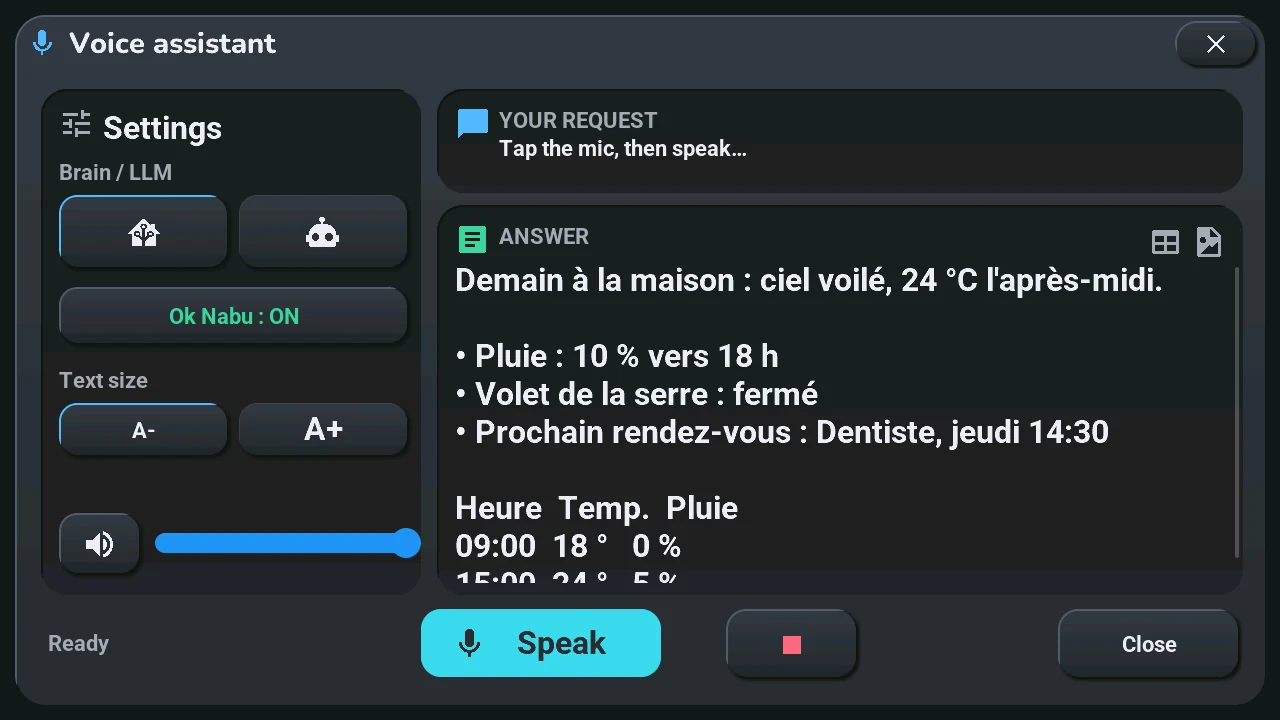
Settings (left)
- Brain / LLM: the house (Domo) or the robot (Discu), as on the home screen.
- Ok Nabu: ON / OFF: the wake word.
- Text size: A- or A+, for the answer.
- The speaker button mutes or unmutes the sound; the slider is the tablet's volume (the same as in the system console).
Your request: what the tablet heard. Answer: what it replied; a long answer scrolls with your finger, and it can hold tables and an image.
Bottom: the state (« Ready »…), Speak (listens; while it answers, cuts and listens again), ■ (cuts the answer), Close.
The window does not close by itself while a conversation goes on, even without a touch.