Step 5 — Your sources
What applies to the whole home — weather, calendars, phone, presence, TV, voice — is picked in Home Assistant, in the « Tab5 · » lists that step 1 added. No YAML: each list offers what your Home Assistant has (ADR-0024).
Open the lists
Settings → Devices & services → Entities, search select.tab5_ for the lists alone (« Tab5 · » also shows the texts and sensors of the packages), open a list and choose.
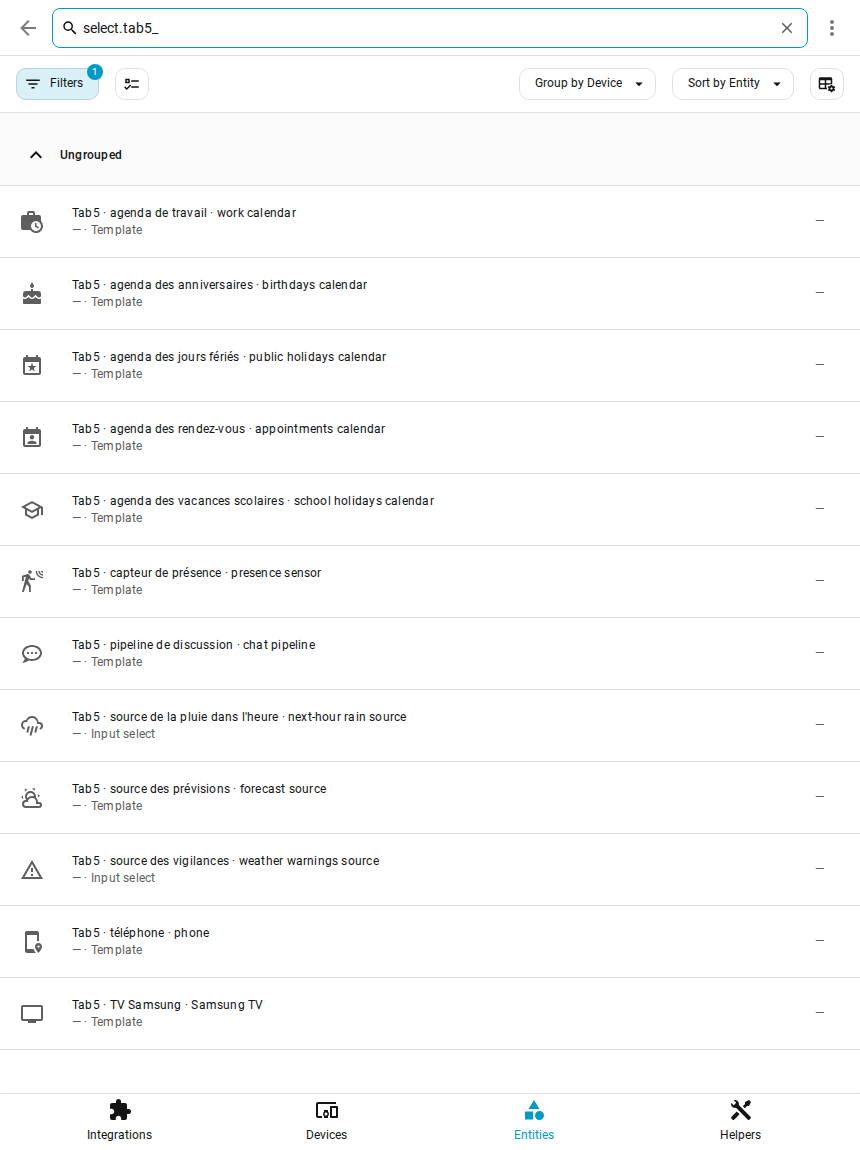
Each list has a two-language name, « français · english » (« Tab5 · agenda de travail · work calendar »), and keeps its entity id. Left on « Aucun » (none), a feature simply stays off, without errors: set only what you have.
What each list drives
| List | What it drives | Chosen by default |
|---|---|---|
| Tab5 · source des prévisions | forecasts and current weather (any weather.*) |
the Météo-France city, otherwise the first weather entity |
| Tab5 · source de la pluie dans l'heure | rain card: Météo-France, OpenWeatherMap, Buienradar, DWD, Met.no, Open-Meteo or Aucune (none) | Météo-France; without the Météo-France integration, Open-Meteo is used |
| Tab5 · source des vigilances | warning icons: Météo-France, MeteoAlarm, DWD, CAP Alerts or Aucune | Météo-France; without the Météo-France integration, no icons (as Aucune) |
| Tab5 · agenda de travail | work events: planning, rest days and the alarm time (which events: see below) | nothing |
| Tab5 · agenda des rendez-vous | calendar popup, appointment reminders, morning briefing | nothing |
| Tab5 · agenda des anniversaires | birthdays in the calendar popup | the only calendar named « anniversaires » (or birthday…) |
| Tab5 · agenda des jours fériés | public holidays in the calendar popup | the only public-holiday calendar (Holiday integration, or its name says so) |
| Tab5 · agenda des vacances scolaires | school holidays in the calendar popup (every event of this calendar) | the only calendar whose name says so (« calendrier scolaire », « vacances scolaires », school…) |
| Tab5 · téléphone | screen on when you come home, off when you leave | the only phone of the companion app |
| Tab5 · capteur de présence | screen on at presence, off after 15 min without | nothing |
| Tab5 · extinction de nuit | during the window, the screen goes off after 1 min without a touch (a touch wakes it) and comes back on by itself at the end: a still image all night long wears an LCD panel. « Aucune »: never | 00:00-06:00; « Aucune » if a presence sensor is chosen (it already turns off the screen of an empty room). A window typed by hand into « Tab5 · mémoire · extinction de nuit » (HH:MM-HH:MM) joins the list |
| Tab5 · TV Samsung, Tab5 · adresse de la TV | app buttons of the TV popup (Samsung Tizen) | the only Samsung Smart TV; the address given by a router tracker when it reports one, otherwise type its IP |
| Tab5 · pipeline de discussion | the voice assistant of the screen's « Discu » mode (the two modes) | nothing: the Domo / Discu buttons are then hidden |
| Tab5 · alertes : mises à jour, vigilance à partir de, capteurs « problème », entités indisponibles, étiquette « Tab5 · alerte », piles sous | what shows as an alert on the central card, until you tap it; to follow a door, a leak or a lock, create the « Tab5 · alerte » label in Home Assistant and put it on the entity | everything (updates: all; warnings: from yellow; batteries: below 20 %, phones of the mobile app left out) |
Outside France, or for another rain or warning source: weather providers. The weather sources can also be set in the blueprint of step 6 (its « Météo · Weather » section): filled, it writes its choice into these lists and wins over them.
The weather providers' own entities (Météo-France rain and warning sensors, OpenWeatherMap, MeteoAlarm, DWD, CAP Alerts) and the tablet's entities (screen, alarm, microphone…) are found by themselves: the tablet by its device model, whatever you named it.
Which events are work
The text « Tab5 · mot des événements de travail · work event keyword » holds the words that make an event of the work calendar a work shift: comma-separated, in any case, looked for in the title. Empty = every event of the work calendar, for a calendar that holds only your shifts. The author's work calendar also holds his appointments: he types Travail.
School holidays
Any calendar of yours. In France, the ministry publishes one ICS file per zone: Settings → Devices & services → Add integration → Remote Calendar, name « Calendrier scolaire » (the list then picks it by itself), URL https://fr.ftp.opendatasoft.com/openscol/fr-en-calendrier-scolaire/Zone-A.ics (Zone-B.ics, Zone-C.ics for the other zones; checked on 2026-09-29, until summer 2028).
Next: step 6, your devices.