Music
Opens with a long press on a TV or media player card that is not the blueprint's TV (tiles), a tap on the « now playing » bar of the home screen or on the compact player left of the clock, « Musique » under « Devices » in the navigation wheel (long press on the central card; not offered once Home Assistant says no player is chosen), the « Musique » entry of the tablet's « Aller à l'écran » list in Home Assistant, or a tap or a long press of the clock or of a button top right when the blueprint gives it « Musique (lecteur) · Music (player) » (home screen).
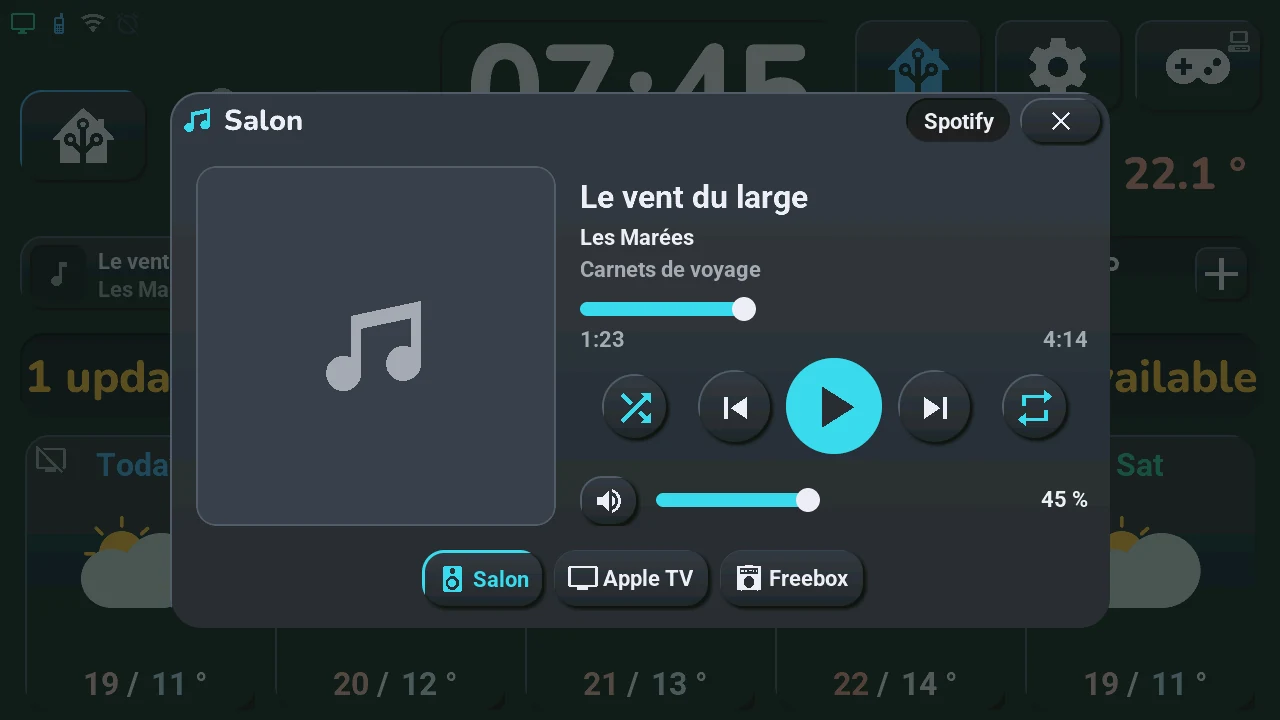
A music player for any media player of Home Assistant (an Apple TV, a TV, a Freebox, a speaker, the tablet itself…), in a window that leaves the edges of the screen visible.
- Header: the player's name and, on the right, the app it plays from (when Home Assistant knows it).
- Cover on the left; a music note when the player sends none.
- Title, artist, album on the right, then the position bar with the elapsed time and the duration: drag it to move in the track (a live stream has no duration and no bar).
- Buttons: shuffle, previous, play / pause, next, repeat (all, one, off). Shuffle and repeat are in colour when on.
- Volume: the speaker button mutes, the slider sets the volume.
- Players at the bottom: one chip per chosen player, the one shown outlined in colour. A tap shows that player.
A button only shows when the player can do it: a TV that cannot skip tracks has no previous and next. A player that is off says « Lecteur éteint » (player off) with an « Allumer » (turn on) button when it can be turned on.
The « now playing » bar takes the place of the Ok Nabu button on the home screen while the shown player plays, and for 5 minutes after a pause: the cover, the title and the artist, and a play / pause button. A tap on the bar opens this window. The Ok Nabu button comes back when the bar goes.
The compact player can take the place of the voice controls left of the clock (chosen in the « Tab5 — emplacements » blueprint, section « Zone à gauche de l'horloge », or by a tap on the second temperature): the cover, the title and the artist, a thin position bar, and previous, play / pause and next — the same player and the same buttons as this window. A tap elsewhere on it opens this window. While it shows, the « now playing » bar stays hidden and the Ok Nabu button stays in place; the bar comes back when the area shows something else. With no player chosen, the tablet skips it.
Pages: the window shows the track on « Lecture » and can have up to three more pages, named on the title line next to the ×, in this order: « Playlists » (your favourite playlists), « Pièces » (rooms, two players or more) and « Bibliothèque » (library, Music Assistant only). Tap a name or swipe left / right; a page only shows when it has something to show.
Favourite playlists (the « Playlists » page): when your favourite YouTube or YouTube Music playlists are written in Home Assistant, the « Playlists » page comes after « Lecture ». It keeps the cover and the player chips and shows one button per playlist (up to eight). A tap starts the playlist on your Apple TV in its YouTube app (the button turns to the accent colour), and the window comes back to « Lecture ». Write them in the « Tab5 — emplacements » blueprint, input « Playlists favorites · Favourite playlists », one per line: « Name | link », the link copied in YouTube or YouTube Music (Share → Copy link; it must contain « list= »). The playlist plays on the Apple TV the window shows, otherwise on the first Apple TV of « Tab5 · lecteurs de musique » that has the YouTube app; if tvOS asks « Open in YouTube? », Home Assistant answers with the Apple TV's remote. Only an Apple TV (Apple TV integration) with the YouTube app can play them; a link without « list= » or no Apple TV in the list gives a Home Assistant notification that says what to fix. This needs the tab5_lecteur.yaml package and the blueprint of this version.
Music of the whole home (ADR-0067, Home Assistant package tab5_musique.yaml): the « Pièces » and « Bibliothèque » pages.
- « Pièces » (rooms): one card per player, eight at most — its kind (speaker, TV, screen, group), its name, its state or its track, a volume slider (the volume is sent when you lift the finger) and up to three buttons: group with the player shown on « Lecture » (or leave its group), bring the music here, turn on or off. A tap on a card shows that player on « Lecture ». A long press opens its wheel: source, mute, « Musique ici » (bring the music here), « Séparer » (leave the group). « Tout ici » groups every player with the shown one, « Tout séparer » ungroups them all. With Music Assistant, the shown player gets a « + n » chip next to its name when n players play with it, and « Lecture » says « À suivre » (next) with the next track and the number of tracks in the queue.
- « Bibliothèque » (library, with Music Assistant only): favourites, playlists, albums, artists, radios, podcasts and recent items, ten per page with their covers (the kind's icon until the cover comes, or when it cannot). The arrows change page, the back arrow goes up a level. A tap plays a track, a radio or an episode on the shown player, or opens an album, an artist, a playlist or a podcast; a long press opens its wheel: « Lire » (play now), « À la suite » (next), « En fin de file » (at the end of the queue), « Radio » (similar music), « Ouvrir » (open). The page says « Chargement... » while Home Assistant looks, and a short sentence when it does not answer within 8 s. « Source » in the wheel of a card lists the sources of that player on this page: a tap picks one.
Without Music Assistant, only « Pièces » with the players of the list below: volume, mute and power, no group and no library.
Setting up in Home Assistant: choose the players in the list « Tab5 · lecteurs de musique · music players » (up to six; a choice is added or removed each time you pick it). With no player chosen, the window says where to choose them. The player shown is the one picked on the tablet, otherwise the first of the list that plays; a player of the list that starts playing is shown when the current one does not play. This needs the tab5_lecteur.yaml package of this version. The cover comes from Home Assistant over http: with a Home Assistant reached only in https, the music note shows instead.
Music in every room (ADR-0067) needs the tab5_musique.yaml package and custom_templates/tab5_musique.jinja, nothing to set. With Music Assistant installed in Home Assistant, the rooms are its players (eight at most, by name) and its library, queue and transfer come with them; without it, the rooms are the players of the list above and there is no library. A room is named after its player in Home Assistant: rename the entity for a shorter name. « Récents » (recent) lists what Home Assistant saw playing on a Music Assistant player (twenty at most).
Like every window, it closes with its ×, a tap on the dark area around it, or after 45 s without a touch.