House
Opens with a tap on the room's name in the central card, in device mode (after a tap on the Home Assistant button), with the « Maison » entry of the tablet's « Aller à l'écran » list in Home Assistant, or with a long press on one of the three buttons top right when the blueprint gives it « Maison · House » (home screen).
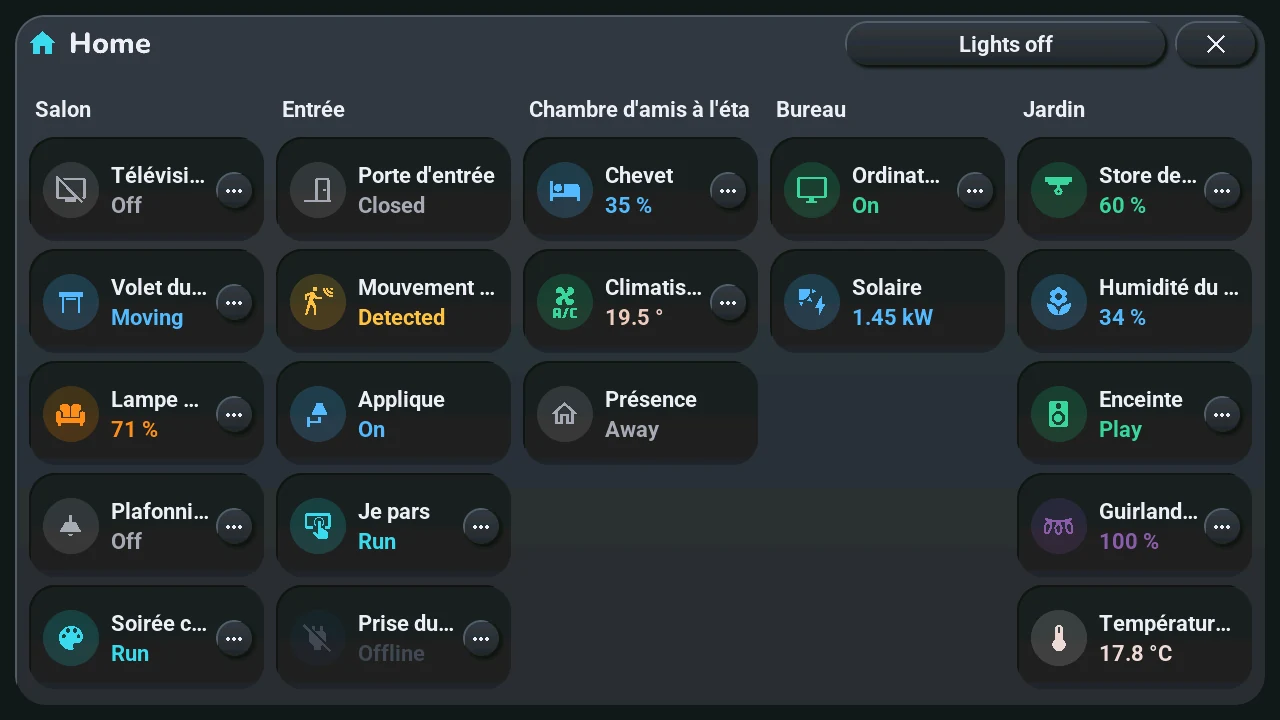
The whole house at a glance, like a Home Assistant dashboard: one column per room of the « Tab5 — emplacements » blueprint that has devices, in the blueprint's order (room 1 to 10), headed by the room's name (« Room 2 » when it has none). Five columns at most: with more rooms, the window has pages, shared out evenly (eight rooms: two pages of four), swiped left or right, their names at the top (« Rooms 1 to 4 »); it opens on the page of the room shown in device mode. Under it, one row per device, drawn like its card in device mode: its icon in a round badge of its state's colour, its name and its state. A state too long for the column ends with « … ». Without any device, the window says « Aucun appareil » (no device).
- Tap a row: what a tap on that device's card does (bottom row): a light or a switch turns on or off, a shutter moves or stops, an action runs.
- Long press on a row, or its « ⋯ » button: what a long press on the card does. A light, a shutter or a climate shows its quick-action wheel around the row's icon, without its « Home » link (touch elsewhere to close only the wheel; its « Details » opens the device's window); the others open that device's window (lights, shutter, TV remote, device window) over this one; close it and the house is still there. A climate with no wheel opens its climate window (a tap too); a shutter set to confirm sends the other way, as on its card. Only devices that have a long press show « ⋯ »: a sensor has none (one of the « Énergie » sections still opens the energy window), a read only device neither, and its row does nothing.
- Éteindre les lumières (lights off), top right: the « All off » of the lights window, in every room that has lights, at once, without asking. The button is hidden when no room has a light.
- More than five devices in a room: each column shows five rows per page. The window then has pages, named « 1–5 », « 6–10 », « 11–15 », « 16–20 » at the top, next to its title (the rows of every column that the page shows): tap a name, or swipe left or right on the window for the next or previous page. Every device has its row on a page.
States change on the rows while the window is open. Like every window, it closes with its ×, a tap on the dark area around it, or after 45 s without a touch.