Step 6 — Your devices
Your devices — lights, shutters, climate, plants, TV, sensors — are picked in one automation, made from the blueprint « Tab5 — emplacements de l'écran · screen slots » that step 1 added (ADR-0019). The tablet itself names no device: changing one is an edit in Home Assistant, no flash, no restart.
Create the automation
With the HACS integration, its setup assistant can create it for you from your Home Assistant areas, then you fill in the rest here (step 1, setup assistant). By hand:
- Settings → Automations & scenes → Blueprints, « Tab5 — emplacements de l'écran · screen slots ».
Not in the list? Import blueprint, with
https://github.com/Axellum/M5-Tab5-ESPHome-LVGL/blob/main/HomeAssistant_Config/blueprints/automation/tab5/tab5_emplacements.yaml - Create automation.
- Fill the sections you need (every field is optional; the labels are in French and English), then Save.
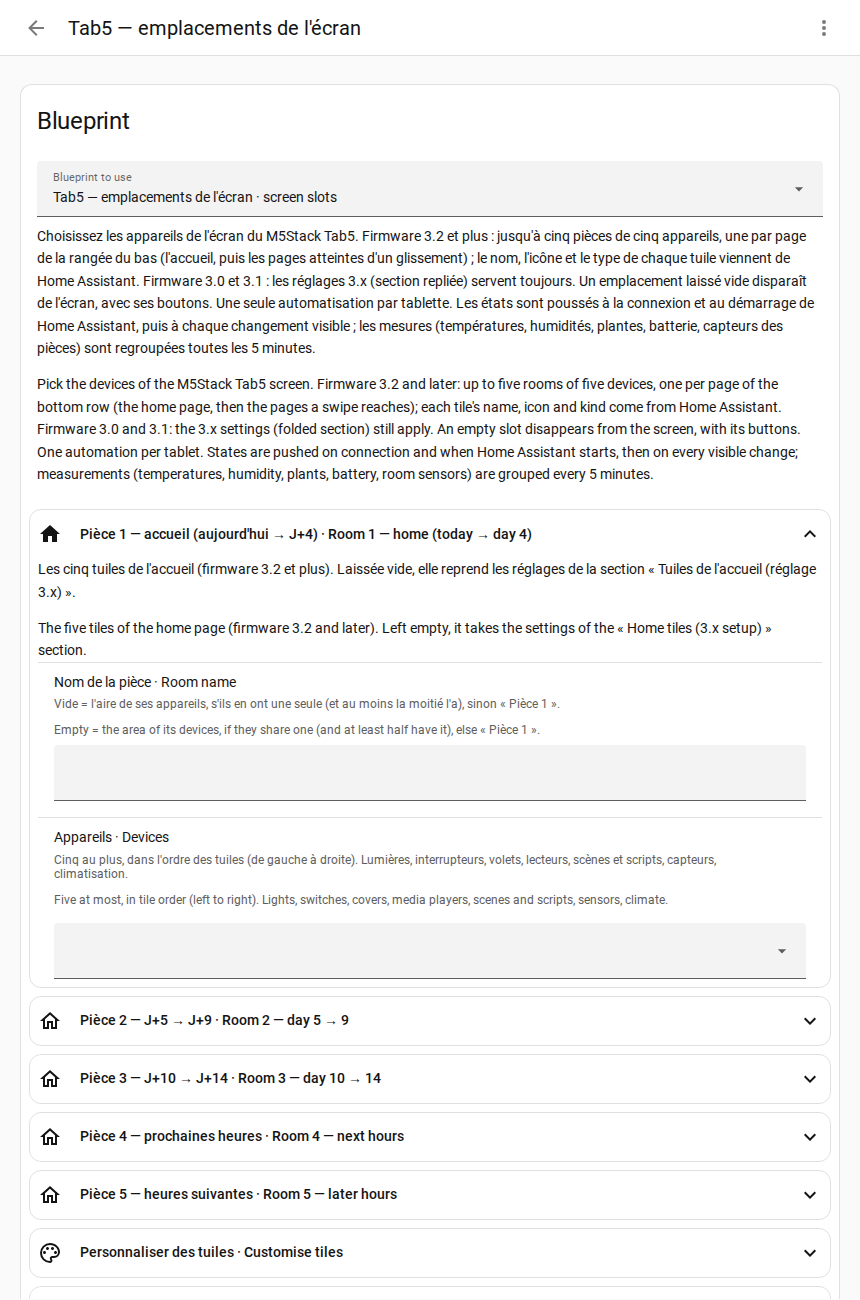
One automation per tablet. As soon as it is saved, the tablet receives your devices.
It worked if the tiles at the bottom of the screen show your devices. The tablet's diagnostic sensor « Zones masquées » lists what is hidden: a slot you left empty, or an entity that does not exist.
The sections
Every section opens folded except Rooms and Room 1: click its title to open it. Each field has a help sentence under it.
| Section | What you pick | More |
|---|---|---|
| Pièces · Rooms | « Nombre de pièces · Number of rooms »: how many rooms the tablet has, 1 to 10 (5 by default) | rooms |
| Pièce 1 — accueil · Room 1 — home | a name and up to twenty devices: the tiles of the home page, left to right (beyond five, the last tiles are cut in two, then in four) | rooms |
| Pièce 2 to 10 · Room 2 to 10 | the rooms a swipe away (rooms 6 to 10: a page each, after days 10-14); in every room, optionally, its temperature, humidity and climate (shown in HA mode) | rooms |
| Personnaliser des tuiles · Customise tiles | another name, icon or behaviour for a tile (on only, confirm, read only) | tile icons |
| TV, téléphone · TV, phone | the TV, its remote, the phone battery | other zones |
| Températures · Temperatures | room temperature and humidity, a second temperature (greenhouse) and whether it is outdoors | temperature history |
| Climatisation · Climate | the climate unit of the home card | climate, any brand |
| Tuile − / + · − / + tile | other devices for the − / + buttons of the home page (a volume, a light's brightness, a thermostat, a fan, a shutter, a number…), picked on the tablet with a long press on the value between − and +; scrolling fixed (default) or automatic, and the time per device | user manual, temperatures and climate |
| Plantes · Plants | up to five moisture sensors | |
| Sous l'horloge · Under the clock | up to three lines of four sensors under the clock (temperatures, humidity, production, batteries, detectors, switches: shown, not controlled), the place of the plants line, scrolling automatic (default) or fixed, the time per line | user manual, home screen |
| Panneau Ok Nabu · Ok Nabu panel | up to three lines of four sensors in the « Ok Nabu » button, like the row under the clock, the place of the listening line « Ok Nabu: ON / OFF » (first by default, or hidden), scrolling fixed (default) or automatic, the time per line | user manual, home screen |
| Zone à gauche de l'horloge · Left of the clock | what the left column above the Ok Nabu frame shows first: the microphone with the Domo / Discu buttons, the next 15 hours as a chart, the compact music player or a tracked sensor; a tap on the second temperature shows the next one | user manual, home screen |
| Horloge et boutons du haut · Clock and top buttons | what a tap and a long press do on the hours, the minutes and the date of the clock, and on each of the three buttons at the top right (house, gear, gamepad), twelve gestures: Automatic, Nothing, a screen (the house and weather windows included) or an action (device mode, next device of the − / + tile, next line under the clock, next line of the Ok Nabu panel, wake word on / off) | user manual, home screen |
| Planning de travail · Work schedule | empty: the calendar of the « Tab5 · agenda de travail » list (step 5) | |
| Météo · Weather | empty: the weather lists of step 5. Filled, it writes its choice into them and wins over them; with several tablets, fill it in one automation only | weather providers |
| Énergie : solaire · Energy: solar | solar power and solar energy produced (a main sensor, then the other inverters if you have several), the panels' peak power | solar energy |
| Énergie : réseau et maison · Energy: grid and home | grid power (bought or sold), home consumption | solar energy |
| Énergie : batterie · Energy: battery | level, power and temperature of a home battery | solar energy |
| Caméras · Cameras | up to sixteen cameras for the Cameras popup (still images refreshed every few seconds while it is open, grouped by their Home Assistant area); Home Assistant's address only if the images do not come | user manual, cameras |
| Ancien accueil (si la pièce 1 est vide) · Former home page (if room 1 is empty) | the five fixed places of the first versions (PC or TV, shutter, three lights): shown while room 1 is empty, and by a firmware too old for rooms | rooms |
| Avancé · Advanced | the tablet's name in ESPHome: change it only if you renamed the device |
What you don't have disappears, with its buttons: leave its slot empty (other zones).
How to use the tiles on the screen (tap, long press, swipe): user manual, bottom row.
Next (optional): step 7, a dashboard.