Debugging this device
This is a short methodology note, not an incident log — see docs/troubleshooting.md for already-diagnosed symptoms. Read that one first; only reach for the techniques below if the symptom isn't already documented there.
Where to look
- Live ESPHome logs (
python tools/tab5_logs.py --host <ip> --config-ha <HA config folder>since 3.0, which reads the API key Home Assistant keeps;esphome logsno longer finds a key in the YAML) — the primary source of truth for boot sequence issues, API connection state, and anyESP_LOG*line in the C++ code. Close the session when you're done; a leaked log process holds an API connection open indefinitely (see the "API connections exhausted" entry introubleshooting.md). - The on-screen system console (
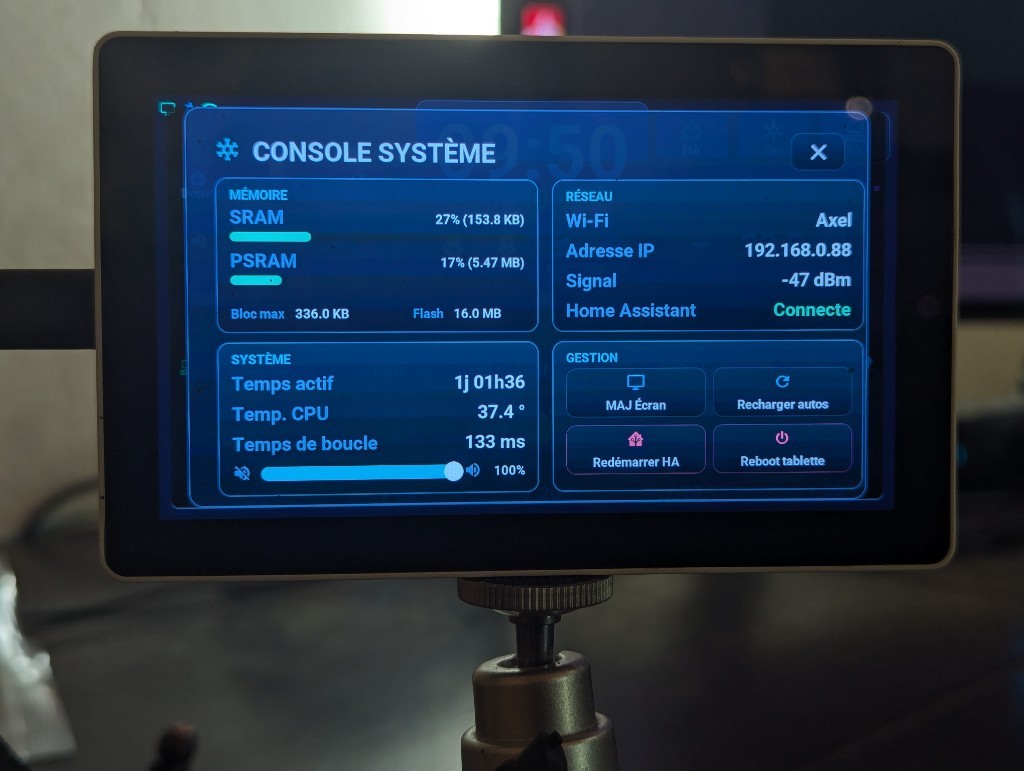
console_sys.yaml, the System page of the settings popup since 2026-10-08, opened directly by a long press on the gear buttonbtn_control_console, top right — a tap opens the settings on their Screen page; not by swipe since the 14/07/2026 rework) — 4 glass cards: MÉMOIRE (SRAM/PSRAM, max free block, flash), RÉSEAU (SSID/IP/signal + HA connection status), SYSTÈME (uptime, CPU temperature, CPU load of each core, loop time, the tablet's battery, volume) and GESTION (screen re-push = the full push automation run again, automation reload, HA restart and device reboot — the last two behind a confirm overlay, 16/07/2026 redesign). It is not a log viewer — for payload/event logs usetools/tab5_logs.py. Useful when you don't have a laptop connected but can see the screen.
- Home Assistant's own logs for anything upstream of the device — automation trigger/condition evaluation, template rendering errors, service call rejections.
Seeing the screen without the tablet
The CI job « Rendu hors tablette » (.github/workflows/rendu-host.yml, ADR-0021) compiles the interface for ESPHome's host platform (tab5-rendu-host.yaml), runs it on the runner, pushes the demo scenes, then opens the ~80 screens of tools/rendu/ecrans.py one by one (popups, sub-windows, Arcade, game menus and games) with a virtual finger, as on the panel. One picture per screen, in the seven languages (one job per language). On a pull request that touches the screen, it says which screens changed compared with main and attaches before/after images (artifact rendu-captures, folder diff/). It does not block the PR. Two tasks do fail on a difference: « clair » and « galerie » (every theme, both modes) compare a live theme switch with a cold start, to the pixel.
- A change on purpose: nothing to do for the screens,
mainbecomes the reference once the PR is merged. For the gallery scenes ofscreens.md:python tools/rendu/maj_references.py --run <run id>replacesdocs/images/rendu/; review the images, then commit. - A new screen: an entry in
tools/rendu/ecrans.py(taps at the captures' coordinates, landscape 1280×720). « identique à … » in the run means a tap missed. - Tuning one screen: Actions → Rendu hors tablette → Run workflow, fields « seulement » (screen names) and « langues » (e.g.
["de"]). - It runs on Linux or macOS only (the
hostplatform): on Windows, use the CI (Actions → Rendu hors tablette → Run workflow). - It shows the layout, not the device: no touch, no sound, no voice assistant, no timings or memory.
Marking a spot for later, in code
Use the [AI-DEBUG] tag (see Tab5/README.md) in a comment when you find a good observation point while investigating something, even if you don't fix the underlying issue in the same session — it saves the next debugging pass (human or AI) from re-finding the same vantage point.
After a crash or a Wi-Fi outage: the boot and outage journal
Since 2026-09-26 the device keeps its own journal (Tab5/ecran/tab5_journal.cpp), so a crash or a failure of the Wi-Fi co-processor link (ESP32-C6) can be analysed after the fact, without a USB cable plugged in at the time:
- What is kept: every error (ESPHome's and ESP-IDF's, including the ESP-Hosted driver of the C6, tag
esp-idf), plus the warnings logged while Home Assistant is not connected (boot before HA, Wi-Fi down). A line repeated in a row is counted, not duplicated. ESPHome's own crash report (tagesp32.crash: PC, fault address and backtrace of both cores) is written by the logger before the journal'son_messagehook exists, so it never reached the journal on its own; since 2026-10-06 the journal reads it (esp32::crash_handler_has_data()), replays it into its lines when the reset reason is a crash, and clears it once the journal has reached HA (as ESPHome does after a log subscription). - ESP-IDF warnings are not in the firmware: ESPHome builds ESP-IDF with its log level at ERROR by default (
esp32: framework: log_level, henceCONFIG_LOG_MAXIMUM_LEVEL=1), so theESP_LOGWandESP_LOGIlines of ESP-IDF and ESP-Hosted are removed at compile time: they show neither in the journal nor on the serial port. One of them is ESP-Hosted's version check of the C6 (see Hardware). The absence of such a warning therefore proves nothing. Errors stay, including an ESP-Hosted RPC timeout (Response not received for …, orError reported: Response Timeoutfor an asynchronous request). Seeing the warnings would take a test build withlog_level: WARNunderesp32: framework:(not tried). Found while answering discussion #369. - Where: 32 lines in
.noinitRAM, which survives software resets, crashes, watchdogs and a reset through USB, but not a power cut. Once Wi-Fi has been missing for 90 s, a copy goes to NVS (at most every 15 min, only when something new was logged) and is read back at the next boot if RAM was lost. - How it reaches you: at each HA connection, the
esphome.tab5_journalevent is sent for an abnormal reset or a crash report, Wi-Fi missing for 90 s or more, a boot that never reached HA, an error after HA connected, or HA reached more than 90 s after boot. Lines logged before the first HA connection are context only (the ESP-Hosted link is legitimately "not yet up" once on every boot, 7 to 12 s after it): a normal boot sends nothing. Guard (e) ofHomeAssistant_Config/packages/tab5_health.yamlturns it into a persistent notification (and a phone push whengrave: abnormal reset, crash, or Wi-Fi missing 90 s). Events stay in the recorder'seventstable. - Reset reason of every boot: the
Tab5 Raison du redémarrageentity (Software Reset,Exception,Task Watchdog,Brownout,Power On…), one row per boot in the HA history. - Timeline of every boot (next version): the
Tab5 Chronologie du démarrageandTab5 Chronologie du démarrage (suite)entities, the time in ms of each step, from the C++ constructors to the end ofsetup()(priority bands,on_bootsequence) then after it (backlight, first frame, Wi-Fi, API, battery charger) — how to read them in performance. - Reliability beyond the recorder's few days (since 2026-10-09): the HA history keeps states for a few days only, and neither
Tab5 Uptime(a timestamp) nor the reset reason (a text) has statistics.packages/tab5_health.yamladds three sensors with astate_class, whose long-term statistics HA keeps with no time limit: « Tab5 · redémarrages » (every restart the unexpected-reboot guard recognizes, requested or not), « Tab5 · redémarrages inattendus » (the ones that guard notifies) and « Tab5 · fonctionnement continu » (hours since the last boot, every 15 min; a day's maximum is its longest run without a restart). Read them in Developer tools → Statistics, or with a « Statistics graph » card (change over a week or a month for the counters, maximum for the run time). A Wi-Fi drop without a reboot, a HA restart or the tablet's arrival in HA do not count. - Watchdog reset with no crash report = the power button (since 2026-10-06): a short press on the power button reboots the tablet with
ESP_RST_WDTand noesp32.crashreport. The journal calls it « bouton d'alimentation ou chien de garde RTC (rst 0x..) » and sends nothing; the entity showsPower button or RTC watchdog (rst 0x..)instead of ESPHome's text, which for this reason repeats the source of the last requested reboot (Reboot request from esphome.ota: ESPHome never clears it).rst 0x..is the ROM's own reset code (esp_rom_get_reset_reason(0); on the ESP32-P4,ESP_RST_WDTcovers 0x07 and 0x0B, timer-group watchdogs, 0x09, 0x0D and 0x10, RTC watchdog, 0x12, super watchdog). The same reason with a crash report is still a crash and still alerts (Crash, other watchdogs (rst 0x..)). What no longer alerts: a boot stuck for more than 9 s (the bootloader's RTC watchdog) and a timer-group watchdog that resets without reaching the panic handler; both stay visible in the entity's history. Reasoning and sources in the[AI-WARNING]ofTab5/ecran/tab5_journal.cpp. - Decoding a backtrace: the addresses belong to the build that crashed. For a local build, keep its ELF (
H:/.esphome_data/build/tab5-ha-hmi/build/tab5-ha-hmi.elf, compareconfig_hash); for a published one, take theelf-<revision>artifact of its « Publication » run (kept 90 days), or rebuild it with Run workflow, tag andelf_seulement(the run checks that the code is the published one). Thenriscv32-esp-elf-addr2line -pfiaC -e <elf> <addresses>, ortools/capture_serie.py --relire … --elf …. If the report says captured by a different firmware build, use that build's ELF. - Not done on purpose: an ESP-IDF core dump to flash. It needs a
coredumppartition, the current table (partitions.csv: 2 × 7.75 MB apps + 448 KB NVS) fills the 16 MB, and a partition table change is only written by a USB flash, never by OTA. The journal covers the C6 case, which is not a crash of the P4.
Capturing a crash on the serial port
When the journal says « crash (exception) » with no report (first seen at the end of an update from HA, 3.0.0-rc.1 → rc.2, 2026-09-27), the panic output of ESP-IDF went to the only place it is written: the USB console (CONFIG_ESP_CONSOLE_USB_SERIAL_JTAG), just before the reboot.
- Tablet plugged into the PC over USB-C.
python tools/capture_serie.pylists the Espressif devices and refuses to guess: pass--mac(the tablet's MAC is its USB serial number) or--port. python tools/capture_serie.py --mac <MAC>: listens up to 10 min without resetting the tablet (DTR and RTS off before opening), writescapture-serie-<date>.logas it goes, and stops 60 s after a reboot.- Trigger the event (for example Install on the « Firmware » entity in HA).
- Read the summary: panic block, reboots, ESPHome's crash report, addresses. Decode with the ELF of the firmware that crashed (the one before the update):
python tools/capture_serie.py --relire capture-serie-….log --elf tab5-ha-hmi-st7123.elf.
Never open another Espressif device plugged into the same PC. Closing the ESP Web Tools window (Chrome) restarts the tablet once.
Diagnosing a silent automation failure on the Home Assistant side
If a Home Assistant automation appears to do nothing — no error, no expected result — and you suspect a step is failing validation or a condition is silently false, insert a debug marker directly into the real automation rather than trying to reproduce its logic in a separate, isolated test script.
Concretely: add a input_text.set_value (or similar low-cost, visible side effect) call as an extra step at the point you want to check, using the real automation, the real trigger, the real entity states — then trigger it for real and read the value back.
This matters because a from-scratch reproduction script can differ from the real automation in a way that's exactly the bug — different Jinja context, different entity availability at trigger time, a condition that only fails on a subset of runs. A reproduction that "works" in isolation tells you nothing about why the real one doesn't; it just wastes a debugging cycle. This is exactly how the now()-without-strftime calendar bug (see troubleshooting.md) was found: the isolated repro would have needed to guess the exact template context, while the marker-in-the-real-automation approach surfaced the failing step immediately.
Remove or comment out the marker once the real fix is confirmed — don't leave debug-only automation steps live in production without a reason.