Fridges and freezers
Opens with a tap on the icon that blinks in the clock's top-right corner, the « Froid » entry of the tablet's « Aller à l'écran » list in Home Assistant, « Frigos » in the Agenda family of the navigation wheel (long press on the central card), or a tap or a long press of the clock or of a button top right when the blueprint gives it « Froid (réfrigérateurs, congélateurs) · Cold (fridges, freezers) » (home screen).
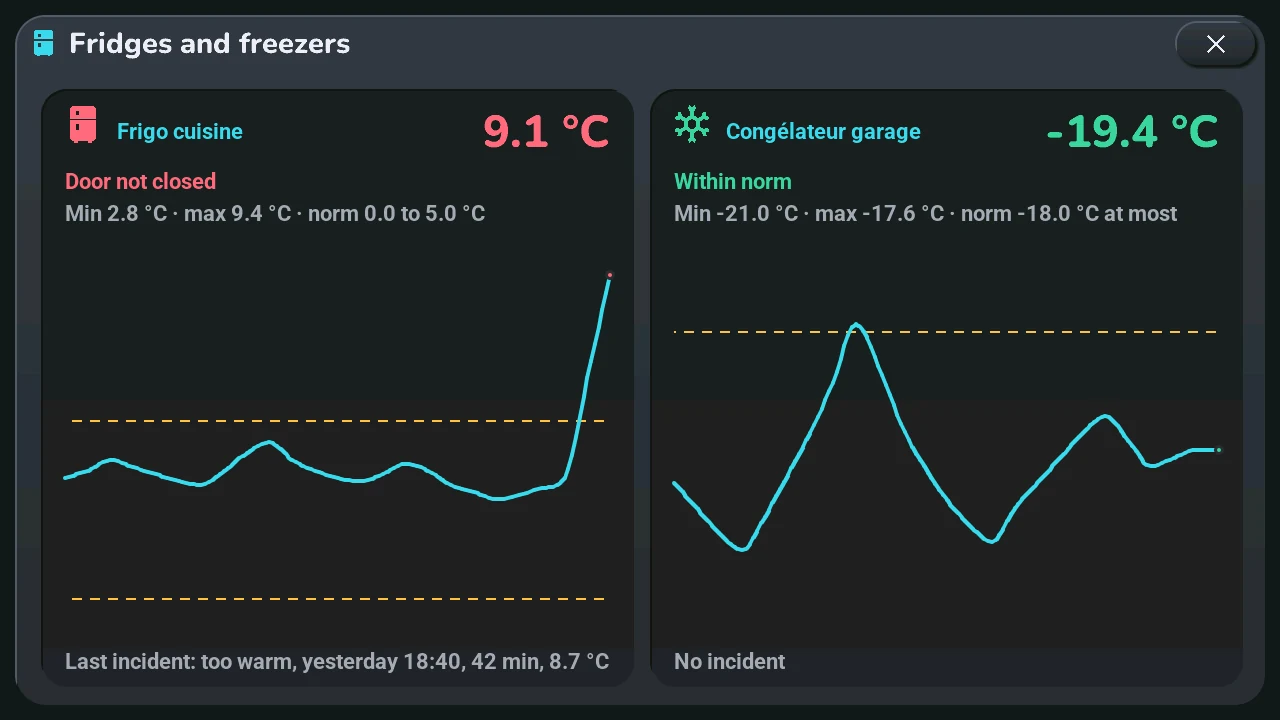
The window « Frigos et congélateurs » shows your fridges and freezers, one card each, up to four:
- Icon and name: a fridge or a snowflake (freezer), the sensor's name cut with « … » when it is too long.
- Temperature, in green within the norm, in orange for attention, in red for a serious problem.
- Status: « Conforme », « Trop chaud depuis 14 h 32 », « Coup de chaud », « Trop froid », « Porte ouverte ? », « Porte mal fermée », « Capteur muet »…
- Lowest and highest of the last 24 hours, and the norm (fridge 0 to 5 °C, freezer -18 °C at most).
- Curve of the last 24 hours, one point per hour and the current value, between the dashed lines of the norm.
- Last incident: its cause, when it started, how long it lasted and the temperature it reached — or « Aucun incident ».
One or two appliances sit on one row; three or four on two rows of two.
What Home Assistant checks (the tab5_froid.yaml package, thresholds at the top of its script):
| Fridge | Freezer | |
|---|---|---|
| Attention (orange) | 15-minute mean above 5 °C or below 0 °C | 15-minute mean above -15 °C |
| Serious (red) | above 8 °C for 30 minutes, or 10 °C reached | above -12 °C for 30 minutes, or -10 °C reached |
| Door open? (orange) | +2 °C since the lowest of the last 30 minutes | +4 °C |
| Door not closed (red) | the same rise still there after 20 minutes, without cooling down | |
| Sensor silent (orange) | no reading for 30 minutes |
On the home screen, each problem is an alert of the central card (orange or red), like the others: a tap marks it as read; it comes back only if it gets worse (another cause or level). A serious problem also makes a red fridge icon blink in the clock's top-right corner, as long as it lasts; a tap on it opens this window.
Setting up in Home Assistant, where to find the lists: Settings → Devices & services → Entities, then search « Tab5 · réfrigérateurs » or « Tab5 · congélateurs » (entities select.tab5_refrigerateurs and select.tab5_congelateurs); or the dashboard's Tab5 settings view, section Home, tiles « Fridges (Cold popup) » and « Freezers (Cold popup) ». Each is a drop-down list: open it, pick an appliance's temperature sensor (« ○ » becomes « ✓ »), then the next one; each entry shows the sensor's name, then its entity ID. Four appliances at most in all; picking a ticked sensor again removes it. Only temperature sensors with statistics are offered (state_class: measurement). With no appliance chosen, the window gives this path. The alerts can be turned off with « Tab5 · alertes : réfrigérateurs et congélateurs ». This needs the tab5_froid.yaml package of this version.
Like every window, it closes with its ×, a tap on the dark area around it, or after 45 s without a touch.