Alerts
Opens with « Alerts », the first button of the navigation wheel: a long press on the central card of the home screen, whatever it shows (the schedule, the rain, a warning, a message or an alert), opens the wheel (home screen).
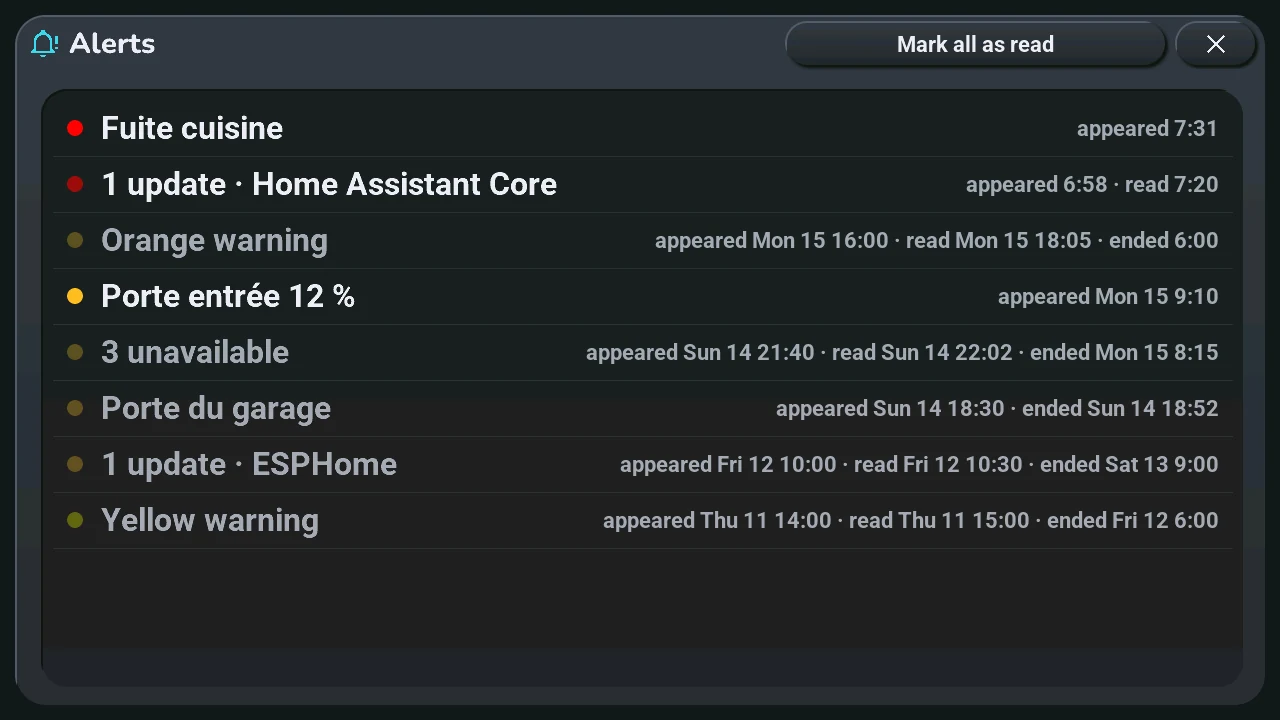
- One line per alert, the newest at the top, the 20 latest: a dot of its colour (red, orange, yellow), its text, then when it appeared, was read (tapped on the central card) and ended (back to normal). A time alone is today; another day shows its name and date first.
- Bright dot: still to read. Faded dot: read, still going on. Grey text: ended.
- Mark all as read, top right: every alert still to read is read at once, also those that did not fit on the central card. The button is hidden when nothing is left to read.
Only the alerts you subscribed to show here, as on the central card: the « Tab5 · alertes … » lists of Home Assistant, in the « Alerts » section of the tablet's settings view. Before Home Assistant answers, the window says it is waiting.