Screens & Features
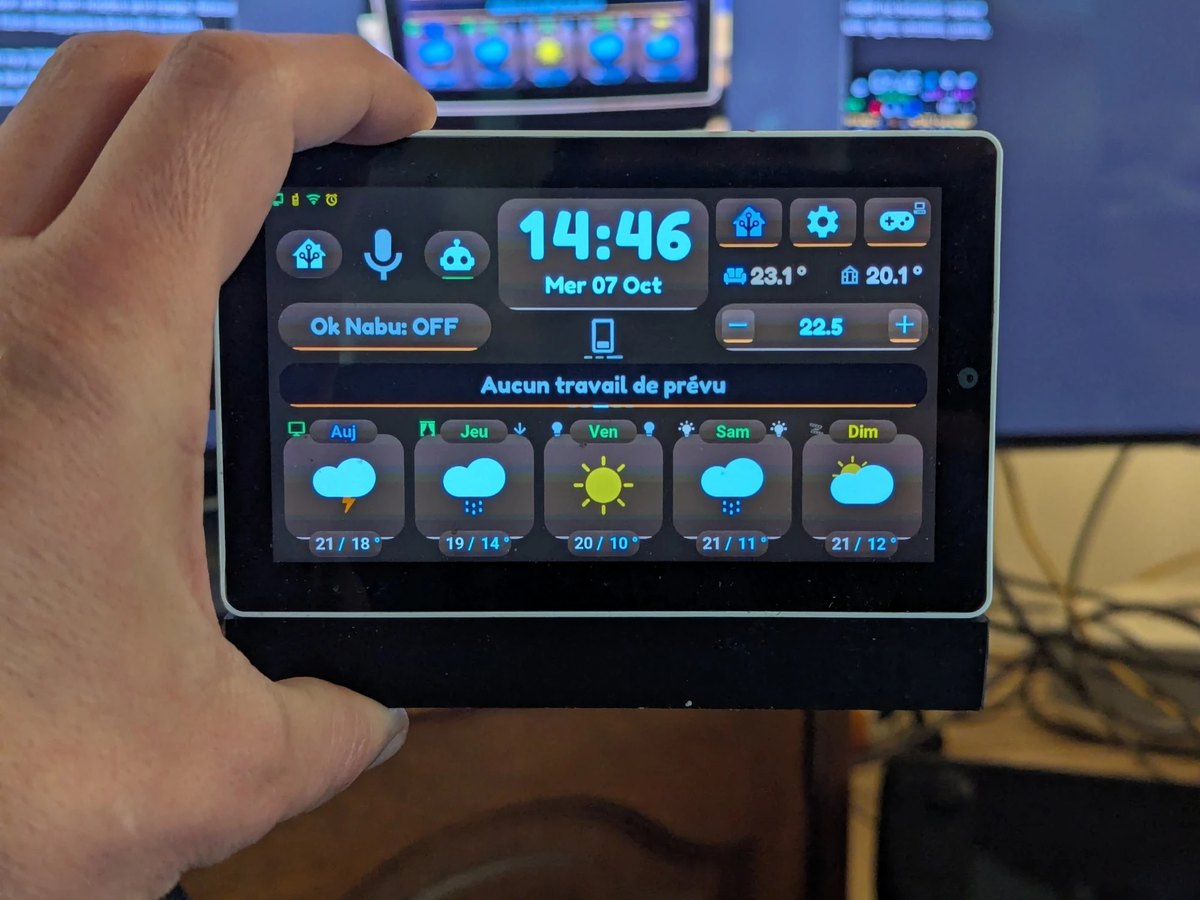
This page describes what the Tab5 actually shows and does — verified against the firmware (tab5-lvgl.yaml, ui_components/*.yaml, tab5_*.cpp) on 2026-07-06, re-checked 2026-07-14 (info panel, console button, swipe zones). Since 2026-10-07 the pictures are renders of the current firmware (drawn by the firmware itself on a PC, with demo data, in the default theme), except the photo of the main page. The previous version of this page described a 6-tab, multi-screen navigation bar that no longer exists (and may never have shipped) — see ADR-0002 for why. If anything below stops matching the running firmware, the firmware is right — fix this page.
Layout overview
There is a single 1280×720 page (page_main), not a tab-navigated set of screens. Three regions:
- Home area — always visible: clock, indoor sensors, quick actions, compact climate card, and the row under the clock (plants and sensors).
- Central card — a small area that automatically rotates between planning, rain forecast, weather alerts and an info panel (calendar recap / alert text).
- Bottom card region — either the 5-card weather forecast (with the devices of each page's room in the tiles' shoulders), or, in HA mode, the 5 device cards of the current room.
Windows open on top of this page — lights, shutters, climate, TV remote, voice assistant, calendar, alarm clock, plants, energy and settings — whose System page is the former system console — and the Arcade's games on pages of their own. Which touch opens each one and what every button does: the user manual; this page explains how each part works. The settings open on their Screen page with a tap on the gear button (btn_control_console, top right) and on their System page, the former console, with a long press on it; the console is no longer opened by swipe since the 14/07/2026 gesture rework.
Generated screenshots
These pictures are not photos: the CI draws them without a tablet, from the same interface code, on every pull request that touches the screen (ADR-0021, workflow rendu-host.yml). The three scenes are those of demo mode, on a fixed date (16 June, 07:45, Paris time), in French then in English. They are also the references the CI compares new renders with, so they match the current firmware.
| Scene | Français | English |
|---|---|---|
| Sunny day | 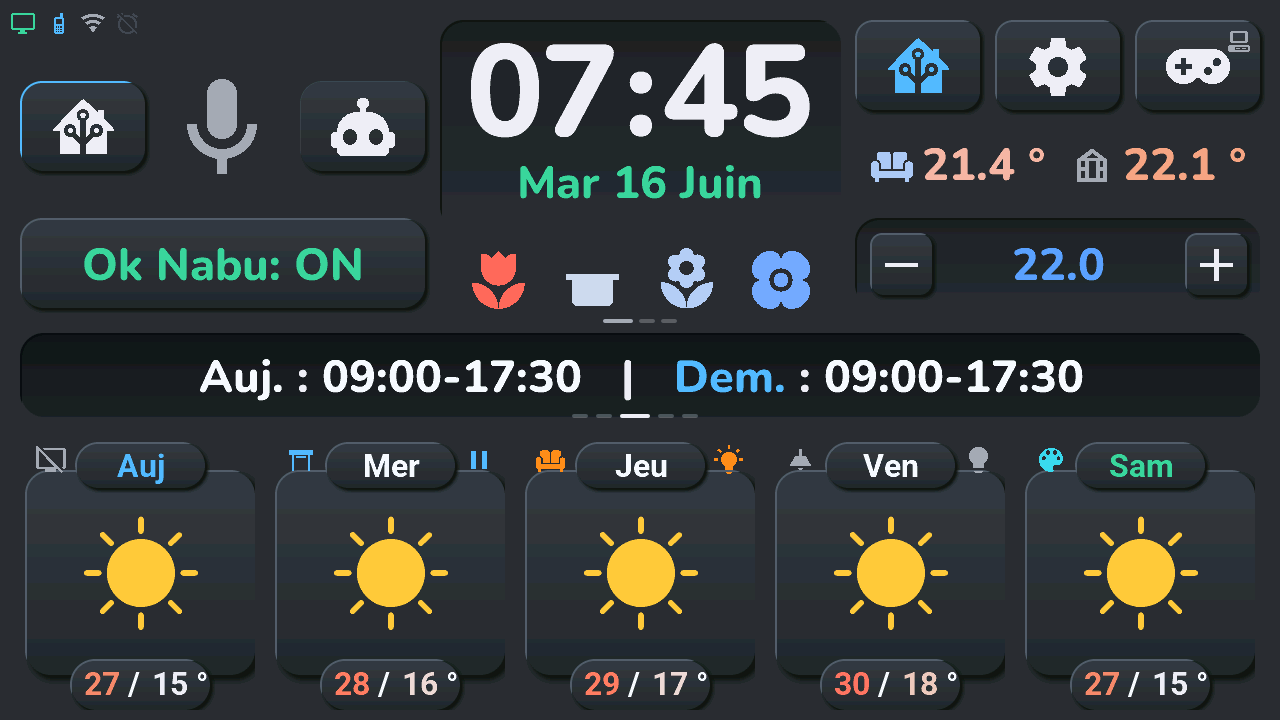 |
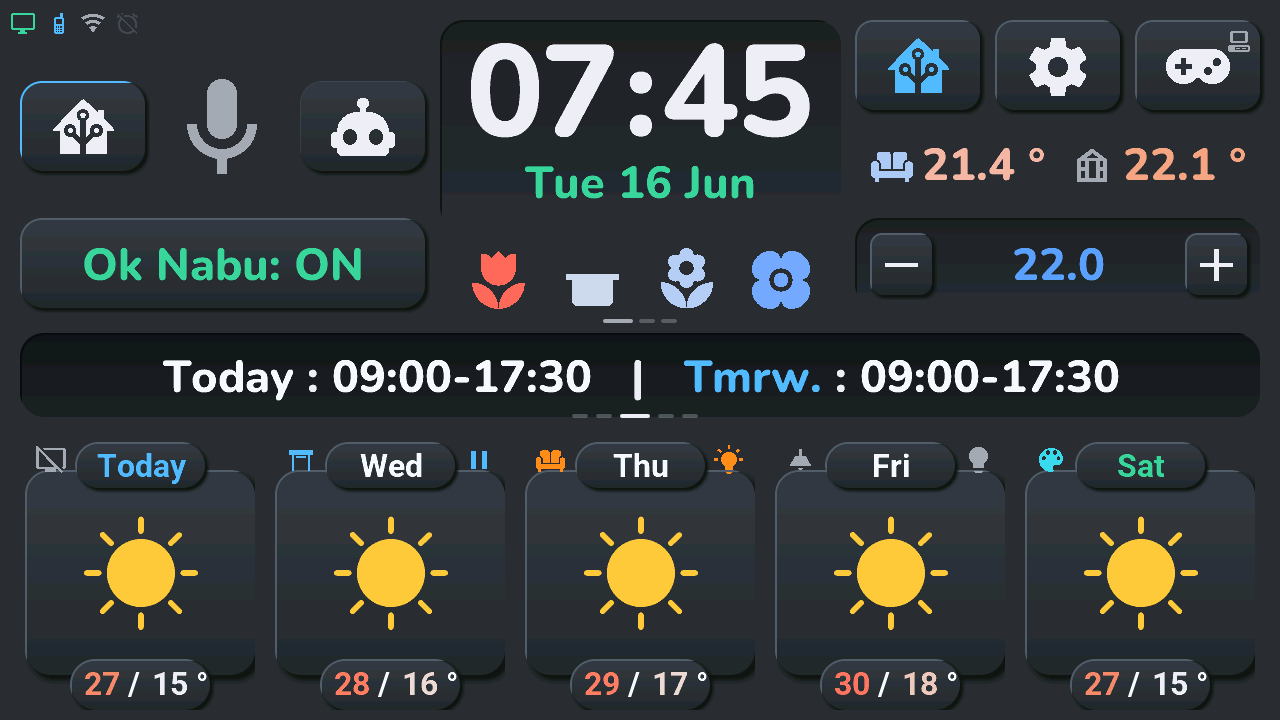 |
| Rain and orange warning | 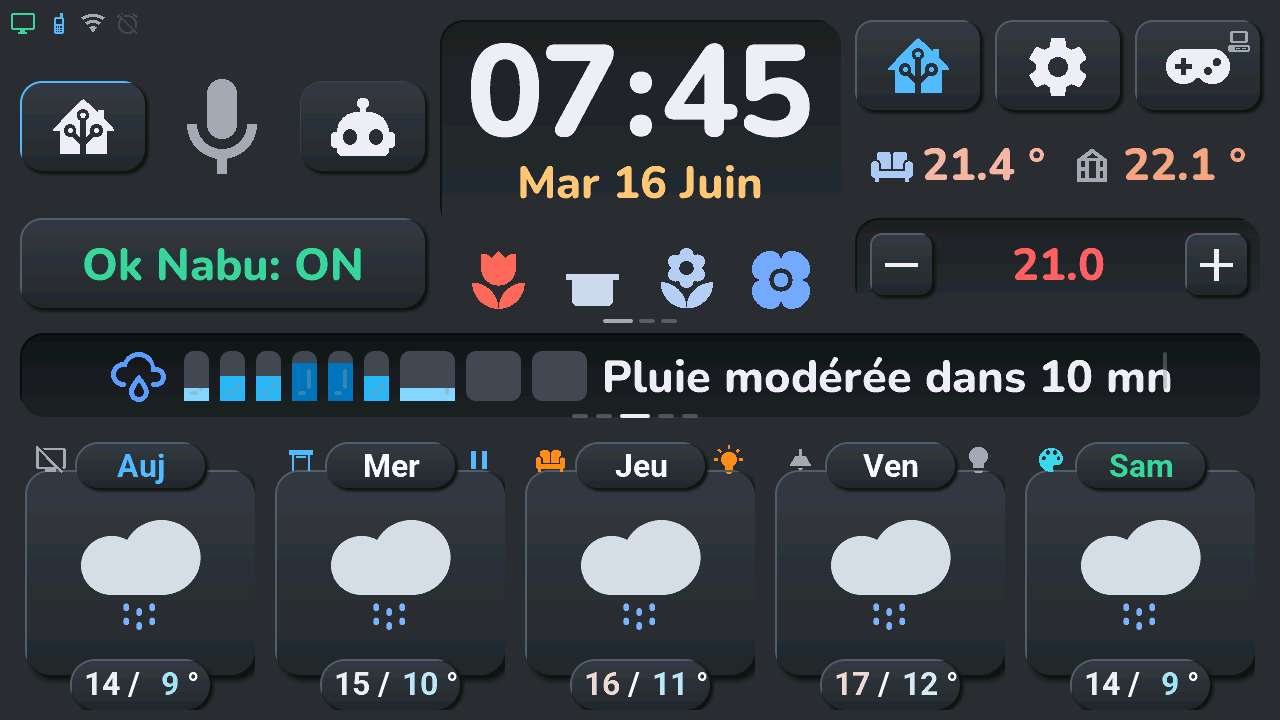 |
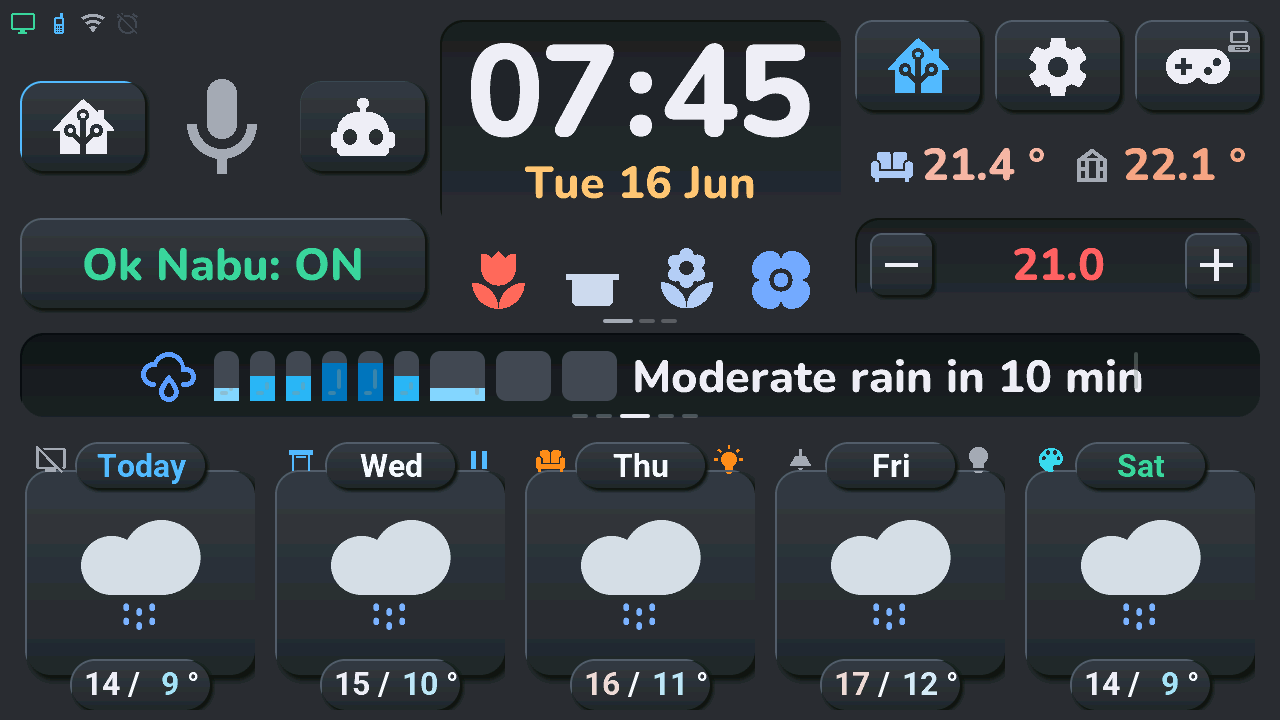 |
| Day off, plants to watch | 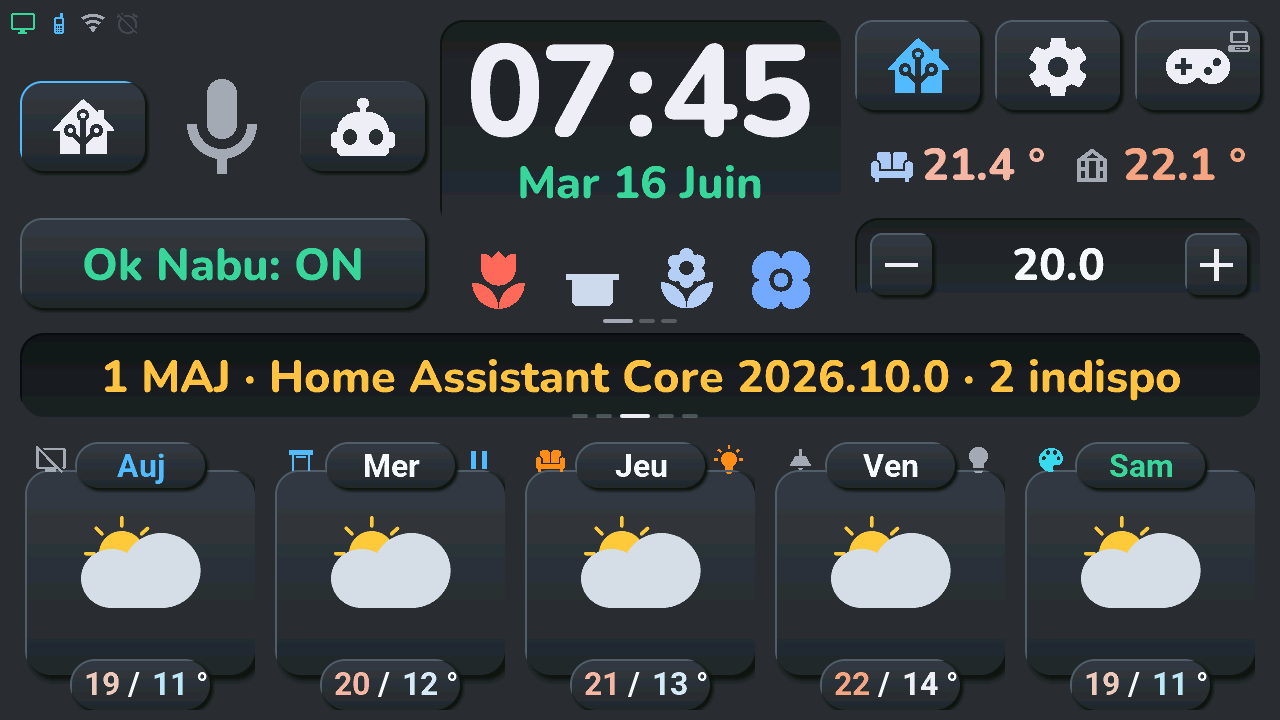 |
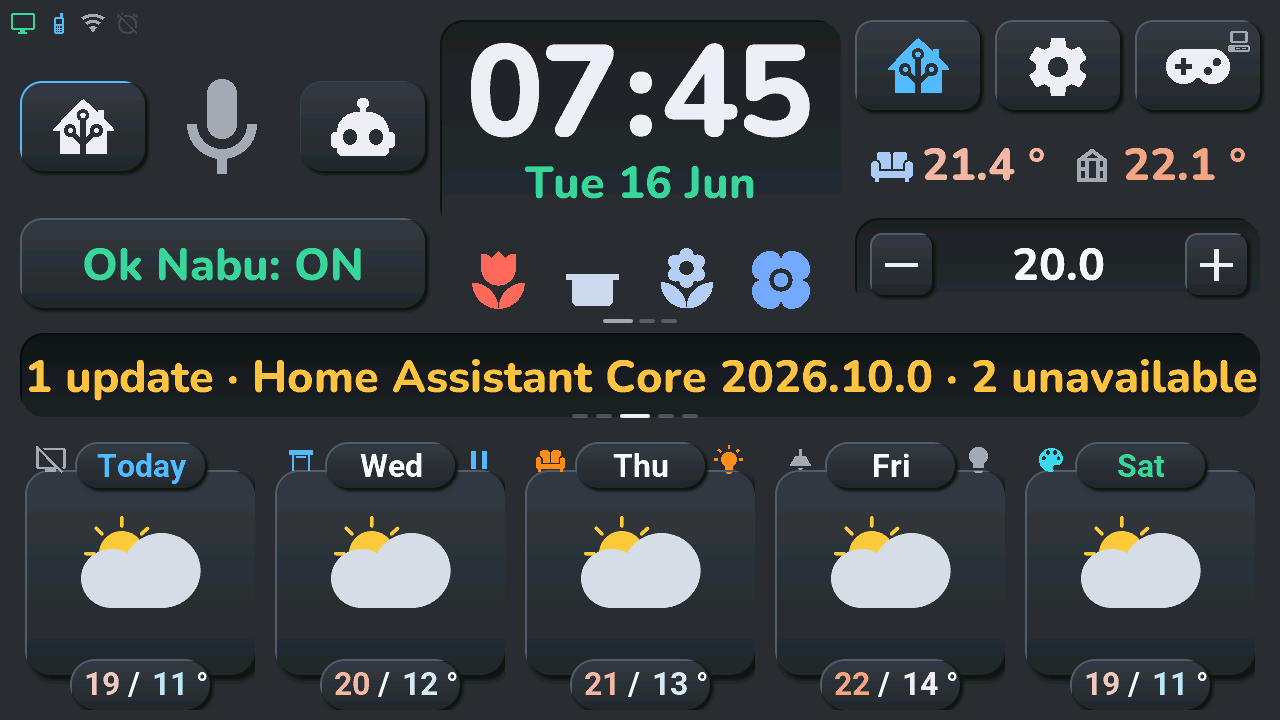 |
Home area
Always-visible content at the top of the screen:
- Status icons, top left, from left to right: PC (green when on), phone (colour of its battery), Wi-Fi, alarm, solar production when the Energy section of the blueprint has a solar power sensor and the panels' peak power (its colour gives the production as a share of the peak, on the battery scale: green above 80 %, blue, amber, red below 20 %; a grey panel at 0 %, at night), and the tablet's own battery when the device switch Tab5 Batterie montée is on (off by default). A plug when no battery is detected (a voltage below 6 V in the last 10 minutes: the tablet runs on USB), in the theme's text colour; with a battery the glyph follows the level (full above 80 %, half, low, "!" below 20 %, a bolt while charging, "?" with no reading), in the same colours as the phone. A hidden icon leaves no gap: the others close up.
- Current time and date, three touch areas since 2026-10-09 (ADR-0039, ui_components/horloge_zone.yaml): hours (left half of the digits, btn_horloge_heures), minutes (right half, btn_horloge_minutes), date (below, btn_horloge_date), cut inside the « : » and between the digits and the date in every theme (tests/test_gestes.py). « Auto »: long press on the hours or minutes = alarm clock, long press on the date = calendar, tap on the minutes = next device of the − / + tile (reglables_suivant()), tap on the date = next line of the row under the clock (rangee_toucher()), tap on the hours = next line of the « Ok Nabu » panel (nabu_suivant(), since ADR-0041; nothing while the panel has only its listening line); each is chosen in the blueprint like the top buttons below. In the clock's top-right corner, a red fridge-alert icon blinks (every 500 ms, no fade) while a fridge or a freezer is at the serious level (ADR-0055, btn_froid_alerte); a tap on it opens the Fridges and freezers popup
- Indoor temperature and humidity
- Microphone icon with pipeline state color (see Voice assistant below), between the two voice-mode buttons (Home Assistant agent vs. conversation/LLM pipeline), and under them the wide Ok Nabu: ON / OFF wake-word button (the mute button is in the assistant popup since 2026-10-05), which can also show lines of sensors (see « Ok Nabu » panel below). Since 2026-10-10 (ADR-0051) the area above Ok Nabu (x 20–425) shows a content chosen in the blueprint (section « Zone à gauche de l'horloge », gauche key of tab5_maj_emplacements): the voice controls (container zone_vocal), a chart of the next 15 hours (zone_graphique, tab5_zone_gauche.cpp: a 5 px temperature curve smoothed like the Weather popup's over a faint gradient, warmest and coldest values placed clear of the curve and of the bars, rain bars in mm — any forecast rain visible — and the total, from cal_heures_data; a tap opens the Weather popup) or the compact music player (zone_lecteur, lecteur_zone.yaml, painted by tab5_lecteur.cpp: the Music popup's cover, title, artist, a thin position bar, previous / play-pause / next; « Rien en lecture » and the like when nothing plays; a tap elsewhere opens the Music popup; the « now playing » bar hides while it shows; skipped when Home Assistant says no player is chosen) or a tracked sensor (zone_suivi, suivi_zone.yaml, ADR-0054, painted by tab5_suivi.cpp: the first sensor of « Tab5 · capteurs suivis », its name, change with a trend arrow, value and 24 h curve over the chart's gradient; a tap opens the Tracking popup; skipped when Home Assistant says no sensor is tracked). The tap on the greenhouse temperature and the zone_gauche_suivante gesture go to the next one; the choice is kept in NVS
- HA, Settings (gear) and Arcade (gamepad) buttons, top right, each with a long press since 2026-10-06: the Energy popup when the solar production is received (solaire_present()), the System page of the settings, the TV remote when the TV zone is present. A 26 px mini icon in the top-right corner of the HA and gamepad buttons (icon_mini_ha, icon_mini_tv: the glyphs of the status row and of the remote's header) says when that long press does something; the buttons no longer move without a TV. Since 2026-10-07 each long press can open another screen, and since 2026-10-09 (ADR-0039) each tap can too, or run an action (device mode, next device of the − / + tile, next line of the row under the clock, wake word on / off), chosen in the blueprint (« Horloge et boutons du haut · Clock and top buttons », gestes key of tab5_maj_emplacements, the older appuis key still read): geste_cible() gives it, the tab5_geste script runs it and tab5_ecran_ouvrir (the routine of the « Aller à l'écran » select) opens a screen; a changed tap changes the button's main icon (tap_glyphe()), and the mini icon (icon_mini_sys on the gear too) shows the glyph of its window's header, hidden when the screen is missing from the home. The home buttons show their icon only, all at the same size (125 × 90, icons of 70 px); the three columns of the top area sit 20 px from the screen edges like the central card, with their tops aligned at y 20 and their bottoms at y 308, 25 px above the central card
- Compact climate card — current temperature (living room + greenhouse/serre sensors) and the target temperature with +/− buttons; tapping the target opens the climate popup (see Climate below). Tapping the living-room temperature opens the quick-action wheel of a climate on it, whose « Détails » is the climate carousel (the same popup, one page per climate; ADR-0048); a long press on it, its history. A long press on the value between − and + unfolds the list of the « − / + tile »: the buttons can adjust another device instead (see Climate below)
- Row under the clock — the plants line (4 slots for up to 5 BLE soil moisture sensors, see Plant moisture below) and up to three lines of sensors picked in the blueprint, rotating with the central card (see Row under the clock below)
Central card — planning / rain / alerts / info
A single card rotates automatically every 8 seconds (script tab5_central_rotator_auto, tab5-scripts.yaml; not while the screen is off or a popup is open) between up to eight panels: planning, rain, weather alerts, info and up to four HA alert slots. The rotation only runs on the default forecast window — swiping to another forecast window replaces the central card with a page-title overlay (page_title_wrapper) and pauses the rotation until you swipe back. That overlay is one line built in forecast_page_title_parts() (tab5_central.cpp), in the theme's date font: the actual span of the 5 visible tiles — Du mercredi 5 août au dimanche 9 août for daily windows (day names/dates from SNTP, 1er for the first of the month), De 14:00 à 18:00 for hourly ones, always oldest → newest even though the hourly tiles are laid out right-to-left. The pagination dots under the card show which window is open (the « Prévisions journalières · 2/3 » kicker was removed on 2026-10-05). If the dates aren't available yet (SNTP not synced and no HA payload), the card stays empty. Tapping a forecast card's temperature (see below) can also interrupt the rotation for a few seconds to show a specific day's schedule.
- Planning — part of the rotation unless Home Assistant has no work calendar (optional zone, lot 5). Shows the day's schedule.
- Rain forecast — only rotated in if
has_rainis true. A short-term rain graph: one data point every 5 minutes for the first 30 minutes, then every 10 minutes for the following 30 minutes (9 points total, 1-hour window), sourced from Météo-France via thetab5_maj_pluie_1h_bulkAPI service (the 9 bars in one call). - Weather alerts — only rotated in if
g_central_ctx.has_mf_alertsis true. Shows one icon per active Météo-France vigilance type (wind, flooding, storms, etc.), each icon colored by its own severity: yellow (vigilance jaune), orange, or red (vigilance rouge) — the official Météo-France color codes, not to be changed.
The date, not "a day", changes color with the current overall alert level: independently of the rotation above, the date text under the clock in the home area (lbl_date, e.g. "Lun 06 Juil") is recolored every time an alert payload is received, based on the overall vigilance level for the day (green/default if none, pale yellow/orange/pale red for jaune/orange/rouge) — see tab5-api-logic.yaml in the tab5_maj_alerte_meteo_france service. This is separate from the per-type icon coloring in the alert panel above, which uses each alert type's own individual level rather than the overall one.
- Info panel — only rotated in if
has_infois true. Shows either a 3-day calendar recap (multi-line, with inline color markup) or a Météo-France alert banner (single line, colored by severity), pushed by HA via thetab5_maj_info_texteservice (update_info_text_ui(),tab5_*.cpp). Tap dismisses it (tab5_dismiss_info_tap→dismiss_central_info_immediate): the panel leaves the rotator immediately; the id is stored intab5_dismissed_localso a re-push of the same id stays hidden until HA sends a new one. - HA alert / info slots (up to 4) — pushed by
tab5_maj_alertes_ha_bulkintoha_alert_wrapper_0…3. Each slot is its own rotator panel; tap dismisses that slot (tab5_dismiss_ha_alert, slot 0-3 →dismiss_ha_alert_slot_immediate) with the same local-dismiss behavior.
If neither rain, MF alerts, info nor HA alert slots are active, the rotation just keeps planning on screen (and leaves the card empty without planning).
Navigation wheel — long press (2026-10-09, asked by the author; ADR-0042). A long press on any panel of the card, or on the page title (forecast pages, HA-mode room), opens the quick-action wheel of the tiles above the card, on the tablet's screens: « Aller à » and a compass rose in the hub, six buttons with a word beside each — Alertes (the history; marked while an alert is on screen), Pièces (Maison, then each room that has devices, its number in the button: HA mode on that room), Appareils (Températures, Clims, Lumières, Volets, Énergie, Plantes, Musique, TV — the last two since 2026-10-10, eight choices on the second ring), Agenda (Météo, Calendrier, Réveil, Caméras, Frigos — the last since 2026-10-10, ADR-0055, offered unless Home Assistant says no appliance is declared, Serveur IA — since 2026-10-10 too, ADR-0059, offered once Home Assistant has pushed a server), Tablette (Jeux, Réglages, Système), Assistant. A family unfolds on the second ring and the hub says which. Only what this home has is offered; an empty family disappears. A touch outside folds, then closes it. tab5_roue_navigation.cpp; the « roue » gesture opens it from the clock or a top button.
Temporary override: tapping the max/min temperature of a daily forecast card (not the hourly ones) interrupts the rotation for 6 seconds to show that specific day's opening-hours text in the central card, then automatically restores the previously active panel (show_temporary_planning(), tab5_*.cpp — this used to be an ESPHome script in tab5-scripts.yaml, moved to C++ in the 12/07 reboot fix).
Bottom card region — rooms
Since 3.2 (ADR-0023) each of the 5 pages of the bottom row is also a room of up to 5 devices, described by Home Assistant (blueprint « Tab5 — emplacements », action tab5_maj_tuiles; states through tab5_maj_emplacements, keys tRT). Room 0 is the home page (days 0-4), rooms 1 and 2 the next daily pages (swipe left), rooms 3 and 4 the hourly pages (swipe right); tile T is the visual position, 0 = left. The definitions are kept in NVS, so the rooms are drawn before HA answers; the states are not (greyed « -- » until the first push). Model and drawing: tab5_tuiles.cpp.
The btn_control_ha button (top right, Home Assistant icon) toggles the region between the weather mode and the HA mode (tuiles_mode_ha(), flag g_central_ctx.ha_mode). It shows an accent border and icon while HA mode is on, and is hidden when no room has a device. Its long press opens the Energy popup when the solar production is received. « Aller à l'écran → Accueil » (the Home Assistant select) leaves HA mode.
Weather mode (default)
5 cards, navigated by left/right swipe (from y 333: the central card and the bottom row), in 5 windows: 2 hourly + 3 daily. The order is deliberate (forecast_page_suivante(), tab5_central.cpp): a left swipe moves forward through the three daily windows and loops on them (from the last one back to the home window); a right swipe moves back, through the two hourly windows, and from the last hourly window back to the home window. See the false positives note in docs/troubleshooting.md; what the user sees: user manual, bottom row.
Hourly windows (2): the next 15 time slots, 5 per window. Each card shows a time label, a two-layer weather condition icon (IconeMeteo.ttf), a color-coded temperature, and rainfall in mm (or - if dry). There is no separate wind-speed reading — "windy" is one of the possible weather condition icons (alongside sun/cloud/rain/snow/fog), not a distinct data field.
Daily windows (3): a 15-day forecast, 5 days per window. Each card shows: - Day name, color-coded (see Color coding below) - Weather condition icon (same two-layer system) - Max and min temperature, individually color-coded — tapping this shows that day's schedule in the central card for 6 seconds (see above)
Device shoulders and quick action. On every page, a tile that holds a device of that page's room shows it in its two « shoulders », left and right of the title tab — left: the device's icon (palette) coloured by its state; right: a bulb (light) or the arrow of a shutter's next move (pause while it moves), nothing for the other types — and an invisible button over the weather icon (btn_jN_action on the daily pages, btn_hN_action on the hourly ones) sends the tile's command; the weather keeps showing. A page without devices looks as before 3.2. With the device switch Tab5 Appareils sur la météo off (on by default; discussion #278), every page looks like a page without devices: the forecast cards show the weather only, and the devices stay in HA mode.
Tap and long press for each kind of device, and the blueprint's « on only », « confirm » and « read only » behaviours: user manual, bottom row. In the firmware, tuile_appui() (tab5_tuiles.cpp) applies the table of ADR-0023 to the tile's type (lum, int, vol, med, act, cap, bin, cli) and options (o on only, k a second tap within 3 s, r read only, t TV remote, m the blueprint's climate, e energy popup).
Quick-action wheel — long press (2026-10-07, asked in discussion #278; two rings the same day, asked by the author; ADR-0036, tab5_roue.cpp, ui_components/roue_actions.yaml). A long press on a light, a shutter or a climate whose settings HA sent — its weather tile, the badge of its HA-mode card or its row in the House popup — opens a wheel at once, in front of the popups' veil at 60 %. On the tile, a hub: the card's icon in the state colour, its state line, a thin arc gauge (brightness, position, setpoint within the unit's bounds) and the device's name. Above it, a first ring of round glass buttons (72 px, 180 px from the tile): Home on the left (the House popup; not there when opened from it), the commands, the families marked with a dot, then Details on the right (the tile's popup: lights, shutter, climate). Touching a family unfolds its choices on a second ring (290 px), centred on it: light Off or On · Brightness ▸ 10 · 25 · 50 · 75 · 100 % · with c Whites ▸ warm · cream · cold and Colours ▸ red · orange · gold · green · blue · purple (swatches); a light without dimmer On · Off; shutter Open · Stop · Close · Position ▸ 25 · 50 · 75 % (when it reports its position); climate Off · Mode ▸ (the modes it has) · Setpoint ▸ (its own and two steps each side) · Options ▸ (Eco, Boost, Quiet, Swing, Breeze, those it has). Each ring sits on a glass band (a rounded arc), the second tinted with the state colour. The current state is a glass tinted with the state colour, with a full rim and a glow. A command or a choice sends what the tile or its popup already sends (esphome.tab5_action, nothing new for HA) and closes the wheel; touching elsewhere or the hub folds the second ring, then closes the wheel; so do the popups' inactivity delay, any popup, the screen turning off and new tile definitions; a theme change or a pushed state repaints it open. Near an edge a ring turns by steps of 5°. No wheel (the popup opens directly): option k, a climate whose settings HA has not sent yet.
Legacy mode (3.x blueprint). Until the first definitions arrive (a firmware updated before its blueprint), room 0 is built from the 3.x slots and looks as in 3.1: card 1 PC/TV (shoulder = TV state, or PC state without a TV; long press = TV remote), card 2 the shutter, cards 3-5 the bedroom, living room and LED lights (long press = light popup), with the 3.x commands. On the shutter card, tapping the title flips the direction the next tap will send (the arrow in the top-right corner shows it); tapping the icon sends stop while the shutter moves, else open or close.
HA mode
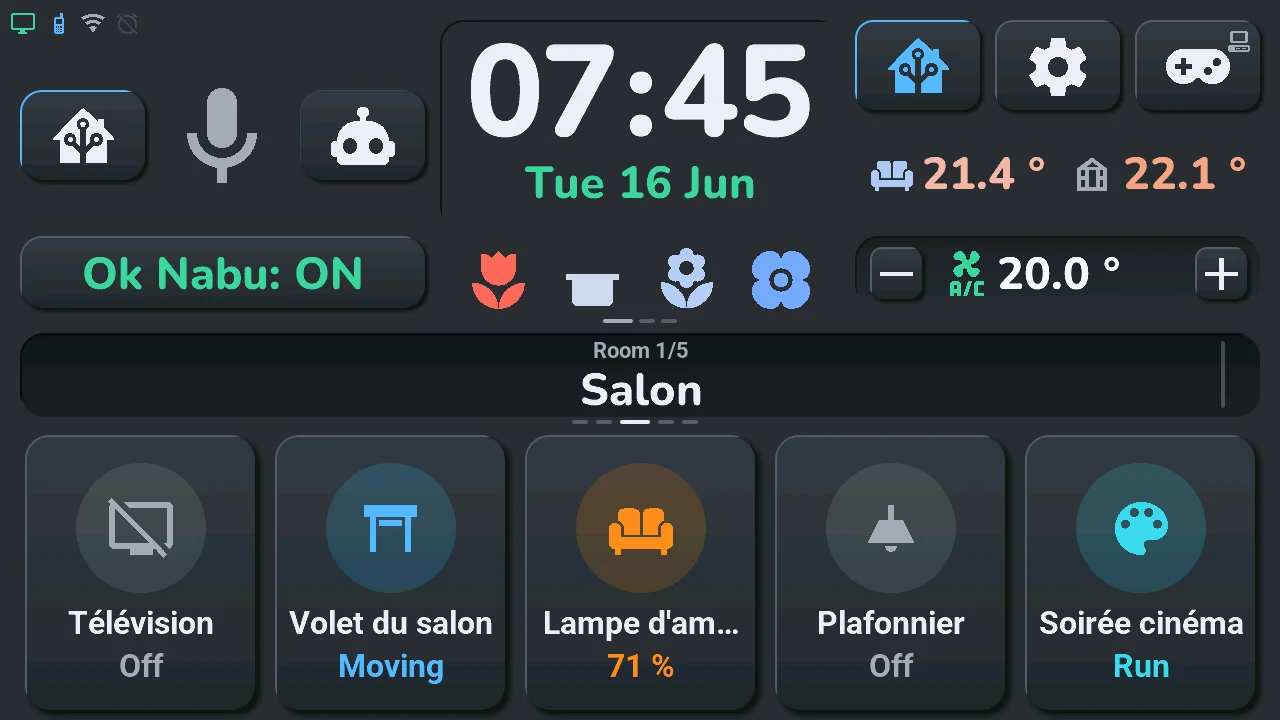
The 5 cards (switches_card.yaml) show the room of the current page, each drawn like the « tile » card of a Home Assistant dashboard in its vertical form (since 2026-10-06, discussion #278): the icon from the palette (70 px) in a round badge of its state's colour (the colour at 20 %, the icon at full strength; tap and long press on the badge), the name under it (cut with « … »; a tap on it flips a shutter's direction), and under the name a state line translated by the tablet — « 60 % », « Allumé » / « Éteint », « Mouvement » / « 45 % » / « Ouvert » / « Fermé », « Lecture » / « Pause », « Lancer », a sensor's value and unit, « Détecté » / « Présent » / « Verrouillé »… by device class, a climate's room temperature; « Hors ligne », greyed, when the entity is unavailable — and a colour by type and state (a light's own colour when it reports one). Empty tiles are hidden and the others centred. The central card shows the room's name; the rotator pauses. Tap and long press: user manual.
Swipe in HA mode goes to the next / previous room that has a device, in the order of the weather pages (same wrap); the weather layers stay hidden and the pagination dots follow. With one room only, a swipe does nothing. Entering HA mode on a page without devices jumps to the nearest room that has some; leaving it shows the weather of the current page.
Tap on the room's name (the central card's title, HA mode only): the House popup.
The room's climate (ADR-0040, optional): when the room's section of the blueprint declares a temperature sensor, the climate card above shows the room instead of the living room and the greenhouse — a thermometer and the room's temperature on the left (the icon tinted by the humidity), a drop and the humidity on the right when a humidity sensor is declared, nothing otherwise. A long press on the room's temperature opens its history. When the section also declares a climate, the − / + tile adjusts that climate (a tap on its setpoint opens the climate popup on it); its list keeps its choice for the other rooms and the weather mode. A room without these fields, or the weather mode, shows the card as before.
Climate
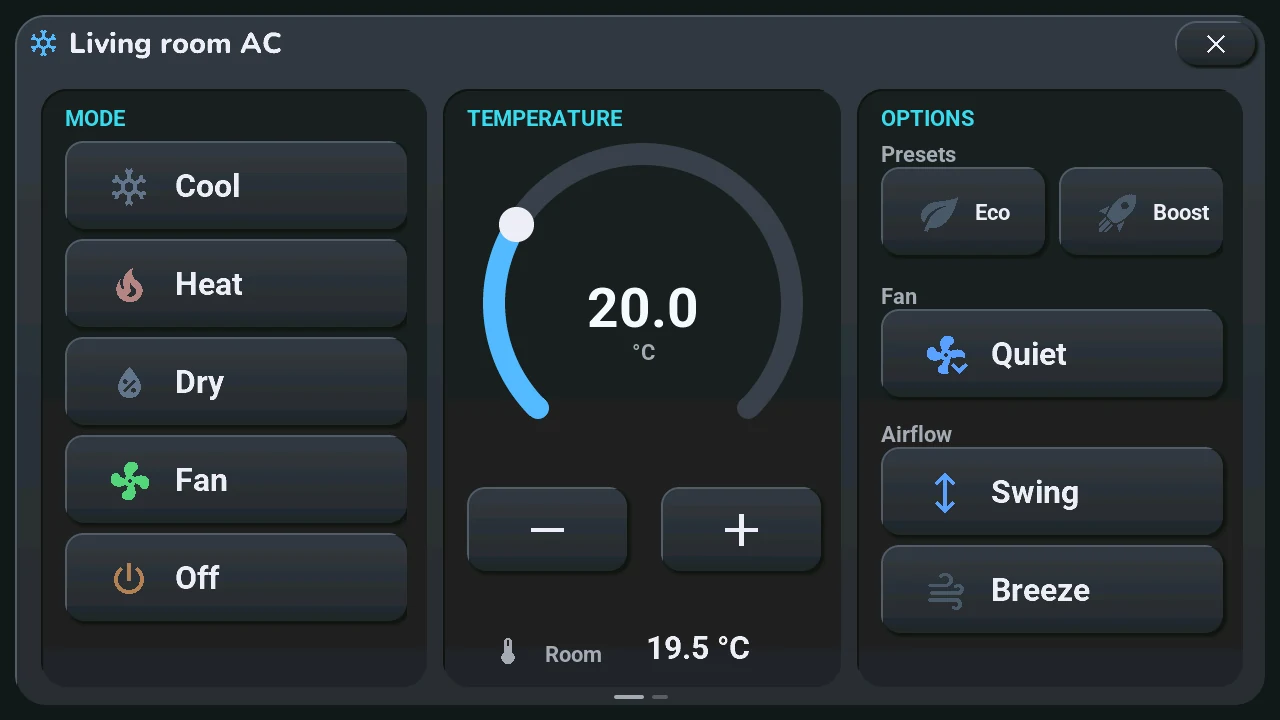
Two levels of control. The compact card drives the blueprint's climate entity (input « Climatisation »); the popup drives the same one, or the climate of the tile that opened it:
- Compact card (always visible in the home area) — current temperature and target with +/− buttons. Always the blueprint's climate.
- − / + tile of your choice (ADR-0033,
tab5_reglables.cpp,ui_components/reglables_liste.yaml) — a long press on the value between − and + (btn_clim_target_click; before 2026-10-09, a tap on the living-room temperature, now the climate carousel) unfolds a list: the blueprint's climate, up to eight devices of the blueprint's « − / + tile » section (keysrN: volume, brightness, setpoint, humidity, fan speed, position, number), then the tablet's volume. The chosen device stays (NVS); a tap on the minutes of the clock (« auto ») moves to the next one without unfolding the list (reglables_suivant()). Scrolling by choice (since 2026-10-09, ADR-0041, « Défilement » of the blueprint's section): « Fixe » by default (as above); « Automatique », the climate and the blueprint's devices take turns with the central card (reglables_tour(), every 32 s by default; not the tablet's volume), without writing the NVS, never while the list is open or a value waits to be sent; a gesture restarts the count. With the climate chosen, nothing above changes, except the climate's icon (clim_consigne_icone,mdi_font_45) 8 px left of its target since 2026-10-09; since 2026-10-18 the icon and the target are centred together between − and + (the target alone at the centre left them 27 px to the left). With another device, its icon and value replace the target, − / + move the value on its step at once and oneesphome.tab5_action(rN/regler, orconsignefor a climate) leaves 250 ms after the last tap; tapping the value opens the popup of the tile carrying the same entity, or the TV remote. - Climate popup (near-fullscreen, 1250×690 card 15 px from the screen edges, opened by tapping the compact card, a climate tile, or « Aller à l'écran → Climatisation ») — three glass cards:
- MODE: Froid / Chaud / Sec / Ventilation / Éteint, stacked full-width (icons colored by the active mode, driven by
tab5_maj_clim) - TEMPÉRATURE: a 320 px arc thermostat with the target shown large in the center, − / + buttons, and the actual room temperature at the bottom. Bounds, step and unit are the unit's own (16–30 °C and 0.5 until Home Assistant sends them, see below). The target updates immediately (optimistic) and a single
climate.set_temperatureis sent once the gesture ends (250 ms debounce — rapid ± taps are grouped) - OPTIONS: Éco / Boost presets (toggle), Silence (fan quiet), and airflow Oscillation / Brise (
windnice, a Daikin Onecta mode previously unreachable from the screen) - Any brand (ADR-0026): the blueprint sends the unit's settings (key
climr:min_temp/max_temp,target_temp_step, °C or °F, the modes it has, its name). The title becomes the unit's name, the arc and the ± buttons follow its bounds and step, and a button the unit cannot do disappears — an OPTIONS section left without a button disappears with its title and the others move up. The buttons still send the Daikin names (Éco =away, Silence =quiet,swing/stop), and the blueprint translates them to the unit's own (eco,low,off,vertical…), or sends nothing when the unit has no equivalent. - Any climate tile (ADR-0027): a
clitile of a room opens the popup on its own unit — its settings (keycrRT, same fields asclimr) and its state (keyceRT) come with the tiles, and its buttons send the same commands withemplacement: tRT, translated by the blueprint the same way. Its target and mode reach the popup at once, its fan / swing / preset and room temperature within 5 minutes (with the measurements). A tile with optionmis the blueprint's climate. Until Home Assistant sent the tile's settings (older blueprint), tapping it does nothing. The compact card keeps showing the blueprint's climate meanwhile, and closing the popup brings it back to that one. - Carousel of climates (ADR-0038, 2026-10-09): the popup has one page per climate the tablet knows — the blueprint's first, then each
clitile without optionmwhose settings arrived, room by room (clims_enumerer(),tab5_clim.cpp; a unit already listed under the same name gets no second page). A page is the whole popup repainted for that unit (its name as title, the buttons it lacks hidden; a unit sent without a name is titled with its tile's room). Swipe left or right for the next or previous one, looping; the page changes at once. Dots under the three cards, like the central card's, show which one (at most 8). With a single climate, neither dots nor swipe. Tapping the living-room temperature (btn_reglables_liste) opens the wheel of the climate of the room shown in HA mode when it has one, otherwise of the blueprint's (below); its « Détails » opens the carousel on it, and the tap opens the carousel directly while that climate has no settings yet; with no climate at all, that tap still unfolds the − / + list. The swipe stays in the popup (nothing changes behind it), and dragging the arc sideways still sets the target. - Wheel of a climate (ADR-0048, 2026-10-09): the tap on the room's temperature opens, its full fan opening upwards from a low anchor (the temperature is too high for it), the quick-action wheel of a
clitile for that climate — same code (clim_roue_ouvrir(),tab5_tuiles_roue.cpp), same buttons (Off, Mode ▸, Setpoint ▸, Options ▸, what the unit has), same commands at the same place (clim,tRT,cpR). The hub shows the room temperature, a gauge of the setpoint and the unit's name; the rings go below the anchor. « Détails » opens the carousel on that climate. With two climates or more, « Clims ▸ » replaces « Maison »: its second ring lists them (setpoint or the power icon, name under it, the current one marked) and a touch reopens the wheel on the one touched. A pushed setting or state repaints the open wheel. - Tapping the dark overlay or the × button (the shared 80×44 glass button of
modal_header.yaml) closes the modal. 6 of the 10 buttons are factorized templates (cool/heat/fan/dry, eco/boost); the remaining 4 (off/swing/windnice/quiet) and the ± buttons are deliberately left as individual YAML — see ADR-0007.
The controls are dimmed (not hidden) when the AC is off, so the layout stays stable.
Row under the clock
Under the clock, a 401 × 70 px row (ADR-0031, tab5_rangee.cpp, ui_components/rangee.yaml) shows one line at a time: the plants line (below) and up to three lines of four devices picked in the « Sous l'horloge · Under the clock » section of the « Tab5 — emplacements » blueprint, three lines at most in all. The blueprint also sets where the plants line goes (first by default, second, third or hidden) and how long a line stays (8 to 120 s in steps of 8 s, 32 s by default).
- Timing. The central card keeps its 8 s.
tab5_central_rotator_autowaits 7.8 s, turns the row (rangee_tour()), waits 0.2 s and moves the central card: when the row changes, it does just before the card, with the same short slide and fade (transition_widgets()). It does not turn with the screen off or a window open. - Layout. Icons only (no sensor on the line): 70 px icons, like the pots. With values: the largest size that fits — the date's font of the theme with 45 px icons, then 32 px bold, then 22 px, then the icon above its value; past that the value is cut with « … ».
- Colours. An icon is coloured like a tile (on, off, offline). A value follows its measurement: the temperature scale (written « 21.4 ° »; °F brought back to °C for the colour), humidity and moisture the plant scale, batteries the battery scale, gold for power and energy (W / kW, kWh / MWh).
- Touch. A tap shows the next line at once and restarts its time; a long press on the plants line opens the plant details. The row commands nothing: a switch or a light only shows its state.
- Small dashes under the row (two or three) show which line is on; one line alone has none.
- Scrolling (since 2026-10-09, ADR-0041): « Automatique » (default, as above) or « Fixe » in the same blueprint section: fixed, the line changes only with a tap on the row or a « next line » gesture of the clock.
« Ok Nabu » panel
Since 2026-10-09 (ADR-0041) the wide Ok Nabu: ON / OFF button (btn_ok_nabu, 405 × 72 at x 20, y 236; 405 × 90 at y 218 until 2026-10-09) is a zone with lines like the row under the clock: the same model, drawing and keys with the letter n (nLI, np, nd of tab5_maj_tuiles, states nLI of tab5_maj_emplacements), picked in the « Panneau Ok Nabu · Ok Nabu panel » section of the blueprint. The listening line (« Ok Nabu: ON / OFF », nabu_ecoute) takes the place of the plants line: first by default, second, third or hidden. Without any line picked, the panel is the button from before.
- Touch. A tap on the listening line turns wake word listening on or off, as before; on a sensor line it does nothing (display only, like the row). The tap on the hours of the clock (« auto ») shows the next line (
nabu_suivant()). - Layout. The lines sit in the button's frame (two panels of 401 × 70, the height of the row under the clock,
ui_components/rangee_panneau.yaml), with 17 px from the sides (kMargeCadre) so that nothing touches a rounded frame, even the pill of the Capsule theme. Same sizes and colours as the row, except a line of icons without values: 45 px icons in the frame, 70 px under the clock. A line is centred in the height of its panel, in the frame and under the clock. - Scrolling. « Fixe » by default: the line changes only with a gesture. « Automatique »: the lines take turns with the central card like the row (its own duration,
nd); a gesture shows the next one and restarts its time. - Small dashes under the panel (y 319,
ui_components/rangee_pastilles.yaml, the same template as the row's), two or three; none for one line. The panel is hidden when it has no line at all (listening hidden and no sensor).
Plant moisture card
Monitors up to 5 BLE soil moisture sensors, but only 4 slots are shown (sort_and_update_moisture_slots(), tab5_*.cpp). The sensors are sorted by moisture level (driest to wettest) each update, then mapped to slots as: driest, 2nd-driest, the median-ranked sensor (it shows that one sensor's raw reading, it is not a computed arithmetic average of all 5), and wettest. Because the mapping is by rank rather than by fixed sensor identity, which physical pot appears in which slot changes over time as moisture levels shift.
Each slot shows the sensor's icon only, in its moisture-level color (see Color coding below), at the size of the home buttons; the pot names and readings are in the plant details popup (long press). The "Pot N" / "Moy:" caption under each icon was removed on 2026-10-05.
Plant details popup — long press
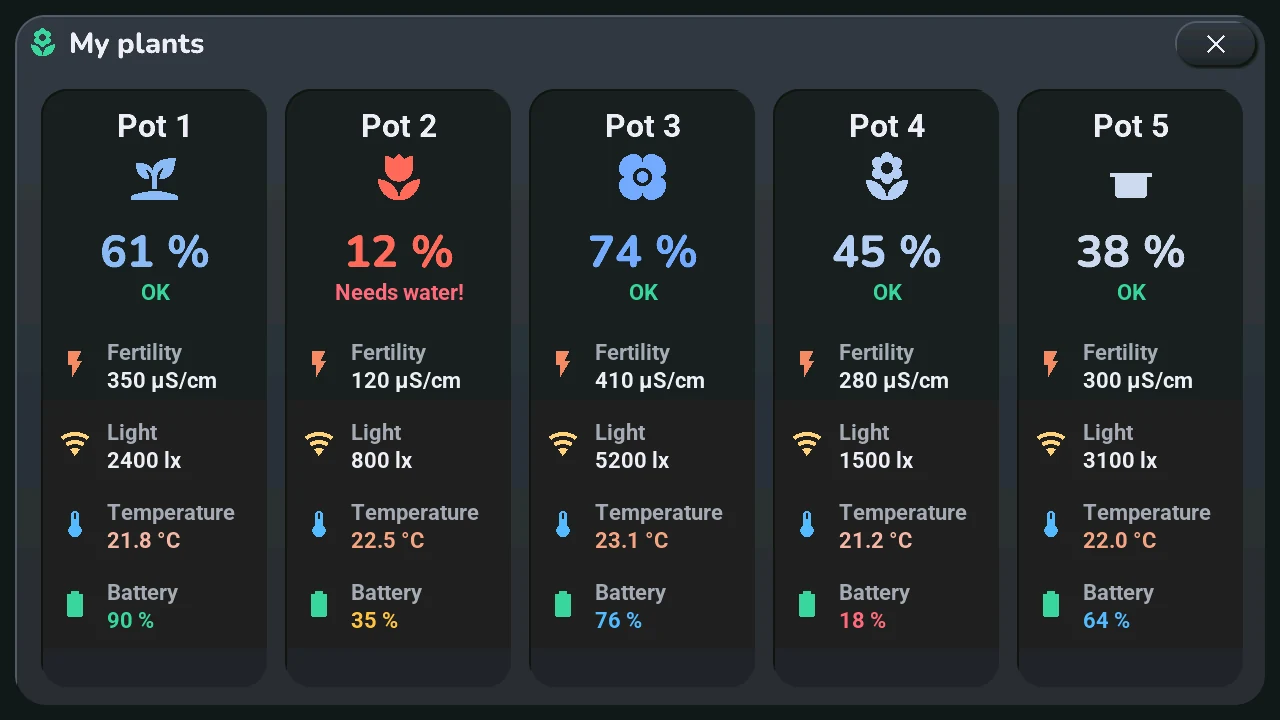
A long press on the plants line of the row under the clock opens a near-fullscreen modal (1250×690 card, 15 px from the screen edges) with 5 fixed glass cards — one per sensor (card N = sensor moisture_N, same icon as the dashboard, no dynamic sorting here). Each card shows:
- the pot name and its plant icon, colored by moisture level (same scale as the dashboard)
- the soil-moisture % (large) and a watering status: OK (green), Bientôt sec (≤ 20 %, amber), À arroser ! (≤ 14 %, red — aligned with the
get_humidity_color()red zone) or Hors ligne (sensor unavailable) - four metric rows: Fertility (EC conductivity, µS/cm), Light (lx), Temperature (°C,
get_temperature_color()gradient) and sensor Battery (%,get_battery_color()scale)
Values are pushed continuously by the pot*_ec/lux/temp/bat HA sensors (update_pot_metric_ui(), tab5_*.cpp) — the popup needs no sync on open. Tapping the dark overlay or the × button (the shared 80×44 glass button) closes it. Components: pots_popup.yaml + pot_detail_card.yaml (5 instances).
Calendar popup — long press on the date
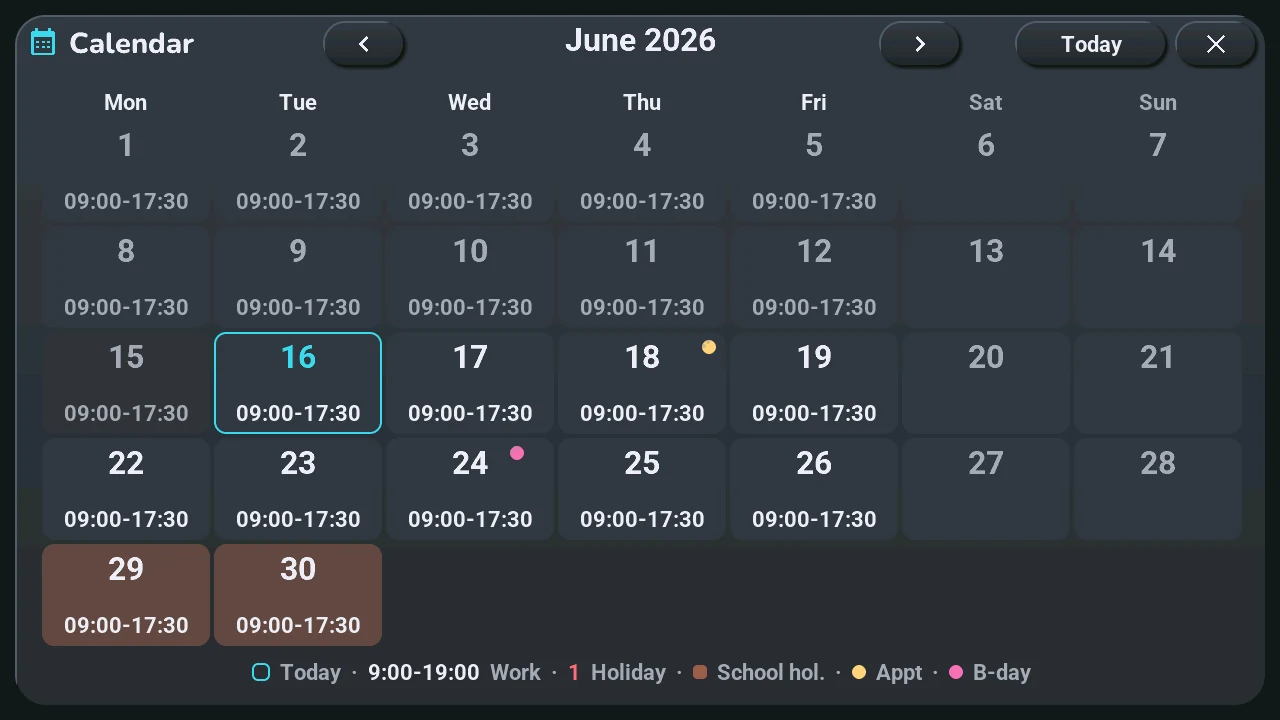
A long press on the date, under the clock (btn_horloge_date, « auto »; the gestures of the clock are chosen in the blueprint since 2026-10-09, see the home area above), opens a near-fullscreen monthly calendar (1250×690 card, 15 px from the screen edges): a 7×6 Monday-first grid with ◀ / ▶ month navigation and an "Aujourd'hui" (today) button. The grid itself — day numbers, Monday-Sunday alignment, weekend dimming, today highlight (cyan border) and past-day fade — is computed locally from the SNTP clock (cal_render_month(), Sakamoto's algorithm), so the calendar works even with HA offline.
Home Assistant then enriches each viewed month on demand (script.tab5_calendrier_mois → tab5_maj_calendrier_mois, cached per month, cache cleared on open):
- work hours printed inside each day cell ("09:30-20:15", pink when the shift starts before 9 am — same convention as the central planning banner), from the work calendar (the events whose title holds the « Tab5 · mot des événements de travail » keyword, or all of them)
- public holidays — day number turns rose (whitelist of real French holidays; civil observances like Mother's Day only appear in the day detail)
- school holidays — soft violet cell background, from the calendar chosen in « Tab5 · agenda des vacances scolaires » (in France, the ministry's ICS file of your zone; until 2026-09-29, a static Zone A table)
- appointments (gold dot) and birthdays (pink dot) from the family/birthday calendars
Tapping a day opens a 780×540 detail sub-popup (script.tab5_calendrier_jour): "Mardi 21 Juillet" title and up to 6 typed lines with colored MDI icons — holiday name, school-holiday label, work hours, timed appointments, birthdays, civil observances — with "Chargement...", "Rien de prévu ce jour" and "Home Assistant hors ligne" states. Closing follows the v2 popup recipe (the shared 80×44 glass × buttons, scrollable: false everywhere). Components: calendar_popup.yaml + cal_grid_build() (42 cells built in C++) + HA package HomeAssistant_Config/packages/tab5_calendar.yaml.
Alarm clock — long press on the time
A long press on the time, hours or minutes (btn_horloge_heures, btn_horloge_minutes, « auto »), opens the alarm settings (1250×690 modal card); the long press on the date opens the calendar. Until 2026-10-09 a short tap on the clock opened it. A small bell in the top status row shows the state at a glance: green = armed with a computed ring time, amber = armed but no day qualifies (the classic trap of "work days" mode during a holiday week), struck through and dim = off.
The alarm rings without Home Assistant. The time comes from SNTP, the next 15 days of work hours are already cached on the device (cal_jours_data[], pushed every 10 min), and the ringtone is an RTTTL melody synthesised on the device — a pure sine, not a file. HA only adds comfort: the spoken briefing, appointment reminders, and an optional custom ringtone URL (with automatic, silent fallback to the local melody when HA doesn't answer).
Three modes, because "base it on the calendar" means two different things depending on the day:
| Mode | When it rings |
|---|---|
| Fixe (fixed) | At the set time, on the weekdays you ticked |
| Travail (work days) | Same time, but only when the calendar says there is work |
| Ouverture (before opening) | Time is derived from the shift: shift start − a configurable lead, clamped by "never before" / "never after" |
The closing time is used too, through the "repos mini" (minimum rest) setting: after a 21:00 close, a 9 h rest forbids ringing before 06:00 — clamped by "never after", so rest can never make you late. The day selector only governs the fixed time: a calendar-driven day rings whatever the weekday, otherwise unticking Saturday would make you miss a Saturday-morning opening.
Stopping it: voice or touch. Touching anywhere on the ring screen stops the alarm; "Répéter" (snooze) stays a separate button. For voice, the microWakeWord "Stop" model was already on board (it only served to stop the roller shutter): it is armed while ringing, and any wake word cuts the alarm. The wake-word engine is started even if "Ok Nabu" is off — otherwise the promise wouldn't hold for anyone who mutes the mic at night. Each melody pass is followed by 2.5 s of silence: that is the window where the mic has a chance to hear you.
Other settings: 4 melodies (a tap picks one and plays it), a dedicated alarm volume (independent of the system volume), fade-in, snooze length, maximum ring duration, and a spoken wake-up briefing (time, today's shift, next appointment, temperature).
Five pages since 2026-10-09, like the settings: Time (the fixed time on two lv_roller wheels, the on / off switch, the next ring, Test), Days (mode, the days of the fixed time with four presets, days off), Shift start (lead, never before, never after, minimum rest on four wheels, and a sentence that sums them up), Ringtone (melody, volume, fade-in, snooze and maximum duration) and Announcements (spoken briefing, appointment reminders and their lead, next appointment). A page is picked by its name next to the title or by a swipe on the window, looping, instantly; the swipe and the colour of the active name come from the brick shared by the popups with pages (Tab5/ecran/tab5_pages.cpp, ADR-0046), which ignores a swipe started on a wheel. Every value is set on a wheel (ui_components/rouleau.yaml): the list of values and the index ↔ value maths are pure C++ (rouleau_*() in Tab5/socle/tab5_core.cpp, tested on a PC), and a value set otherwise in Home Assistant (a minute that is not a multiple of 5) is inserted in its place. The action wheel of the tiles (ADR-0036) is not used here: its first ring only holds icons, and the wheels already show every value. The popup only writes the alarm's own entities; nothing changed for Home Assistant.
Appointment reminders, N minutes ahead (0–120, configurable). HA pushes the list of timed appointments every 5 minutes; the firmware runs the countdown, so an HA outage between the push and the deadline doesn't miss anything. Components: alarm_popup.yaml + alarm_ring_overlay.yaml + Tab5/paquets/tab5-alarm.yaml + Tab5/socle/alarm_clock.h/.cpp + HA package HomeAssistant_Config/packages/tab5_reveil.yaml.
Voice assistant
The microphone icon on the home screen is the visual interface for the voice assistant; its colour follows the pipeline state (assist_set_pipeline_state()): standby (wake word off), idle, listening, processing (STT + intent), speaking (TTS), error. The colours, the wake-word button, the two mode buttons (Home Assistant's conversation agent, or an LLM-backed conversation pipeline) and the microphone's tap and long press: user manual, voice.
When the list « Tab5 · pipeline de discussion » is set to « Aucun » (no conversation pipeline), the two mode buttons (home screen and assistant popup) disappear and the tablet stays in Home Assistant mode (zone discussion, installation).
The mode is saved across reboots via the HA select entity (select.m5stack_tab5_home_assistant_hmi_assistant).
Second on-device wake word — "Stop": a second microWakeWord model (Stop) is armed only while the roller shutter is moving (volet_en_mouvement global) and disarmed as soon as it stops. Saying "Stop" then halts the shutter directly from the device (script.tab5_volet_action) — no "Okay Nabu", no pipeline round-trip.
Interrupting a reply: tapping the microphone icon while the assistant is speaking (blue) stops the current reply (pipeline stop, which Home Assistant follows, + the speaker) and immediately re-opens listening (tab5_vocal_interrupt_and_listen) — the reliable way to cut a long Discussion answer short, since the wake word is inactive while the pipeline is in its responding phase.
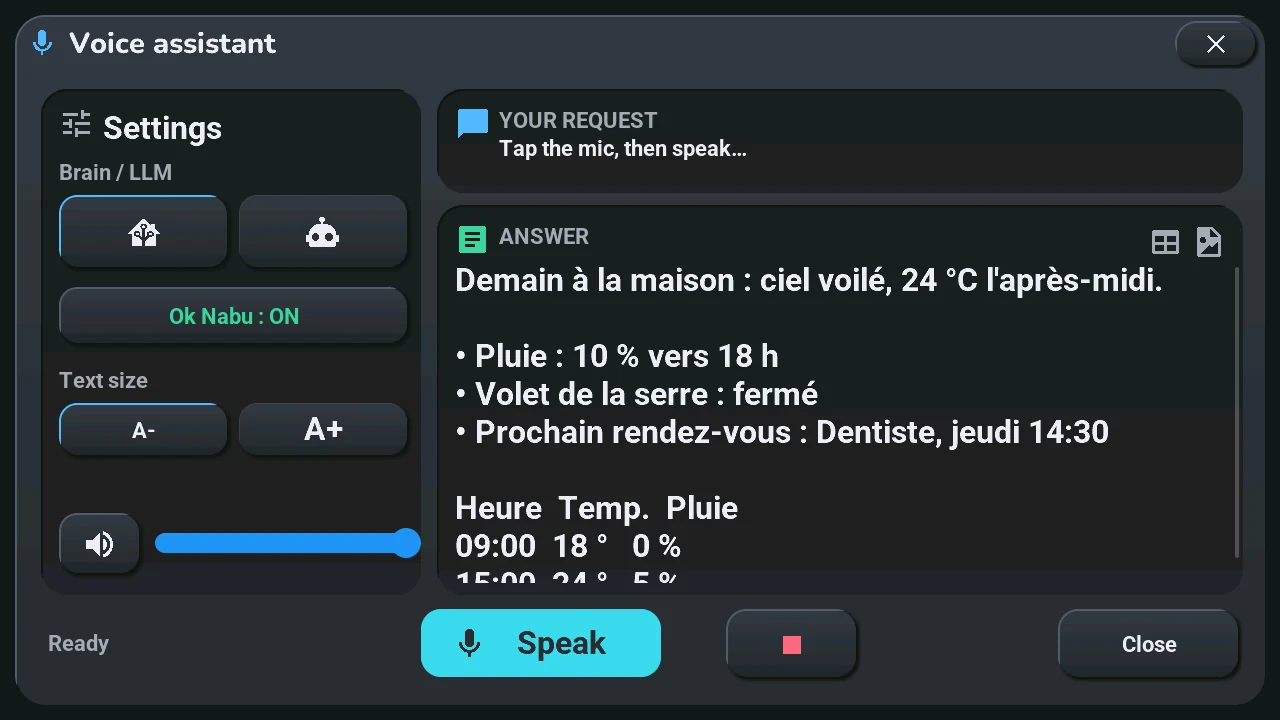
Assistant popup (long press on the microphone, btn_assist_trigger; its buttons: user manual). In conversation mode a voice request opens it by itself (on_stt_end → tab5_assist_on_request); in Home Assistant mode the central card's 8 s banner stays the quick feedback. The answer is rendered from Markdown (tables re-aligned approximately — proportional font since 26/09/2026 —, bold, code, bullets), plus an image downloaded on demand (online_image, PNG → RGB565, 760×360). The engine can push a rich answer through the tab5_assist_reponse service (variables texte = Markdown, image_url = optional PNG).
System page of the settings (former console)
The fourth page of the settings popup since 2026-10-08 (console_sys.yaml, a popup of its own before). It opens directly with a long press on the gear button (btn_control_console, top right of the home area; a tap opens the Screen page) or with « Aller à l'écran → Console système » — the option keeps its name for Home Assistant and the blueprint. Its refreshes only run while the page is shown (reglages_page_visible(REGLAGES_PAGE_SYSTEME)). Four glass cards:
- MÉMOIRE — SRAM/PSRAM usage bars, max free block, flash size
- RÉSEAU — Wi-Fi SSID, IP, signal strength, and HA connection status (lbl_sys_ha_val, green/red)
- SYSTÈME — uptime, CPU temperature, CPU load of each core (core 0 · core 1, measured every 2 s while the page is shown), loop time, the tablet's battery (level and voltage with the status-bar icon, level and power drawn while on battery since the next version, "On USB" when no battery is detected, "Not fitted" while the « Tab5 Batterie montée » switch is off; 2026-10-06, discussion #278), plus the volume slider with a live % readout
- GESTION — HA management buttons: « MAJ Écran » (re-arms the push flag and re-triggers the screen-push automation — the direct remedy for the recurring frozen-screen incident), « Recharger autos » (automation.reload), « Redémarrer HA » and « Reboot tablette » — the last two behind Annuler/Confirmer overlays (no more invisible double-tap arming) — in a 2 × 2 grid since the theme row moved to the settings popup (2026-10-06)
It is not a log viewer (use tools/tab5_logs.py for payloads and events). See docs/debugging.md for more on using it to diagnose issues.
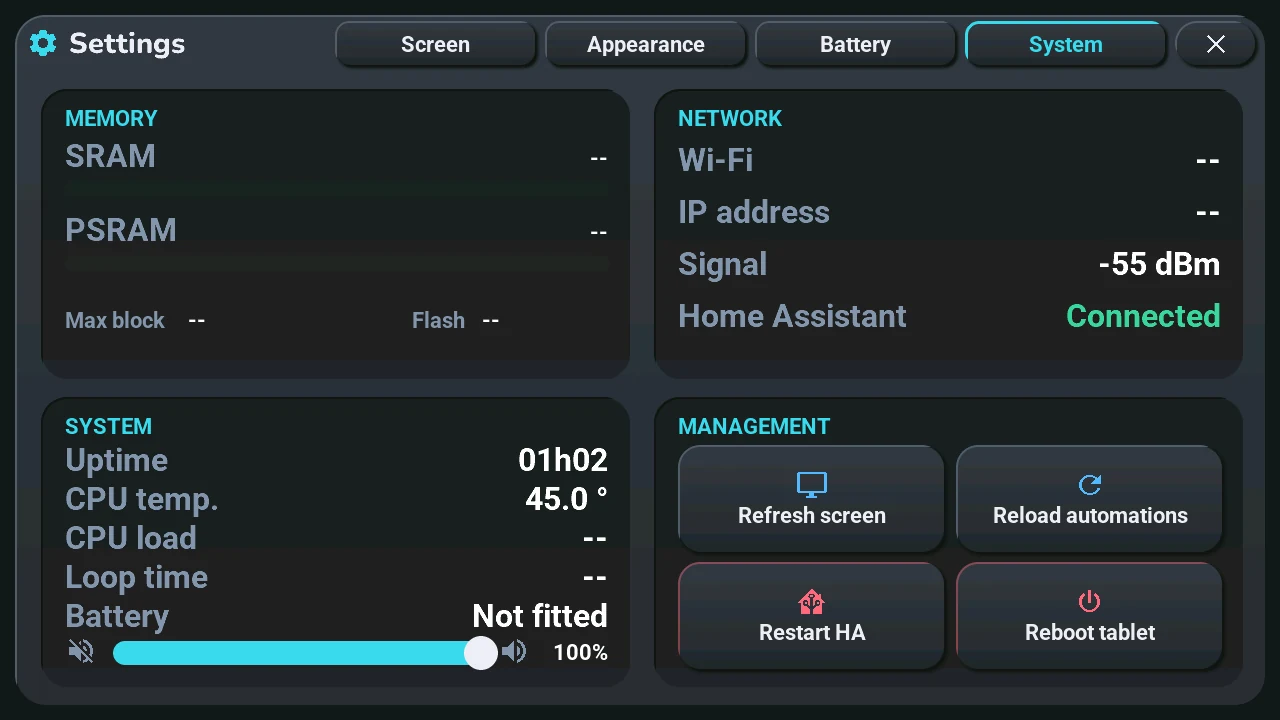
Settings popup
Opened on its Screen page by a tap on the gear button (btn_control_console, top right) or by « Aller à l'écran → Réglages », on its System page by a long press on the gear button or « Aller à l'écran → Console système » (reglages_popup.yaml, the shared modal chrome of ADR-0009; scripts in tab5-reglages.yaml, painting in tab5_reglages.cpp). Four pages since 2026-10-08, named at the top next to the title, the page shown lit (reglages_onglet.yaml). A tap on a name shows its page; a left / right slide in the popup shows the next / previous one, wrapping around, instantly. The popup catches the gesture (LV_EVENT_GESTURE, no bubbling to page_main, so the dashboard does not change page behind it); a slide that starts on a slider moves the slider only, and the tap at the end of a slide chooses nothing (ui_appui_glisse()). Changing page or closing the popup cancels an open confirmation.
- ÉCRAN — a brightness slider (10-100 %, it writes the backlight itself), the auto screen-off delay (Jamais, 1, 2, 5, 10, 30 min), and Oui / Non for waking the screen on « Okay Nabu » and with a tap;
- APPARENCE — the theme between two arrows (previous / next, wrapping round), Sombre / Clair / Auto, Oui / Non for the night switch of Auto mode, the animations (Complètes, Essentielles: only the central card turns, Aucune: everything instant; energy saving on means Aucune, ADR-0045), and the seven languages, each in its own name. A language asks first (Annuler / Confirmer): the tablet restarts to apply it;
- BATTERIE — on the left the battery settings: the charge limit (100 % / 80 %: at 80 % the charge stops at 80 % and resumes at 70 %, for a tablet always plugged in) and the charging mode (Classique / Rapide: the charger's quick charge, only while the charger is on) side by side, power saving (Jamais, Sur batterie, Toujours), eco Wi-Fi (Jamais, Sur batterie, Toujours: the Wi-Fi's light power save, never during voice, sound or an update; ADR-0045) and Oui / Non for « battery fitted »; on the right, read only, the state (Sur batterie, En charge, Sur USB, Pas de batterie détectée, or Mesure en cours before the first reading), the level, the voltage and the power drawn (« -- » without a battery). These values are repainted only while the page is shown (reglages_batterie_peindre());
- SYSTÈME — the former system console, described above.
Each button writes the device entity Home Assistant sees (tab5_reglages_choisir), and each of those entities repaints the popup when it changes (tab5_reglages_sync_ui, run from its on_value / on_state): a change made from Home Assistant shows at once, and the option in force has an accent border. The brightness slider is read when the popup opens. The same settings in Home Assistant: Tablet settings.
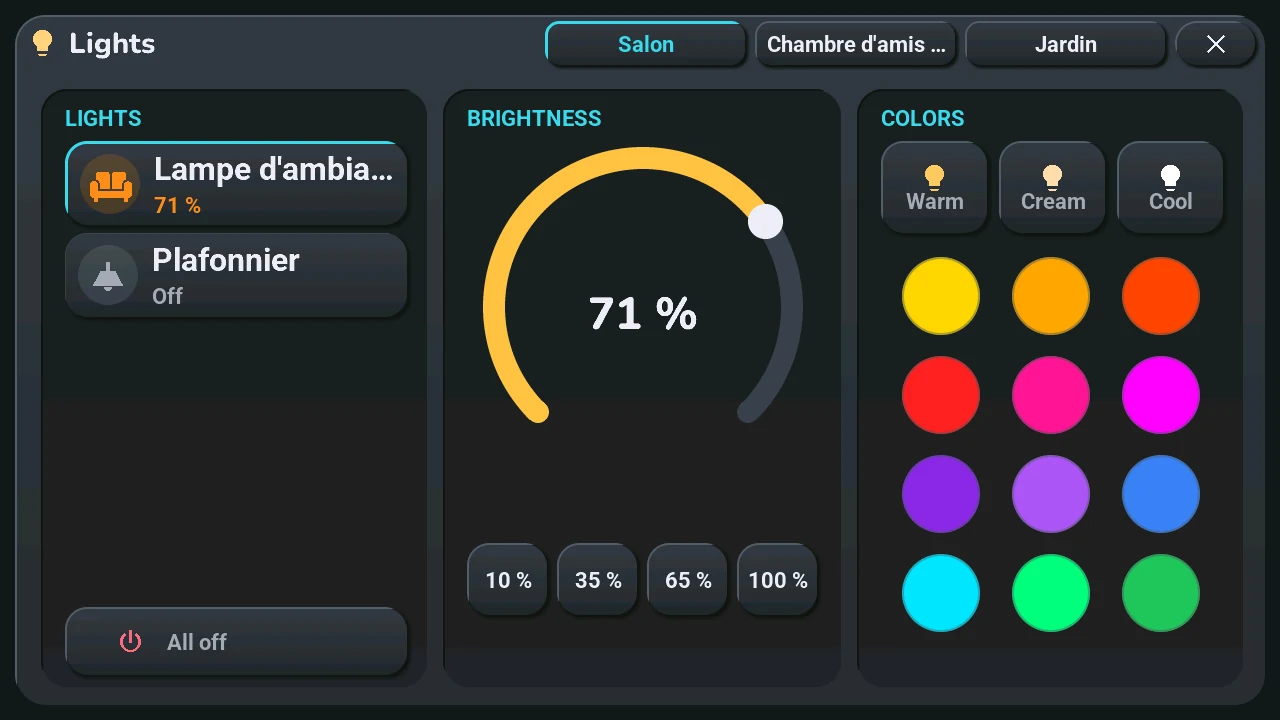
Lights popup — one page per room
Long-pressing a light tile — its weather shoulders or its HA-mode card — (instead of the short tap that just toggles it), then Details on the quick-action wheel (see above; a light with option k opens it at once), opens a near-fullscreen modal (1250×690 card, 15 px from the screen edges) on that light's room, that light selected. « Aller à l'écran » → Lumières (or the navigation wheel, or a home page gesture set to it) opens it on the room shown on the home page, or the first one that has lights. Since 2026-10-09 (ADR-0046) the popup shows every light of the house, one page per room that has lights:
- Room names at the top, on the title line next to the × (pages_onglet.yaml): the room shown is in the accent colour; tap a name, or swipe left / right anywhere on the popup (except on the arc), to change room. A house whose lights are all in one room has no names and no swipe.
- AMPOULES (left): the lights of the room (up to 5, in tile order, piece_ligne.yaml), each drawn like its HA-mode card by tuile_peindre_ligne() — icon in a round badge of its state's colour, name, state. The selected light is framed in the accent colour; a tap on a row selects it. A tap on the round badge runs the tile's own tap (toggle, with the confirmation of option k), a long press on a row opens the tile's quick-action wheel around its badge (tuile_appui_maison()). Tout éteindre: every light of the room shown (pR / eteindre; in legacy mode the three 3.x lights). The former On/Off button is gone: the badge does it, for every row.
- LUMINOSITÉ (center): a 320 px brightness arc (0–255) with the % value shown live in the center — synced from the HA brightness attribute at open time and live (never during a drag), debounced 200 ms so one drag sends a single light.turn_on — plus 4 shortcuts 10/35/65/100 %
- COULEURS (right): 3 named whites (Chaud/Crème/Froid) and a 4×3 grid of 12 round color swatches (each sends light.turn_on with the matching color_name, factorized via light_color_preset_btn.yaml)
- Tapping the dark overlay or the × button (the shared 80×44 glass button of modal_header.yaml) closes the modal
The arc and the colours control the selected light: popup_lumiere_choisir() (tab5_tuiles_popups.cpp) sets the current_light_slot global to the tile's key (tRT, or lumiere_N in legacy mode) and syncs the rows and the arc. The pages come from the shared popup-with-pages brick (tab5_pages.cpp, also used by the Settings popup).
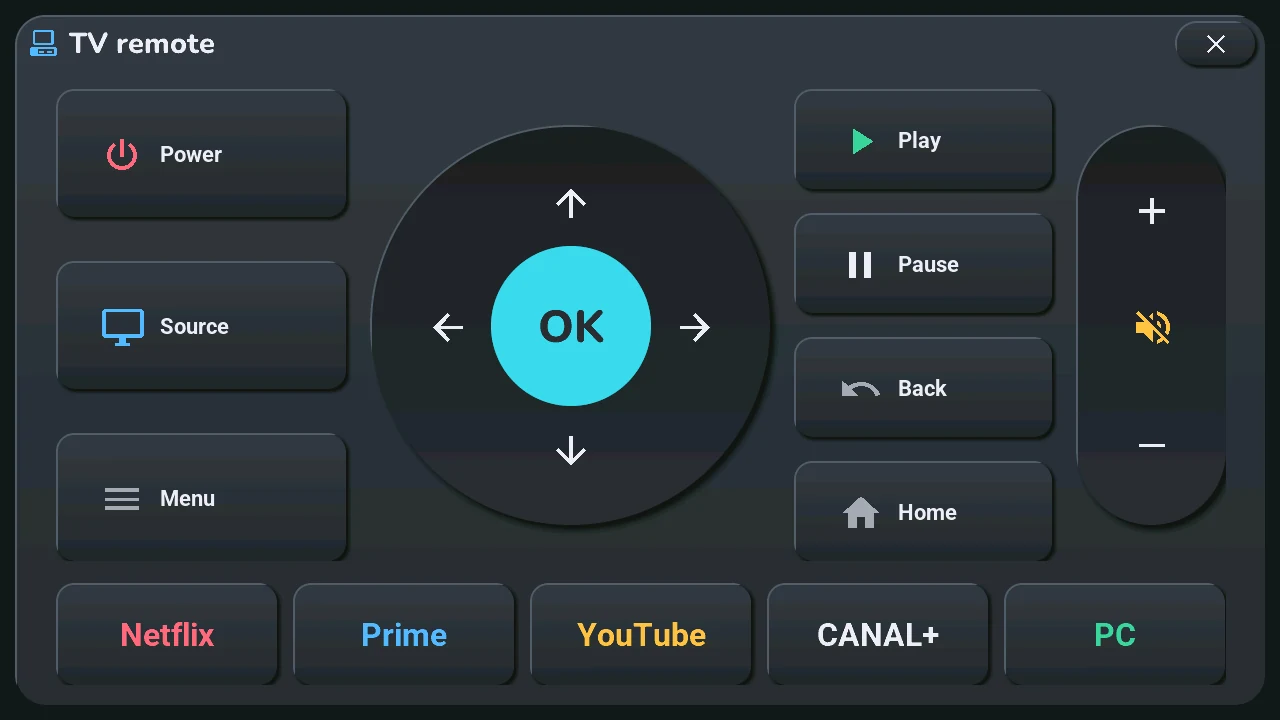
TV remote popup
A near-fullscreen remote (tv_remote_popup.yaml, 1250×690 card — the shared modal tokens of ADR-0009, 15 px from the screen edges): power, source and menu keys, a round navigation pad with OK, a volume column with mute, the Play · Pause · Back · Home keys and a row of app buttons (Netflix, Prime, YouTube, CANAL+, PC). Opened by long-pressing a media tile with the TV option (t; the PC card in legacy mode) or by a long press on the gamepad button (btn_control_tv, when the TV zone is present); every key emits a tab5_action event (ADR-0025) that the blueprint automation sends to the remote of the page (remote.send_command), the app buttons through script.tab5_tv_app (tab5_tv.yaml) — the Tab5 carries no IR hardware, HA's integrations do the work. Tapping the dark overlay closes it. Several remotes since 2026-10-10 (ADR-0056, tab5_telecommande.cpp): up to four, the TV's then « Autres télécommandes » of the blueprint, pushed with every state (telecommandes key of tab5_maj_emplacements); one page each, their names at the top and the shared swipe (ADR-0046); the event slot is the page (tv, tv1, tv2, tv3). The keys keep the Samsung codes; for a box of the Apple TV integration (Apple TV, Freebox Player) the blueprint translates them (select, menu, top_menu, play_pause…), the popup shows Stop instead of Source, no mute, and a playback row (Previous, Rewind, Play / Pause, Forward, Next) instead of the apps.
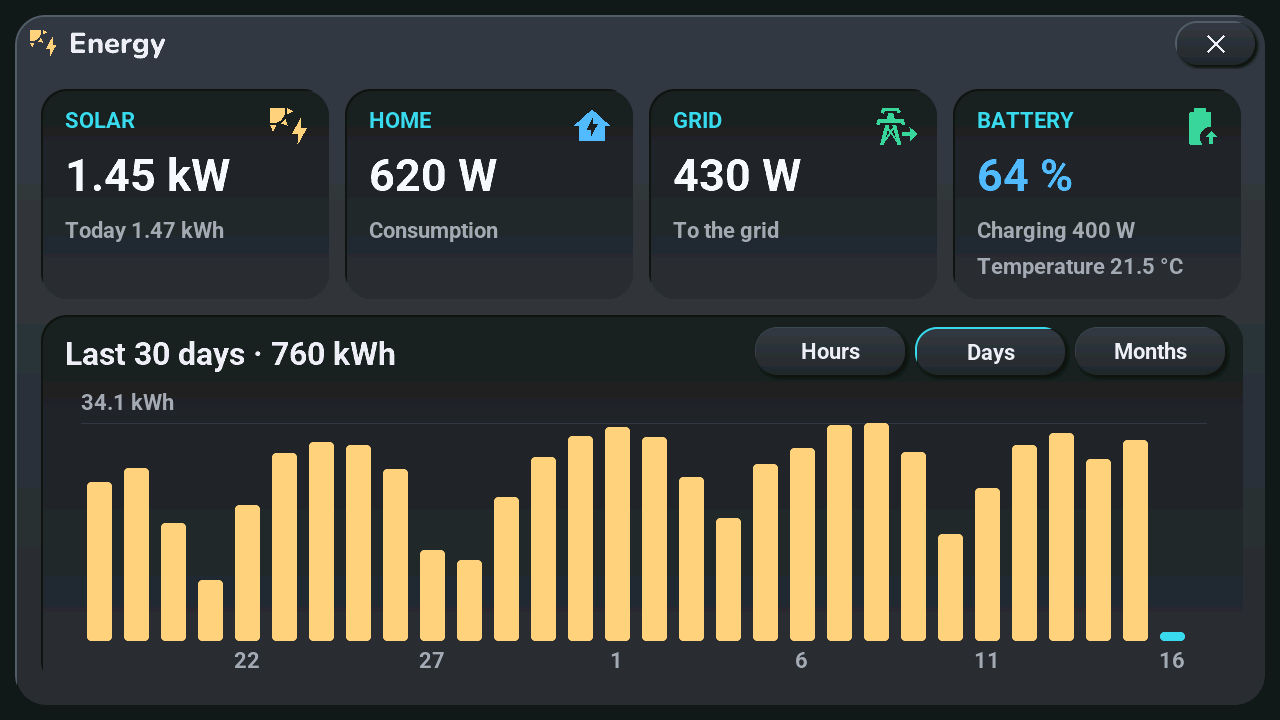
Energy popup — solar installation (optional)
Shown only if sensors are picked in the « Énergie » sections of the blueprint (ADR-0028). Opened by tapping a sensor tile of those sections (tile option e; the solar sensor gets the solar-panel icon), by a long press on the HA button when the solar production is received, or by « Aller à l'écran → Énergie ». Same modal chrome as the other popups (energie_popup.yaml, ADR-0009), drawn by tab5_energie.cpp:
- Top, live: up to four glass cards — Solar (power, « Today » production), Home (consumption), Grid (power, « From the grid » / « To the grid » / « No exchange »), Battery (level with a battery icon that follows it, « Charging » / « Discharging » / « Idle », temperature). A card without a sensor disappears and the others share the width. Units stay short (W, kW, kWh).
- Bottom, history (needs the produced-energy sensor): the title gives the period and its total (« Today · 3.20 kWh »), three buttons switch between Hours (24 bars, today), Days (30 days) and Months (12 months). Gold bars, the current slot in the accent colour, a line at the maximum with its value. Without that sensor, the cards fill the popup.
- Before Home Assistant answers: « En attente de Home Assistant »; section empty: « Aucun capteur d'énergie choisi ».
HA pushes only while the popup is open (package tab5_energie.yaml); instant transitions, like every popup.
Temperature popup — history and forecast
Opened by a long press on one of the two home-screen temperatures (ADR-0032): the room's (salon slot) or the second one (serre slot, a greenhouse or outdoors). A tap on the second one switches the area left of the clock to its next content (ADR-0051). In HA mode on a room whose temperature the blueprint declares (ADR-0040), the left one is that room's (p0 to p4), without forecast — and the right one too when it shows the room's humidity (ADR-0047).
- Top: Now (and the average of the period), Minimum and Maximum with when they were reached, each in the screen's temperature colour. For the second temperature, a fourth card: the highest forecast temperature, the lowest below.
- Bottom: the title gives the place (the sensor's area, pushed by HA) and the period; three buttons switch between 24 h (hour by hour), 7 days (every three hours) and 30 days (day by day). The accent line is the mean of each slot, ending on the current value (a dot); a pale bar behind it goes from the minimum to the maximum. Grid every 1, 2, 5, 10… degrees, time axis every 3 h, 6 h, a day…
- Forecast (second temperature only): a gold line on a tinted background after a « Maintenant » mark, with gold min-max bars for a day-by-day forecast. The blueprint box « La seconde température est dehors » makes it extend the curve (« Prévu »); unticked, it is the outdoor forecast next to a greenhouse (« Dehors, prévu »).
- Humidity (ADR-0047): when the slot has a humidity sensor (the living room's, or the room's), a second line in the humidity colour (
HUMIDITY_WET, the secondary accent when a theme's accent is the same blue) on the same chart, its % scale on the right on the same grid lines, the degrees then in the accent colour; legend « Température », « Minimum et maximum », « Humidité »; the fourth card shows the humidity now (in its home-screen colour) and its range. Without a humidity sensor, the popup is unchanged. - Pages (ADR-0047): one tab per known temperature next to the title (
salon, eachpRwith a declared temperature,serre; hidden with a single one), the shown one in the accent colour like the Réglages pages; a tap or a left/right swipe (the gesture stops at the popup) shows the next one, at the same view, at once from what the tablet keeps, then HA's answer. - Before Home Assistant answers: « En attente de Home Assistant »; sensor without statistics: « Aucun historique ».
HA pushes once per request, only while the popup is open (package tab5_historique.yaml, recorder statistics and weather.get_forecasts); the tablet keeps the three views of each temperature already shown in PSRAM (~40 KB) and nothing in NVS.
House popup — every room at once
Opened by a tap on the room's name in HA mode, or by « Aller à l'écran → Maison » (ADR-0037, discussion #278). Shared chrome (ADR-0009), card of 1250 × 690, title « Maison ».
- One column per room of the blueprint that has devices, room 1 → 5 (the blueprint's order, not the pages'), width (1250 − 24 − 12 (n − 1)) / n: about 235 px with five rooms, 607 px with two. Header: the room's name, or « Pièce n »; « Aucun appareil » without any room.
- One row per device (104 px, glass card): the palette icon (32 px) in a 56 px badge of its state's colour, the name and the state line, painted by the same
Vueas the HA-mode card (tuile_peindre_ligne()), cut with « … » at the column's width. - Gestures of the tile: tap, long press and the « ⋯ » button (36 px, only on the types that have a long press: not
cap,bin, nor a tile with theroption) go throughtuile_appui_piece(); the long press and « ⋯ » first open the tile's quick-action wheel (see above, without its Home link) around the row's badge, in front of the House popup, and without a wheel the tile's popup. A popup opened from a row or from the wheel's « Details » comes over the House popup, which stays behind; the inactivity closes both. - « Éteindre les lumières » in the title bar, shown when a room has a
lumtile: the light popup's « Tout éteindre » (pR/eteindre) for each of those rooms, no confirmation.
Nothing new with Home Assistant: no event, action or blueprint input. Widgets are YAML templates (maison_popup.yaml, 5 headers, 25 rows), laid out and painted at each opening and repainted while shown when a state or the definitions change.
Weather popup — the forecast in graphs
Opened by « Aller à l'écran → Météo », a home gesture (code meteo, ADR-0039) or a long press on the body of a forecast tile that holds no device (ADR-0043, tab5_meteo.cpp, ui_components/meteo_popup.yaml). Shared chrome (ADR-0009), title « Météo »; three pages named next to the title (reglages_onglet.yaml, the accent on the page shown), changed by a tap on a name or a left / right swipe in the popup, looping, instant — the shared brick of the paged popups (pages_brancher(), choix_peindre(), ADR-0046).
- « Aujourd'hui »: a « Maintenant » card (150 px): the weather icon (120 px font), the temperature in its colour (
roboto_55_b), the condition in words, « Minimum … · Maximum … » of today, and on the right « Pluie sur N h » with the total in mm (« Aucune » when dry). Below (432 px), up to 15 hours ofcal_heures_data: hour labels, icons at 40 % (font_meteo_48/_32), a monotone smoothed curve (lv_line, colour of the mean temperature), 12 px points and values coloured by temperature (at least 4 °C of range), rain bars from a common base (scale at least 2 mm, colours of the rain levels) with their mm. The current hour has a 10 % accent column and an accent label; the first hour after midnight reads « Demain » after a thin line. - « 10 jours »: ten 58 px rows from today (
cal_index_for_offset()): « Aujourd'hui » (info colour), « Demain », then the short day label; icon; low and high in their colours; a 10 px track with a horizontal gradient bar from low to high on the common scale of the ten days (the current temperature included), and a dot for the temperature now on today's row. - « Détails »: « Pluie dans l'heure » with the central card's sentence in the colour of its level, the nine bars on a time scale (0-30 min by 5, then 10-min steps), height = level, against four dashed level lines (« Faible » to « Très forte »), axis « Maintenant », 15, 30, 45, 60 min; dry bars are 4 px stubs. Then four 288 × 210 cards: humidity (colour of
get_humidity_color(), dry / comfortable / humid air), UV index (WHO level: low, moderate, high, very high, extreme, coloured), frost and snow probabilities.
Nothing new with Home Assistant: the hourly and daily forecasts, rain bars and sentence the home page already gets, plus tab5_maj_meteo_actuelle and tab5_maj_probabilites fields that were reserved. packages/tab5_push.yaml sends the third hourly block again (hours 10-14). Plot widgets are created once at the first opening; repainted on opening, page change, each push while shown and theme change.
Cameras popup — a still image of each camera
Opened by « Agenda ▸ Caméras » on the navigation wheel, « Aller à l'écran → Caméras » (so Home Assistant can open it, from a doorbell automation for instance) or a home gesture (code cameras, ADR-0039) (ADR-0049, tab5_cameras.cpp, ui_components/cameras_popup.yaml, discussion #278). Shared chrome (ADR-0009), title « Caméras », header icon cctv. The cameras picked in the blueprint's « Caméras · Cameras » section (sixteen at most, in its order), in a mosaic from two cameras on, or one camera large; a left / right swipe changes page (pages_brancher(), ADR-0046), looping; the pagination dots of the home page under it from two pages on.
- Rooms (ADR-0057): the blueprint sends each camera's Home Assistant area. From two areas on, a 238 px column on the left (
cameras_puce.yaml): « Toutes », one chip per room with its number of cameras, « Autres » for the cameras without an area; the chosen one in the accent colour, scrolling past eight. A tap filters: the swipe and the dots then go through the cameras of that room only. Room and camera are kept in NVS. With one room, no column. - Mosaic (ADR-0057, lot 2): the frame split into four 476 × 266 squares (
cameras_vignette.yaml), four cameras per page (two side by side in the middle, three with the third centred below); each square shows the camera's name in a glass chip and its small image (asked at 480 × 270, cropped to the square without scaling when it nearly fits, reduced to cover it otherwise). Under the frame: the room (« Toutes les caméras ») and « Touchez une image pour l'agrandir ». A tap on a square shows that camera large; a tap on the large image comes back to the mosaic. The view is kept in NVS with the room and the camera. - Large: a 964 × 544 glass frame with the image (960 × 540 at most) — centred, or against the right edge when the column is shown —, « Room · Camera » under it on the left and « Image de 14:32:05 » on the right; the swipe goes from camera to camera of the room.
- No video, one image at a time: images are downloaded and decoded in the background (their own task and the ESP32-P4 hardware JPEG decoder, RGB565 in PSRAM, at the image's own size: a larger one is shown reduced, a smaller one is not enlarged), only while the popup is open: large, the camera shown every 5 s and its neighbours in the room once in between; in the mosaic, the squares of the page one after the other, each every 10 s. The last image of each camera, large and small, stays while the popup is open (8 MiB at most): coming back to a camera shows it at once. Closed, the images are released and nothing more is downloaded.
- Offline: a camera that Home Assistant says
unavailableis not asked for; « Hors ligne depuis 14:32 » in the frame, over its last image dimmed to 40 % if there is one. Two failures in a row say the same; each camera waits 10 s, 30 s, then 60 s after its failures without holding the others. - The URL is the camera's
entity_picture(/api/camera_proxy/…?token=…) withwidth=960&height=540, so Home Assistant scales a larger JPEG down before sending it. The token turns every 5 minutes: the tablet asks for the list again (esphome.tab5_cameras) at the opening, every 4 minutes while open and after a failed image; the blueprint answers withtab5_maj_cameras. - Messages in place of the image: « En attente de Home Assistant », « Aucune caméra choisie », « Chargement... », « Image indisponible », « Adresse de Home Assistant inconnue »; « Plus d'image depuis 14:32:05 » under a kept image when the next ones fail.
The screen and touch keep working while an image is fetched (since 2026-10-10: before, each image froze them about 2 s). A camera offline shows « Image indisponible », or the last image with « Plus d'image depuis … ».
Tracking popup — tracked sensors
Opened by a tap on the tracked sensor left of the clock, « Aller à l'écran → Suivi » or a home gesture (code suivi, ADR-0039) (ADR-0054, tab5_suivi.cpp, ui_components/suivi_popup.yaml). Shared chrome (ADR-0009), icon chart-line, title « Suivi ». One glass card per sensor chosen in « Tab5 · capteurs suivis » (six at most, suivi_carte.yaml): one row up to three sensors, two rows above (two columns for four), the last row centred, inside the modal body. Each card: the name (accent, cut with « … »), the value in the date's font with its unit, a trend arrow and the change coloured SUCCESS up / ERROR down / TEXT_DIM flat, the period (« Aujourd'hui » for a change_pct in %, « 24 h » for a difference in the sensor's unit), and the 24 h curve (ui_courbe_lisse(), lv_line, its last point ringed in the background colour). Before any push: « En attente de Home Assistant »; an empty list: « Aucun capteur suivi » and where to choose them.
Pushed by packages/tab5_suivi.yaml (tab5_maj_suivi: 24 hourly means of the recorder's statistics and the current value, scaled 0–100), at once on a change then at most every five minutes, when the list changes, on connection, « MAJ Écran », HA start and every hour. Repainted on opening, on each push while shown and on a theme change.
Fridges and freezers popup — food-safety norms
Opened by a tap on the icon blinking in the clock's corner, « Agenda ▸ Frigos » on the navigation wheel, « Aller à l'écran → Froid » or a home gesture (code froid, ADR-0039) (ADR-0055, tab5_froid.cpp, ui_components/froid_popup.yaml). Shared chrome (ADR-0009), icon fridge, title « Frigos et congélateurs ». One glass card per appliance declared in « Tab5 · réfrigérateurs » and « Tab5 · congélateurs » (four at most in all, froid_carte.yaml): one row for one or two, two rows of two above, the last row centred. Each card: a fridge or snowflake icon (accent), the name (cut with « … »), the temperature in the date's font coloured SUCCESS within the norm / WARNING attention / ERROR serious, the status (« Conforme », « Trop chaud depuis 14 h 32 », « Porte ouverte ? », « Porte mal fermée », « Capteur muet »…), the 24 h lowest and highest and the norm, the 24 h curve (ui_courbe_lisse(), accent) between the dashed lines of the norm (WARNING), and the last incident (cause, start, duration, extreme). Before any push: « En attente de Home Assistant »; no appliance: « Aucun appareil déclaré » and where to declare them.
Home Assistant decides the levels (packages/tab5_froid.yaml, thresholds in one place) and pushes them with tab5_maj_froid: at once on a change then at most every minute, every five minutes, when a list changes, on connection, « MAJ Écran » and HA start. Each problem is also an alert of the central card (Orange / Red, source « froid »). Repainted on opening, on each push while shown and on a theme change.
AI server popup — a local LLM server
Opened by « Agenda ▸ Serveur IA » on the navigation wheel (once Home Assistant has pushed a server), « Aller à l'écran → Serveur IA » or a home gesture (code serveur_ia, ADR-0039) (ADR-0059, tab5_serveur_ia.cpp, ui_components/serveur_ia_popup.yaml). Shared chrome (ADR-0009), icon server, title « Serveur IA ». A band across the top: a dot (green online, grey offline, dim when unknown), the state, the server's name and the loaded model, cut with « … ». Below, on the left, the tokens per second card: a large number, a smoothed curve of the last 24 pushes (kept by the tablet, a gap for an unknown value) and the requests running and queued. On the right, four cards: VRAM (used, of total, % and a bar), GPU (temperature coloured green / amber / red by the level Home Assistant sends), RAM (% and a bar), Power (W). A value the server does not give shows « — », never a 0; with no sensor chosen the popup says « Aucun serveur choisi ».
Pushed by packages/tab5_serveur_ia.yaml (tab5_maj_serveur_ia: the sensors picked in the ten « Tab5 · serveur IA, … » lists, units converted and rounded by Home Assistant, GPU thresholds 80 and 90 °C in one place) on each change, two seconds apart at least, and at once when a list changes, on connection, « MAJ Écran » and HA start. Nothing is painted while the popup is closed; repainted on opening, on each push while shown and on a theme change.
Action buttons (ADR-0060, ui_components/serveur_ia_action.yaml): up to three in the band, right of the model — « Décharger » (eject), « Réveiller » (power), « Redémarrer » (restart) — each shown only when Home Assistant offers it (14th field of the payload, from packages/tab5_llm.yaml), greyed when it makes no sense right now (no model loaded, server already online). Unload and restart ask a second tap: the button turns orange, « Confirmer ? », for 4 s. Wake leaves at the first tap. A sent action shows « Envoyé » in green for 5 s, during which nothing else is sent. The tablet emits only esphome.tab5_serveur_ia_action with the code; Home Assistant does the rest.
Color coding for readability
Color is used consistently as a primary information channel — to let you read state at a glance without reading labels.
Temperatures: mapped to a continuous scale via get_temperature_color() — blue (cold) → green (comfortable) → orange (warm) → red (hot). Applied identically to indoor sensors and forecast temperatures.
Day names on daily forecast (refresh_daily_forecast(), tab5_*.cpp):
- Cyan — today
- Green — day off (non-Sunday)
- Amber — Sunday, day off
- Rose/Red — Sunday worked, or any day with a shift starting before 09:00 ("early")
- Dim slate — past day (overrides the above once the day has passed)
Plant moisture (get_humidity_color()):
- Red — ≤ 14% (very dry, needs watering)
- Gradient green → white-ish — 30–80%
- Blue — ≥ 80% (too wet)
Batteries (get_battery_color()) — phone, tablet and solar production icons of the status bar (solar: grey panel at 0 %), battery line of the plant details popup:
- Green — above 80 %
- Blue — 41–80 %
- Amber — 20–40 %
- Red — below 20 %
- Grey — unknown
Microphone icon: see Voice assistant above.
All interface colours live in one palette, struct Palette in tab5_tokens.h (included by tab5_custom.h); UIColor is the active one. The YAML takes them through the role styles of tab5-styles.yaml (style_text_dim…), the games keep their own dark palettes (ADR-0029). Twenty-one themes, each with a dark and a light mode, change the colours, the shapes (radius, borders, shadows) and the fonts of the time, the date and the titles; a new tablet starts in « Relief doux ».
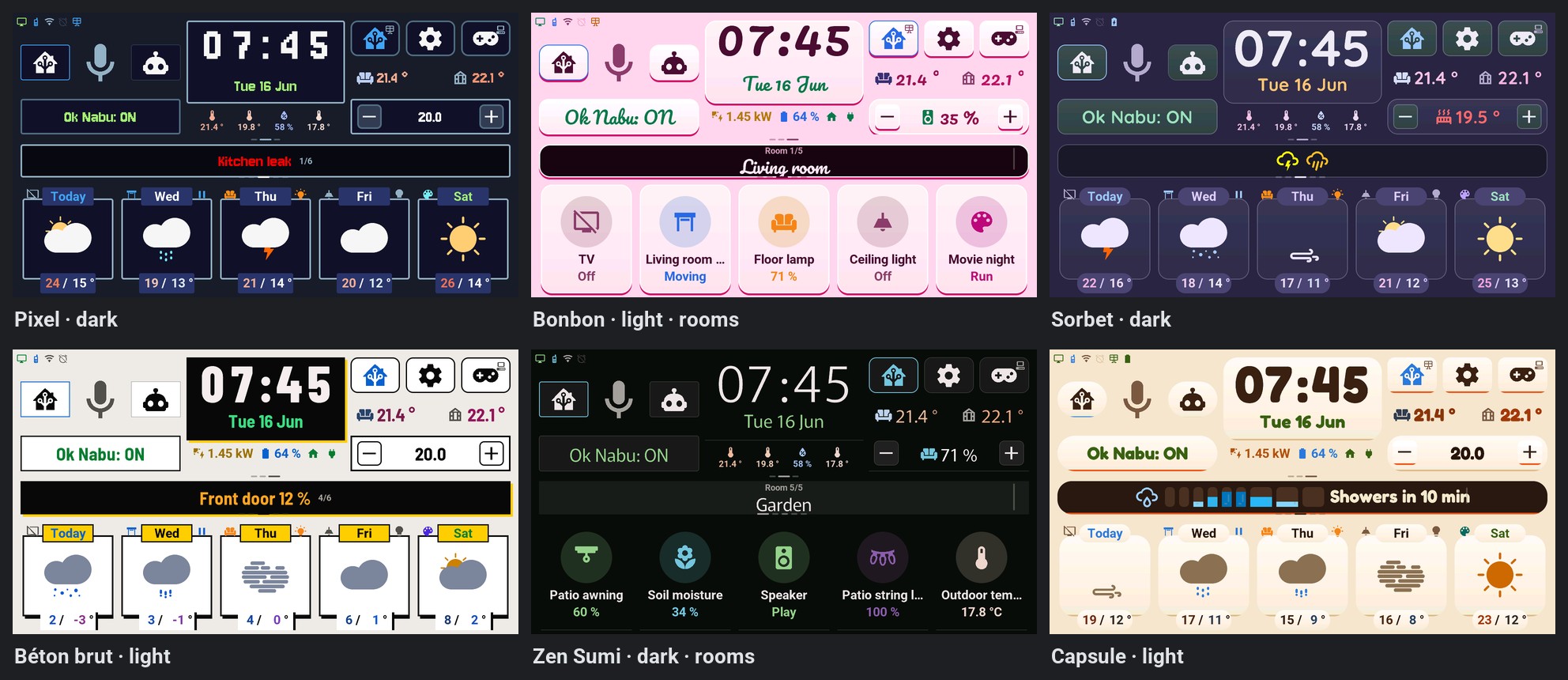
The theme, the mode (Sombre, Clair, Auto) and the « Nuit (thème auto) » switch are entities of the tablet, also in the settings popup: Tablet settings.
Roller shutter control
Since 3.2 every vol tile is a shutter or a valve of its own (tap: stop while it moves, else close if open, open otherwise; the right shoulder shows the arrow of the next move).
Shutters popup — one page per room (2026-10-05, asked in discussion #278; ADR-0023, updates of 2026-10-05 and 2026-10-06; one page per room since 2026-10-09, ADR-0046). A long press on a vol tile — its weather shoulders or its HA-mode card —, then Details on the quick-action wheel (2026-10-07, see above), opens a near-fullscreen modal (volet_popup.yaml, the shared chrome of ADR-0009) on that shutter's room, that shutter selected; « Aller à l'écran » → Volet (or Volets in the navigation wheel) opens it on the room shown on the home page, or the first one that has shutters. The room names at the top work as in the Lights popup (tap or swipe, except on the drawn shutter; nothing with a single room). Two glass cards:
- VOLETS (left): the shutters of the room (up to 5, piece_ligne.yaml, same rows and gestures as the lights: the badge runs the tile's tap, a long press opens its wheel), and Tout ouvrir / Tout fermer for every shutter of the page. A shutter tile with option k or r is not listed.
- POSITION (right), for the selected shutter: a drawn shutter (2026-10-06, « like the HA animation, not a basic slider »): a window whose slatted curtain comes down from the box at the top as the position goes down (12 slats built in C++, lames_construire()). Drag it with a finger, up or down, anywhere on the window: the curtain and the number follow the finger, and the position leaves on release only (position, cover.set_cover_position / valve.set_valve_position on that tile's entity, when it can set one); a touch that does not move (under 12 px) sends nothing. To its right, its name, the position in large digits (« 45 % ») and the state in words below (« Ouvert », « Fermé », « Partiel », « En mouvement », « Hors ligne »), then Ouvrir, Stop and Fermer, the tile's own commands, each icon in a round tinted badge. A shutter that does not report its position (or the simulated shutter of optionnel/volet_serre_tracking.yaml) cannot be dragged and shows no number: the drawing shows its state (open = curtain up, closed = down, anything else = half-way with faded slats) and the words.
- The popup follows the shutter while it is open (position, state): every pushed position redraws the curtain at once, without an animation of its own (the drawn shutter goes down as the real one does, push after push), never under the finger. With option k the long press keeps sending the other of open / close (confirmed by a second press); option r: nothing. In legacy mode, the 3.x shutter (tab5_maj_volet_etat) is tile 1 of the home page: its weather card has both the direction flip (tap the title) and the action button (tap the icon) described above, and its HA-mode card shares the same script.tab5_volet_tap; it is not in this popup.
Device popup
Long press on a switch, a scene or a media player (2026-10-06, asked in discussion #278: « buttons can have pop up screen like ha dashboard »; ADR-0023, update of 2026-10-06). A long press on an int or act tile, or on a med tile without option t (with t, the TV remote) — its weather shoulders or its HA-mode card — opens the « more info » window of a Home Assistant dashboard for that device: a near-fullscreen modal (appareil_popup.yaml, the shared chrome of ADR-0009, registered as « Appareil ») titled with the tile's name, in two glass cards:
- ÉTAT (left): the tile's icon in a round badge of its state's colour (the colour at 20 %, the icon at full strength), the state in words as on the HA-mode card (« Allumé », « Éteint », « Lecture », « Pause », « Hors ligne »; « Prêt », or « En cours » for a running script, for an act), the room, and the tile's options in words (o: « Allumer seulement », k: « Confirmer chaque commande »).
- COMMANDE (right): one large vertical switch (180 × 380 px) — filled at the top in the state's colour when the device is on, at the bottom in grey when it is off, filled for an act — and, under it, what a press does (« Éteindre », « Allumer », « Lancer »). The press runs the tile's own tap through the same function (tuile_appui_piece): same command (basculer, allumer with o, lancer), same confirmation with k (amber « Confirmer ? »; a second press within 3 s sends), same « OK » after lancer. No new command and no change on the Home Assistant side.
- The popup follows its tile while it is open. Option r (read only): no popup, as there is no tap. Only what HA already pushes for the tiles is shown: no « last changed », no attributes, no history.
Arcade — 8 game consoles (experimental)
Status: early prototypes. First-pass AI-generated games, built to see what LVGL + C++ can do on an ESP32-P4. Functional but unpolished — proof of concept, not finished product.
Opened by tapping the gamepad button (btn_control_tv, top right) or « Jeux » in the navigation wheel. The greenhouse temperature (btn_serre_games) opened it until 2026-10-10; its tap now switches the area left of the clock (ADR-0051). The selector shows a 4×2 grid of 8 cards (298×252 each) with an MDI icon, the game name and a one-line description.
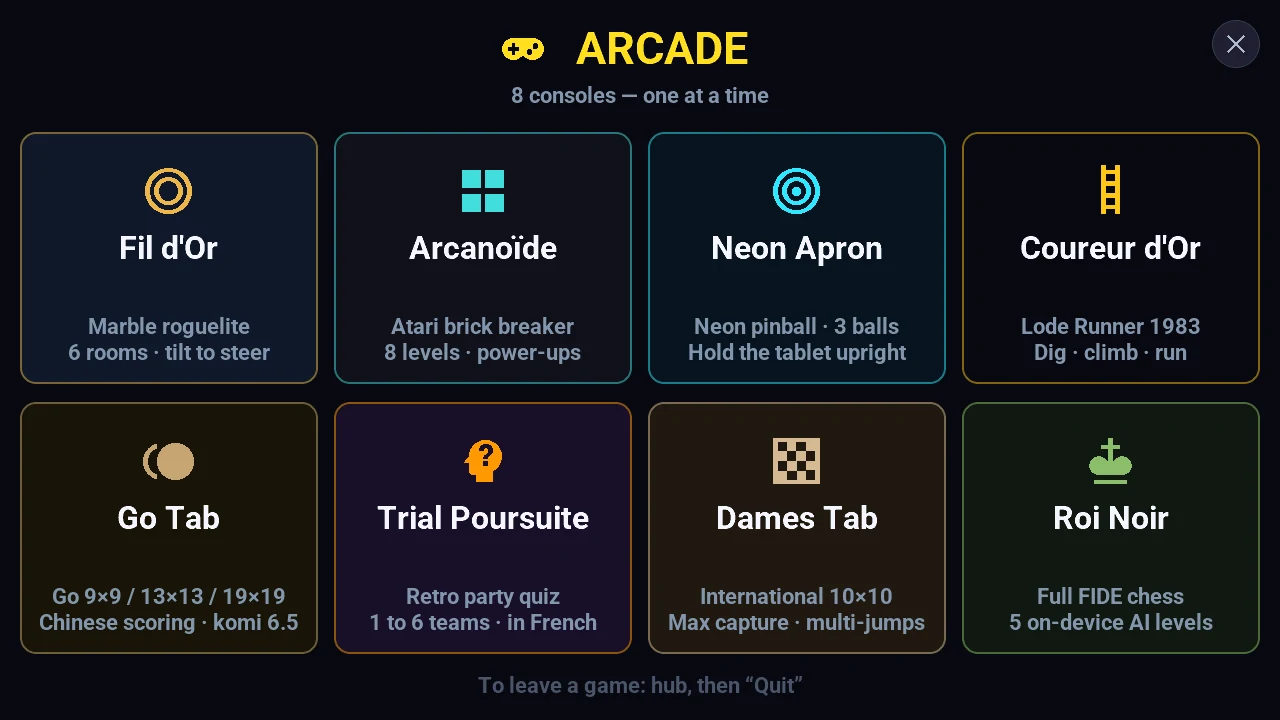
Each console is its own fullscreen LVGL page (page_marble, page_chess… declared skip: true in tab5-lvgl.yaml so swipe navigation can't reach them), not an overlay stacked on the dashboard. Documented ADR-0009 exception: no modal chrome. Shared architecture: YAML = empty containers, all content in C++, lv_timer created on open / destroyed on close, pre-allocated LVGL pool (zero allocation in the tick), NVS persistence, zero HA or network dependency.
| # | Console | Description | Controls |
|---|---|---|---|
| 1 | Fil d'Or | Marble roguelite, 6 rooms, Dark Souls-style progression | BMI270 tilt |
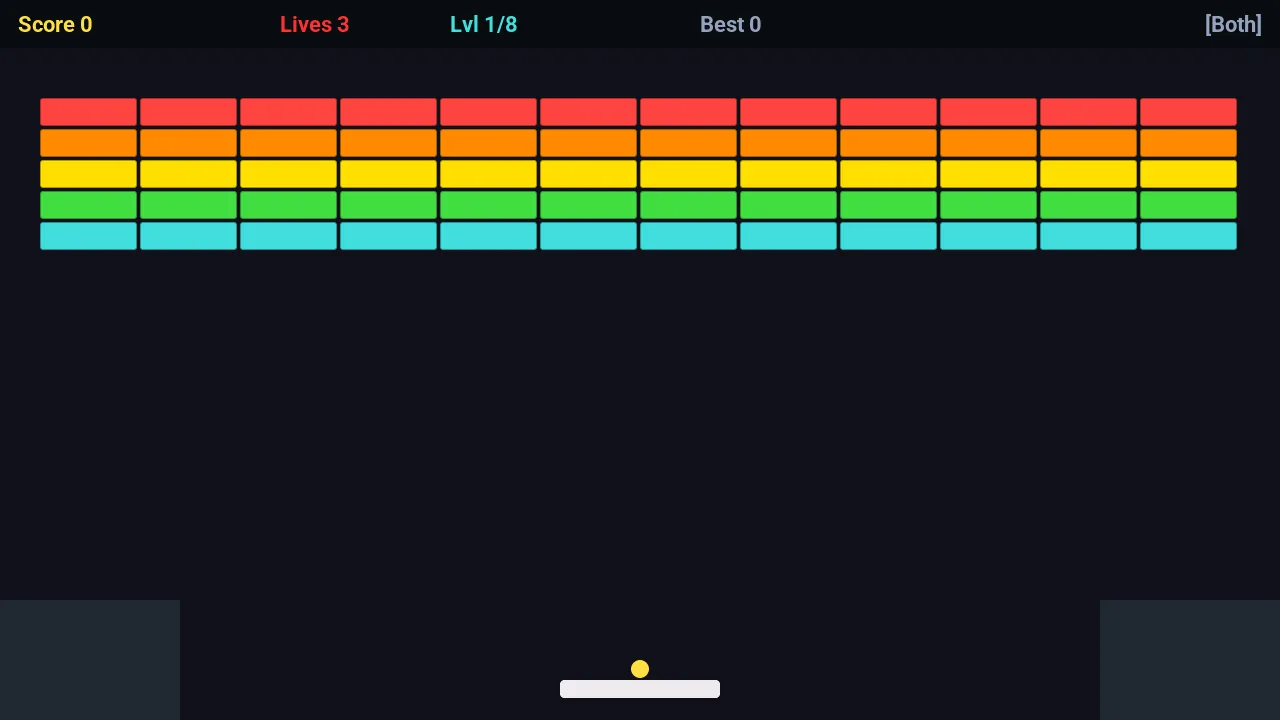
| 2 | Arcanoïde | Breakout, 8 levels, power-ups, combo | Tilt + touch |
| 3 | Neon Apron | Neon 3-ball pinball — switches the screen to portrait 720×1280 | Touch zones + IMU nudge |
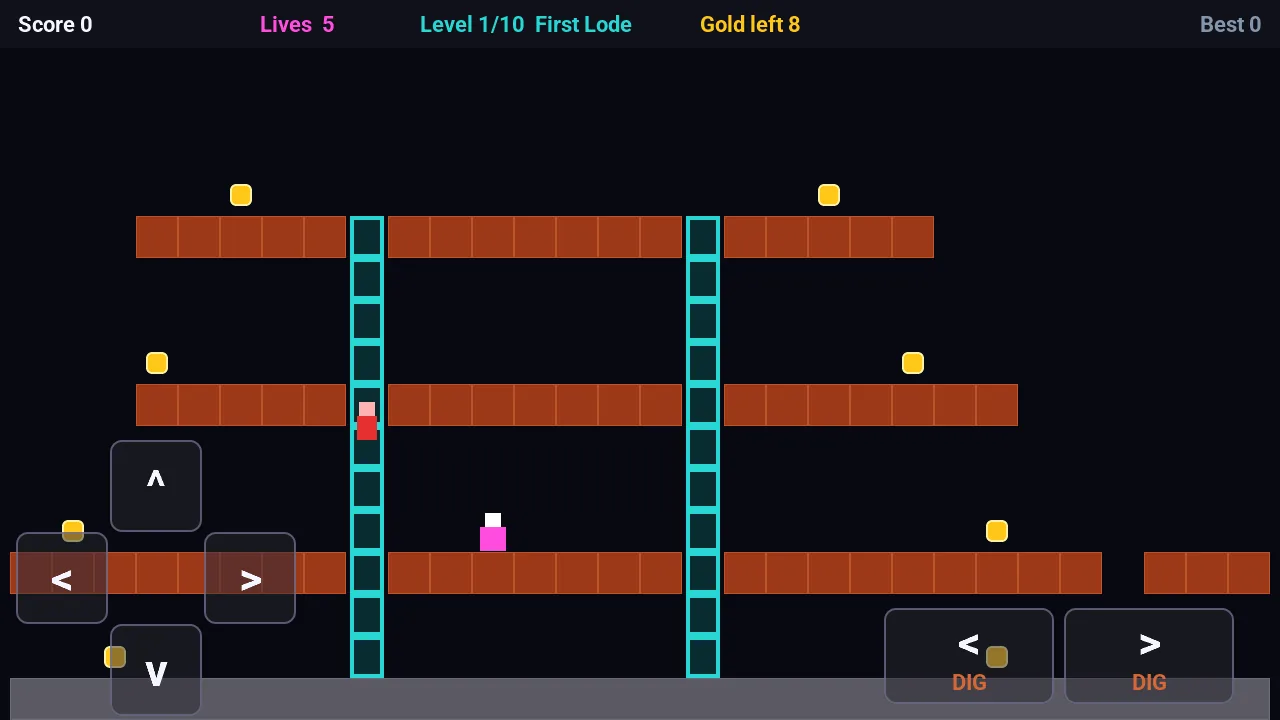
| 4 | Coureur d'Or | Lode Runner, 10 levels, dig & climb | Touch D-pad |
| 5 | Go Tab | Go 9×9/13×13/19×19, Chinese scoring (komi 6.5), 4 AI levels | Touch |
| 6 | Trial Poursuite | Trivia, 1–6 teams, 42-space wheel + 6 spokes | Touch |
| 7 | Dames Tab | International draughts 10×10 (8×8 checkers option), 4 AI levels | Touch |
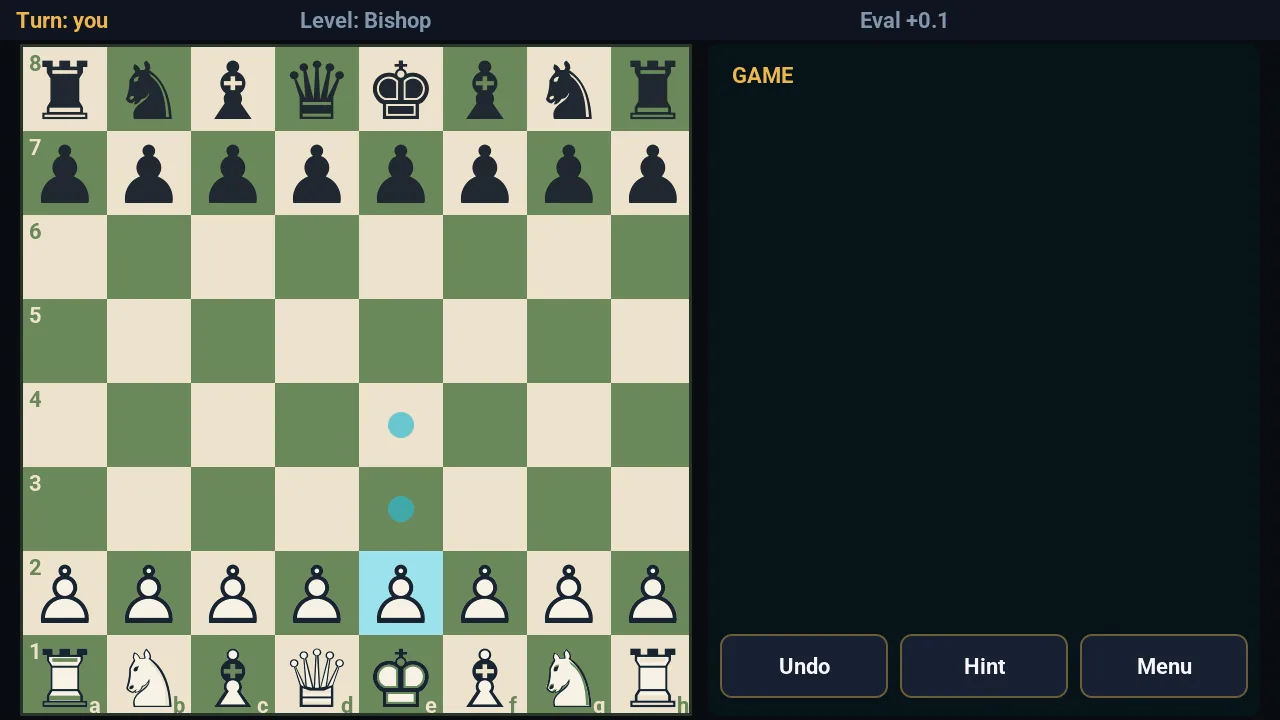
| 8 | Roi Noir | FIDE chess, 5 AI levels, perft-validated | Touch |
| Roi Noir (chess) | Arcanoïde (breakout) |
|---|---|
 |
 |
| Coureur d'Or (Lode Runner) |
|---|
 |
Exiting any game: hub → "Quitter" (clean return to page_arcade then the dashboard: timer stopped, score saved to NVS, and for Neon Apron the landscape rotation is restored).
→ Full technical details per game: docs/arcade.md