TV remote
Opens with a long press on the gamepad button, top right of the home screen, on the card of the TV picked in the blueprint (bottom row), or « TV » under « Devices » in the navigation wheel (long press on the central card).
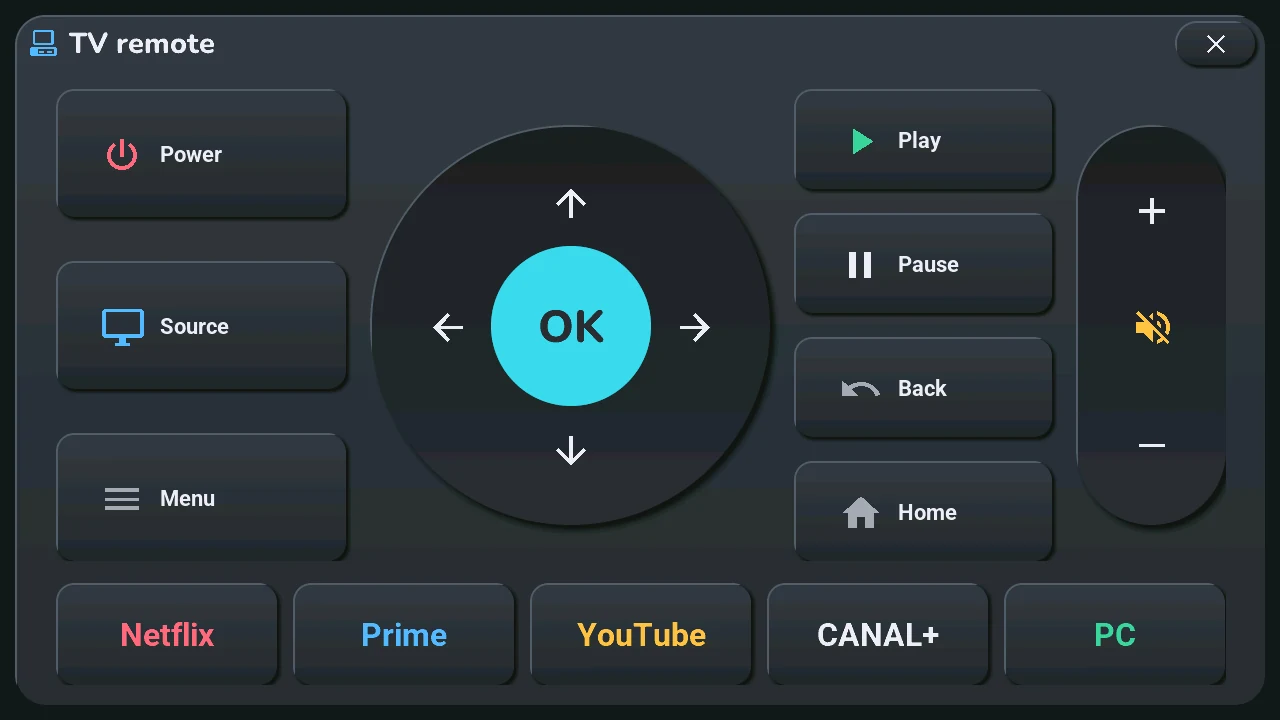
- Power, Source, Menu (left).
- The round pad: the four arrows and OK (centre).
- Play, Pause, Back, Home, right of the pad.
- The volume column (right): +, mute, −.
- The bottom row opens an app on the TV: Netflix, Prime, YouTube, CANAL+; PC switches to the computer's input.
Several remotes. Up to four: the TV's, then the ones picked in « Autres télécommandes » in the blueprint (an Apple TV, a Freebox Player…). Each one has its page: their names at the top — tap one, or swipe left or right. On a box of the Apple TV integration (Apple TV, Freebox Player), Stop takes the place of Source, the volume has no mute, and the bottom row becomes Previous, Rewind, Play / Pause, Forward, Next; there are no app buttons.
The keys go through Home Assistant, to the remote of the page shown (« Télécommande de la TV » and « Autres télécommandes » in the blueprint, other zones); the tablet has no infrared. The app buttons need a Samsung TV, picked in the « Tab5 · TV Samsung » list (step 5). The PC key sequence is set for the author's TV, in the tab5_tv.yaml package.