Step 4 — Add the tablet to Home Assistant
Home Assistant gives the tablet its encryption key, and keeps it: nothing to copy. It can only do so during the tablet's pairing window, the 30 minutes after it starts.
Within 30 minutes of the tablet's start
- Settings → Devices & services: the tablet shows up as discovered, ESPHome integration.
- Configure, then Submit.
That is all. Home Assistant creates the key, gives it to the tablet and keeps it. A tablet Home Assistant already knows, installed again with an erase (« Erase device » ticked, or « Erase User Data »), shows up under « Discovered » with a Reconfigure button: Home Assistant waits for that confirmation before it gives the tablet back its key (reinstalled with an erase).
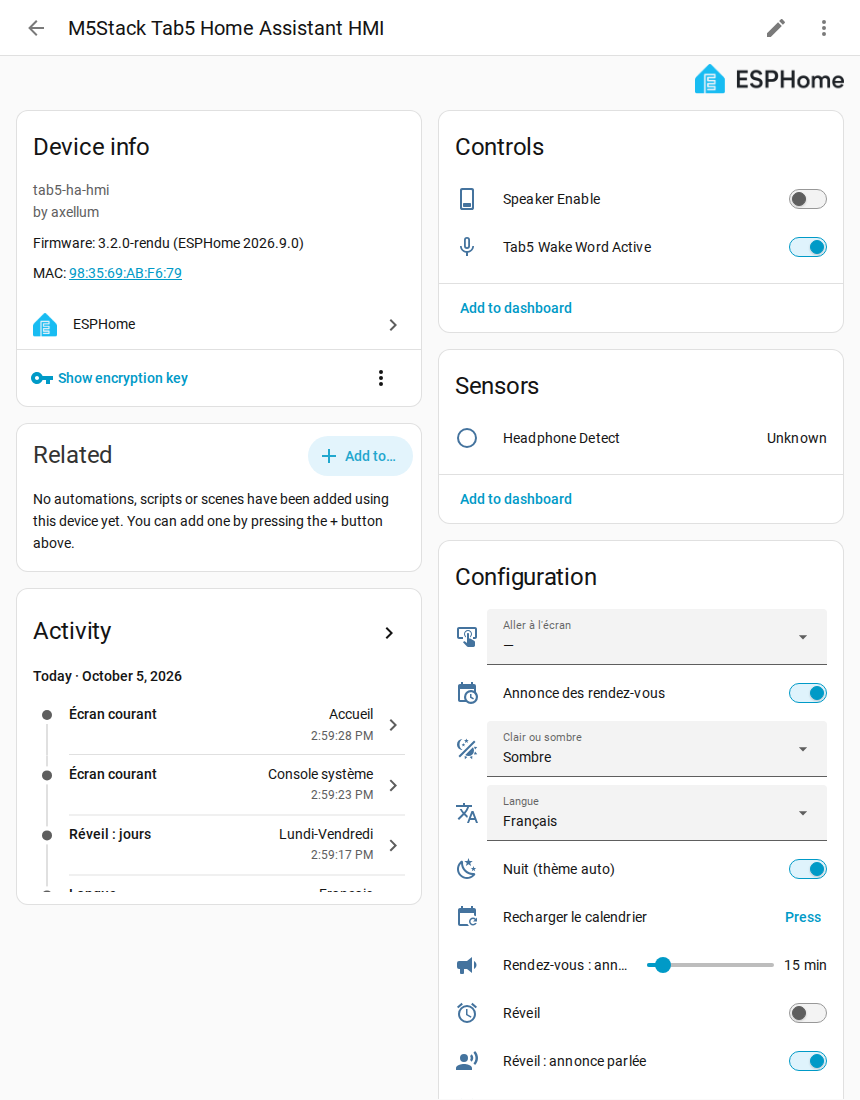
It worked if the tablet is listed under Settings → Devices & services → ESPHome, and its device page shows its controls, sensors and configuration. That page is where every tablet setting lives.
If it does not work
| What you see | What to do |
|---|---|
| The 30 minutes are over | restart the tablet (a short press on its reset button, or unplug it): the window opens again for 30 minutes. Once the tablet has its key, it never opens again |
| The tablet was already in Home Assistant, and was erased | Home Assistant waits for a confirmation and no longer connects: reinstalled with an erase |
| The tablet is not discovered | Settings → Devices & services → Add integration → ESPHome, then type the tablet's IP address (step 3) and port 6053. Same result: Home Assistant gives it its key. The fresh-install test of the project adds the tablet this way |
Nothing else to allow
The tablet never calls a Home Assistant action: it sends events, which packages/tab5_evenements.yaml (from step 1) turns into a fixed list of actions, for a Tab5 only (ADR-0025). The option « Allow the device to perform Home Assistant actions » stays unticked.
Only a firmware 3.1 or older still needs it ticked (ESPHome → Configure): voice, calendar and alarm clock use it on those versions. See upgrading from 3.1.
Next: step 5, your sources.