Tablet settings and options
Every setting of the tablet is an entity of its device in Home Assistant, and the tablet keeps it across restarts. Three places show them, all equivalent:
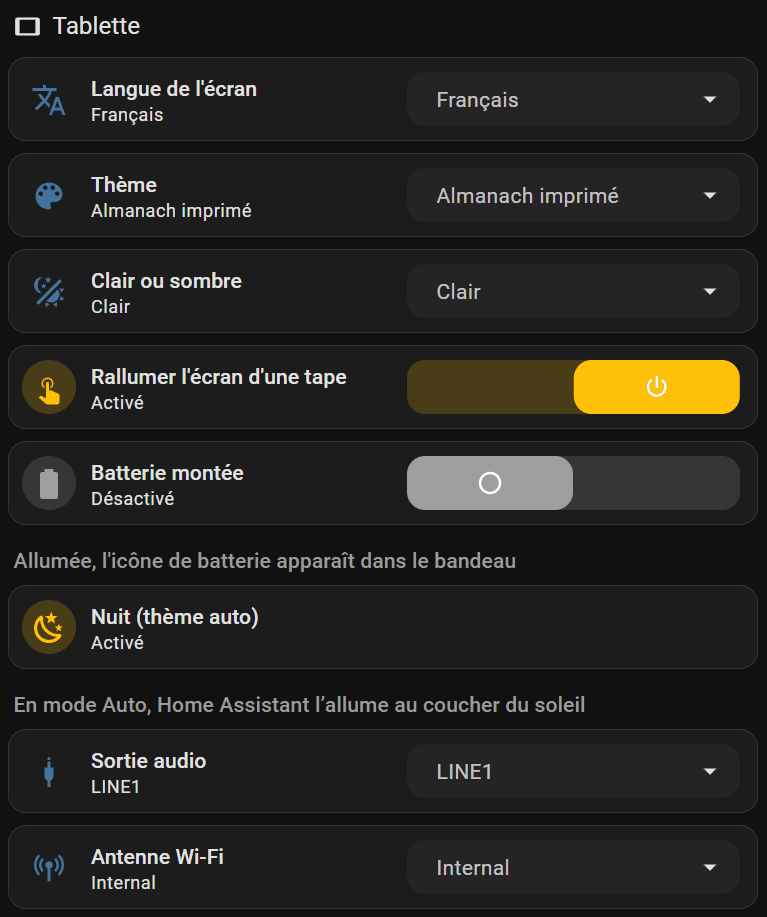
- the Settings view of the tablet's dashboard, left below: its « Tablette » column;
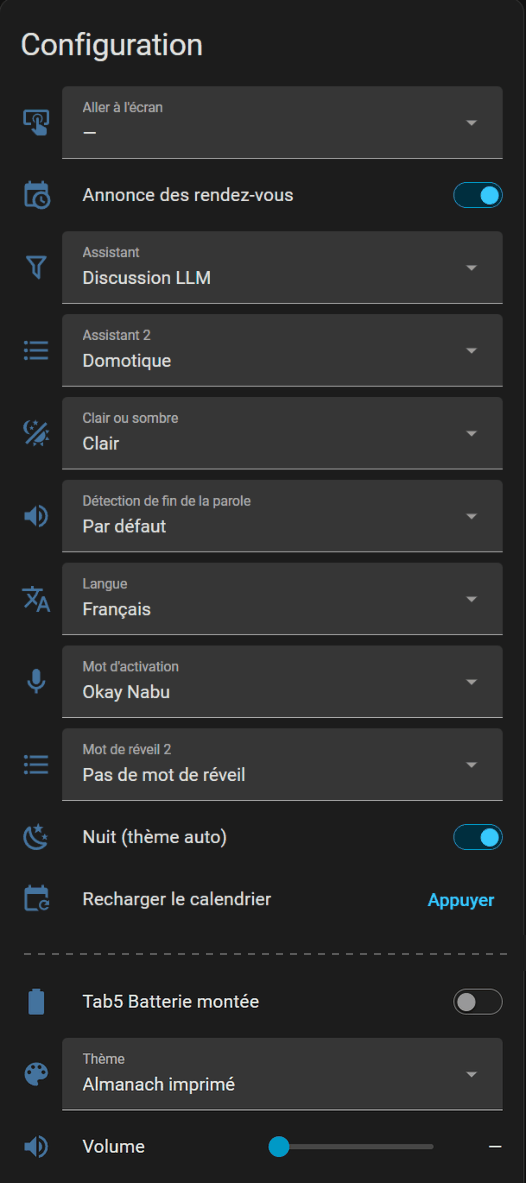
- the device page, right below: Settings → Devices & services → ESPHome → your tablet, cards Controls and Configuration;
- on the tablet itself, the Settings window (a tap on the gear button, top right), four pages since 2026-10-08: brightness, auto screen off and both ways to wake the screen (Screen page); theme, light or dark, night switch, animations and language (Appearance page); charge limit, charging mode, power saving, eco Wi-Fi and battery fitted, with the battery's state, level, voltage and consumption (Battery page); and the System page, the former system console (user manual).
The device page shows the entities under their French names, whatever the screen language. Home Assistant identifies an ESPHome entity by its name: translating these names would create new entities on every tablet already installed, and the dashboard and the automations would lose track of them. For labels in your language, use the dashboard: it follows the screen language, or write it with tab5_dashboard(langue='English') (step 7). The « Tab5 · » lists of the Home Assistant files are named in French and English.
Theme, light or dark
| Entity | Values | What it does |
|---|---|---|
| Thème | 21 themes, from « Ardoise » to « Ultraviolet »; a new tablet starts in « Relief doux » | colours, shapes (radius, borders, shadows) and the fonts of the clock, the date and the titles. The screen repaints at once, without a restart; the games keep their own dark colours |
| Clair ou sombre | Sombre, Clair, Auto | the mode of the theme. Auto: light by day, dark at night, following « Nuit (thème auto) » |
| Nuit (thème auto) | on / off | read only in Auto mode. The automation « Tab5 — thème jour/nuit » (packages/tab5_push.yaml) turns it on when the sun sets and off when it rises (sun.sun, so the location of Home Assistant). To decide yourself (a light sensor, bedtime…), turn that automation off and switch it from your own. Without Home Assistant, Auto keeps the last state received |
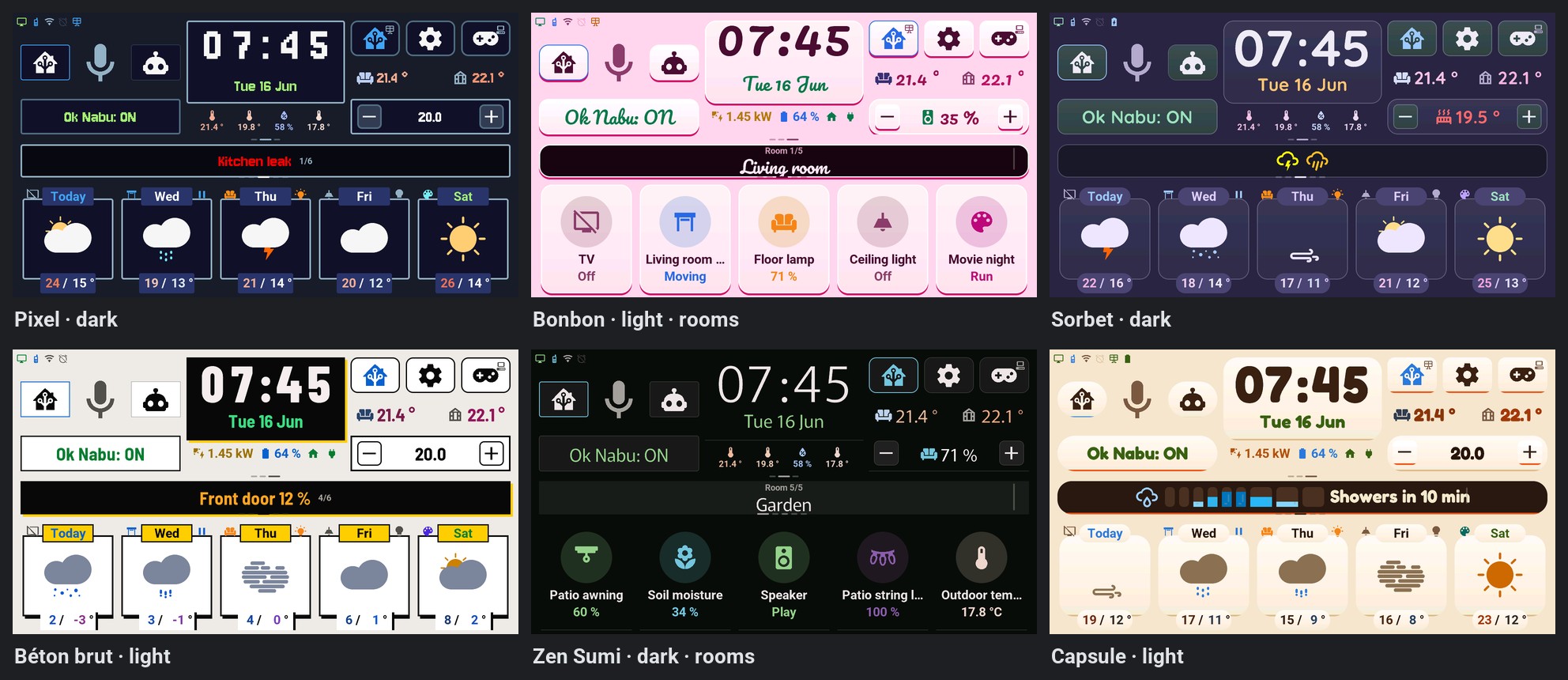
The theme names stay as they are in every language: they are names. Six of them:
Screen, sound and network
| Entity (name on the dashboard) | Values | What it does |
|---|---|---|
| Langue (Langue de l'écran) | Français, English, Deutsch, Nederlands, Español, Italiano, Türkçe | screen, games, dates and the spoken alarm briefing. The tablet restarts to apply it. The names and states Home Assistant sees stay in French |
| Display Backlight (Luminosité) | on / off, brightness | the screen backlight; 75 % at the very first start, then the brightness you chose. Off, the screen turns black (and the Waveshare 7B panel goes to sleep), it does not keep the last image |
| Sens de l'écran | Normal, Retourné; Normal on a new board | Waveshare 7B only: Retourné for a board mounted upside down. The picture turns by 180° at once, without a restart, and the touch follows; kept across restarts and updates, so the published firmware fits both mountings (Waveshare 7B). « Retourné » also draws a little faster: no rotation of each frame, about 69 ms for a full screen instead of 83. The Tab5 has no such setting (ADR-0069) |
| Tab5 Extinction auto de l'écran (Extinction auto de l'écran) | Jamais, 1 min, 2 min, 5 min, 10 min, 30 min; Jamais (never) by default | turns the screen off after that long without a touch, the way Home Assistant turns it off; a touch, a tap (Tap-to-Wake), Home Assistant or the alarm clock turn it back on. Never while the alarm rings, while the voice assistant listens or answers, while a game is open or during an update |
| Tab5 Extinction auto sur batterie seulement (Extinction sur batterie seulement) | on / off; off by default | on, the auto-off delay above only applies when the tablet runs on its battery (« Tab5 Sur batterie »); plugged in, the screen stays on. With « 5 min », a tablet carried around the house goes from 1.74 W to 1.23 W while nobody looks at it (measure) |
| Tab5 Nuit (écran éteint) | on / off; off at start | set by Home Assistant from the « Tab5 · extinction de nuit » list (sources), not by hand: on, the screen goes off after 1 min without a touch, even on « Jamais » or plugged in, with the same exceptions; turned off by the night, it comes back on when the night ends |
| Tab5 Économie d'énergie (Économie d'énergie) | Jamais, Sur batterie, Toujours; Sur batterie (on battery) by default | energy saving: brightness capped at 50 %, down to the minimum (10 %) after 30 s without a touch and when the battery is at 35 % or less (a touch brings it back); no animation; the screen redrawn at most 30 times a second, except in a game. Home Assistant and the settings slider keep the brightness you chose. « Sur batterie » follows « Tab5 Sur batterie » (decided from the battery current, every 60 s): plugged in, nothing changes |
| Tab5 Animations (Animations) | Complètes, Essentielles, Aucune; Complètes (full) by default | « Essentielles »: only the rotation of the central card stays, page swipes, the clock roller and the alert entrance become instant; « Aucune »: everything instant. Energy saving, while on, means « Aucune ». Since 3.8.0 (ADR-0045) |
| Tab5 Limite de charge (Limite de charge) | 100 %, 80 %; 100 % by default | with a battery: at « 80 % », charging stops at 80 % and starts again at 70 %, after at least 10 minutes stopped, for a tablet that stays plugged in. The level is estimated from the voltage, which reads higher while charging: charging stops a little before a real 80 %. Since 3.8.0 (battery) |
| Tab5 Mode de charge (Mode de charge) | Classique, Rapide; Classique (standard) by default | with a battery: « Rapide » switches on the charger's quick charge, only while the charger is on. Currents not measured (battery). Since 3.8.0 |
| Tab5 Wi-Fi éco (Wi-Fi éco) | Jamais, Sur batterie, Toujours; Jamais (never) by default | the Wi-Fi's light power save, on battery or always, never during voice, sound or an update. Answers may come a little later; current saved and latency not measured (ADR-0045). Since 3.8.0 |
| Tab5 Tap-to-Wake (Rallumer l'écran d'une tape) | on / off, on by default | a tap on the tablet lights the screen up again when it is off |
| Tab5 Rallumer l'écran à Okay Nabu (Rallumer l'écran à Okay Nabu) | on / off, on by default | « Okay Nabu » lights the screen up again when it is off, as the assistant starts listening (not « Stop »). Off, the screen stays dark and the answer is only spoken |
| Volume | 0 to 100 % | speaker volume; also on the System page of the settings and in the assistant popup |
| Speaker Enable (Haut-parleur) | on / off | turns the speaker on or off (a line of the IO expander) |
| Tab5 DAC Output (Sortie audio) | LINE1, LINE2, BOTH | output of the ES8388 audio chip; the author's tablet uses LINE1 |
| WiFi Antenna (Antenne Wi-Fi) | Internal, External | the internal antenna, or one on the external connector |
| Tab5 Batterie montée (Batterie montée) | on / off, off by default | shows the battery icon in the status strip: a plug while « Tab5 Batterie détectée » says no battery (below 5.5 V read with the charger switched off, since 3.8.1; before, a reading below 6 V in the last 10 minutes), else the battery's level |
| Tab5 Appareils sur la météo (Appareils sur la météo) | on / off, on by default | shows the rooms' devices on the forecast cards (icons and touch actions). Off, the forecast cards show the weather only; the « HA » button still shows the rooms and their devices |
| Aller à l'écran (Afficher) | —, Accueil, Assistant vocal, Calendrier, Réveil, Climatisation, Plantes, Télécommande TV, Console système, Énergie, Réglages, Alertes, Maison, Lumières, Volet, Température, Météo, Caméras | opens that screen or popup, from the dashboard or an automation, then goes back to « — ». A game in progress is closed first. « Console système » opens the settings on their System page, « Réglages » on their Screen page |
| Recharger le calendrier | button | asks Home Assistant again for this month and the next, when a new appointment is not on screen yet |
Alarm clock, appointments, voice
- Alarm clock: « Réveil » (armed or not), « Réveil : mode » (Heure fixe, Jours travaillés, Avant l'ouverture), the fixed time and its days, « jamais avant » / « jamais après », lead before the shift, minimum rest, snooze, maximum duration, ring tone, its own volume, fade-in and the spoken briefing. How the three modes compute the time: alarm clock.
- Appointments: « Annonce des rendez-vous » and « Rendez-vous : annoncer avant » (minutes): the tablet announces a timed appointment of « Tab5 · agenda des rendez-vous » that long before it; it counts down by itself, so a Home Assistant outage in between misses nothing.
- Voice: « Mot d'activation », « Assistant », « Assistant 2 », « Mot de réveil 2 » and « Détection de fin de la parole » are the Assist satellite settings Home Assistant adds to the device. The Domo / Discu modes of the screen: below.
Two settings stay on the tablet only: the text size of the assistant popup and a custom choice of alarm days. What applies to the whole home (sources, calendars, phone, presence: the « Tab5 · » lists of step 5) and the rooms and tiles (the blueprint automation) are set in Home Assistant; the Settings view groups them too.
Voice assistant: the two modes
Two buttons choose who answers when you speak: Domo (Home Assistant icon) and Discu (robot icon), on the home page and in the assistant popup (long press on the microphone). Each one uses a voice assistant of Home Assistant: speech-to-text, a conversation agent, text-to-speech. In Discu mode, each request opens the assistant popup with the answer; in Domo mode, a short command does not open it.
In Home Assistant:
- Settings → Voice assistants. The assistant set as preferred is the one of Domo. To control the home, its conversation agent is « Home Assistant ».
- For Discu, add a second assistant whose conversation agent is a language model: an online service, a local Ollama, or any other conversation integration.
- Pick that assistant in the list « Tab5 · pipeline de discussion » (Settings view of the dashboard, or the entity itself). The list shows your assistants once the tablet is added. While it stays on « Aucun », the Domo and Discu buttons are hidden (by the screen slots automation of step 6) and the tablet stays in Domo.
The « Assistant » list of the tablet's device page follows these buttons: each tap, and each start of the tablet, sets it back to the preferred assistant (Domo) or to the Discu one. Do not set it by hand: change the preferred assistant, or the « Tab5 · pipeline de discussion » list.
The author's Discu goes through his own engine, vromvrom-engine, for three reasons: - a fast home shortcut: short home commands are recognised and run directly, without going through an LLM; - an LLM with dedicated agents depending on the request (specialists); - replacing the chosen LLM when it is unavailable, or for a smarter one for instance, local or in the cloud.
This engine is still a rough draft, which the author manages only through AI: it is not a prerequisite, nor something he can recommend. Any Home Assistant conversation agent will do.
All local: Ollama is an official integration that works as a conversation agent; controlling the home with it is marked experimental. For speech, Home Assistant's local voice guide uses Whisper (free sentences, slow on a small machine) or Speech-to-Phrase (fast, home commands only) to understand, and Piper to speak; Home Assistant finds these add-ons through Wyoming. A server that speaks the OpenAI API (LM Studio…): the official OpenAI Conversation integration cannot change its address; the HACS integration Home LLM can.
Wake word: « Okay Nabu » is recognised by the tablet itself, nothing goes to Home Assistant before it; the « Ok Nabu » button turns it on or off. « Assistant 2 » and « Mot de réveil 2 » are a second wake word and its assistant, added by Home Assistant: the Domo / Discu buttons leave them alone, and the firmware offers Home Assistant only one wake word (« Stop », for the alarm clock and the shutter, stays inside the tablet).