Plants
On the home screen, in the plants line under the clock, one icon per pot, from the driest on the left to the wettest on the right, an offline sensor last in grey. With five pots there are four icons: the driest, the next one, the middle one and the wettest. Which pot sits where changes as they dry. The colour: red, to water; green, fine; blue, too wet.
Opens with a long press on those icons. A tap shows the next line of the row, if it has others (home screen).
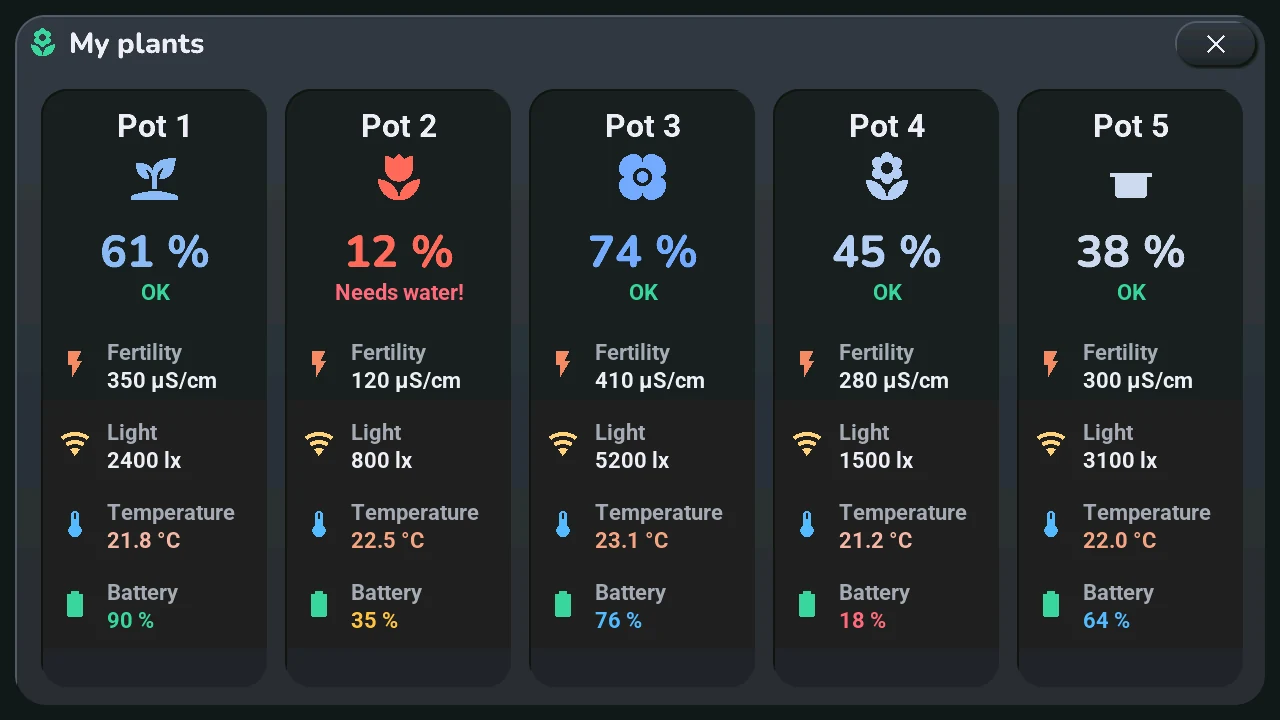
One card per sensor, always in the same order:
- the pot's name and icon, its moisture in large digits, and its state: OK, Drying soon (20 % or less), Needs water! (14 % or less), Offline;
- Fertility (µS/cm), Light (lx), Temperature, and the sensor's Battery.
Apart from its ×, the window has no button: it only shows. The values follow the sensors while it is open.