Adapt to your home
The screen was first drawn around the author's home. Everything is chosen in Home Assistant, in the « Tab5 — emplacements » automation (the blueprint of step 6): changing a device is an edit in HA's UI, no flash, no restart.
Rooms (firmware 3.2 and later)
The five tiles at the bottom of the screen are rooms you fill yourself (ADR-0023):
- Up to 10 rooms of 20 devices (ADR-0066). « Nombre de pièces · Number of rooms », the first section of the blueprint, says how many rooms the tablet has: 1 to 10, 5 by default; the « Room n » sections beyond it are ignored, nothing of them is sent. Room 1 is the home page (today to day 4); rooms 2 and 3 are one and two swipes to the left (days 5-9, 10-14); rooms 4 and 5 one and two swipes to the right (next hours); rooms 6 to 10 each get a page of their own after days 10-14, further to the left, when the tablet's « Tab5 Appareils sur la météo » switch is on — in weather mode; in HA mode the rooms follow each other in order. In each room, pick the devices in the order of the tiles, left to right (they can be dragged): up to five, one tile each; from the sixth, the last tiles are cut in two (top, bottom), then in four; beyond twenty, only the first twenty are used. A device may be in several rooms.
- Older firmware: the blueprint sends the number of rooms and the extra devices to every tablet; a firmware that does not know them yet ignores them and keeps showing the first five rooms and their first five devices, as before. The firmware and the blueprint can be updated in either order.
- Devices that fit on a tile: lights; switches, fans, humidifiers, input booleans and automations; covers and valves; media players; scenes, scripts and buttons; sensors and numbers (shown, not controlled); binary sensors, people, trackers and locks (shown); climate — a climate tile shows the room temperature, and a tap opens the climate popup for that unit (the one in the « Climatisation » input keeps the − / setpoint / + card of the home page).
- Names and icons come from Home Assistant. A room takes the name you type, otherwise the area its devices share, otherwise « Pièce n ». A tile takes the entity's name without the room's name (« Lampe du salon » in « Salon » becomes « Lampe »), and the icon chosen in the entity's settings, otherwise one for its kind.
- Customise a tile (folded section « Personnaliser des tuiles »): another name, another icon, or a behaviour — on only (never switched off from the screen), confirm (a second tap within 3 s), read only.
- The « HA » button shows the current page's room; a swipe left goes to the next room, a swipe right to the previous one, and after the last room comes room 1 again.
- A room's climate (optional, ADR-0040): three more fields in each room's section, all empty by default — « Température de la pièce · Room temperature » (a temperature sensor), « Humidité de la pièce · Room humidity » (a humidity sensor) and « Climatisation de la pièce · Room climate » (a climate). With a temperature, the climate card of the home page shows that room while you are on it in HA mode: its temperature on the left, its humidity on the right (or nothing), and the − / + tile adjusts its climate. Its temperature's long press opens its history. The humidity and the climate need the temperature. Both the firmware and the blueprint must have it; either one alone keeps the screen of before.
- A sensor's value is sent with the other measurements, every 5 minutes; the other devices are sent as soon as what the screen shows changes.
- Room 1 left empty: the home page keeps the 3.x setup (folded section « Ancien accueil (si la pièce 1 est vide) · Former home page (if room 1 is empty) »: PC or TV, shutter, three lights), with the PC tile's PC + TV behaviour. Nothing to redo after the update.
- Firmware 3.0 or 3.1: the blueprint reads the tablet's version and then only uses the 3.x setup; the rooms show up once the firmware is updated. The firmware and the blueprint can be updated in either order.
Solar energy (optional)
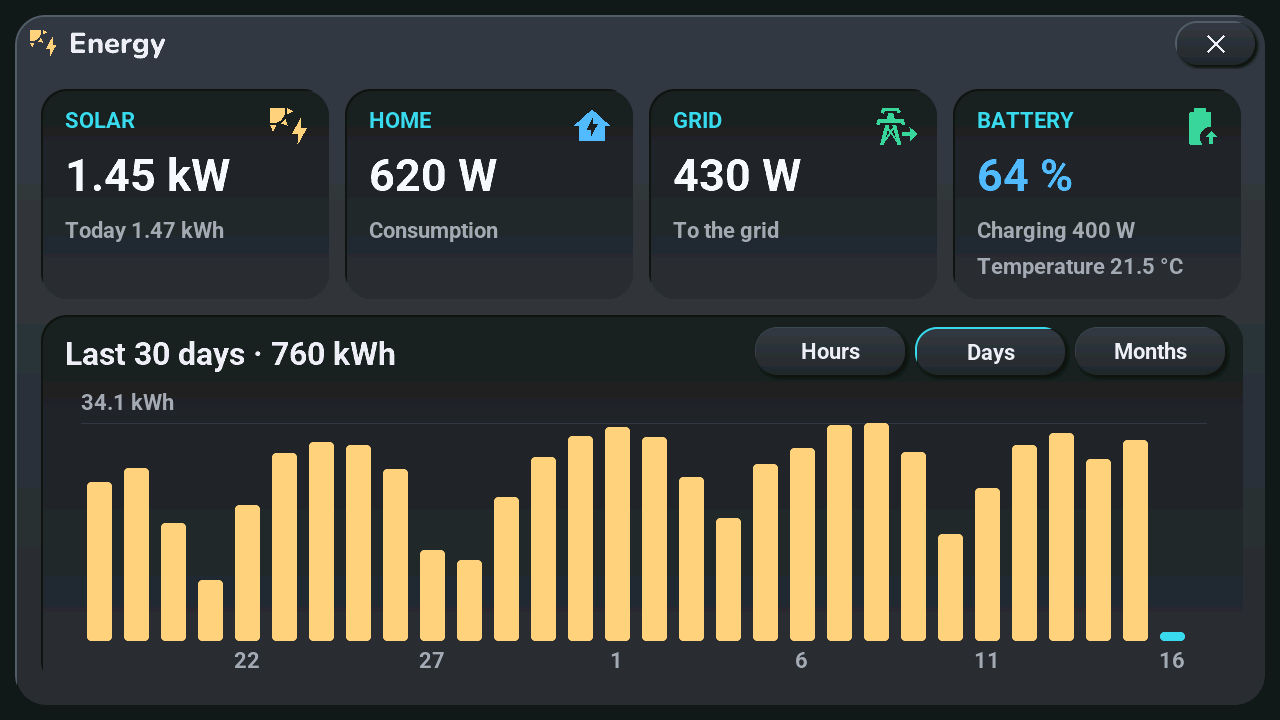
A solar installation gets its own popup (ADR-0028): solar, home, grid and battery live, and the production as bars per hour (today), per day (30 days) and per month (12 months).
- In the « Tab5 — emplacements » automation, open the three folded sections « Énergie : solaire · Energy: solar », « Énergie : réseau et maison · Energy: grid and home » and « Énergie : batterie · Energy: battery », and pick what you have: solar power, solar energy produced (the kWh meter of HA's Energy dashboard: the day total and the bars come from its statistics), grid power, home consumption, battery level, power and temperature. Every field is optional. Grid power is positive when the home buys: tick « Invert » if your meter says the opposite, or give the export in its own field if your meter splits them. Battery power is positive when charging (same « Invert » box). Several inverters or panel strings (pv1, pv2…): put the first one in « Solar power » / « Solar energy produced » and the others in « Other solar power » / « Other solar energy produced »; they are added up (an inverter unavailable at night is skipped, a meter without data for a period counts as 0). Left empty, home consumption is computed (solar + grid − battery charge). Give the panels' peak power (kWp, all the panels) too, and an icon of the status strip, top left, shows the production as a share of it by its colour (grey panel at night); 0 = no icon.
- Place one of these sensors in a room (the solar power, for instance): its tile shows the value and opens the popup on tap. The option « Énergie » of the tablet's « Aller à l'écran » select, in Home Assistant, opens it too.
- The
tab5_energie.yamlpackage (in the archive of step 1) pushes the values while the popup is open. Without it, the popup says « En attente de Home Assistant ». - The day's forecast and the balance (optional, ADR-0058). With the solar energy meter picked, the « Today » page needs nothing more: the sun's times come from HA's
sun.sun, the clear-sky curve is learned from your own production of the last 30 days (orientation and shade included; it appears after about three sunny days), and the forecast lowers it with the clouds of the hourly weather forecast the tablet already uses. If you have a forecast integration (Forecast.Solar, Solcast…), pick its kWh sensors in « Prévision de production du jour » and « … de demain »: the learned shape is scaled to them. For the « Balance » page (ADR-0062), pick « Énergie consommée par la maison · Home energy consumption » (the home meter of HA's Energy dashboard, in kWh) and/or « Énergie achetée au réseau » and « Énergie vendue au réseau » (its grid meters). With the production and the home consumption only — monthly net metering, for instance — the page works in kWh and Home Assistant estimates import and export hour by hour (export = what the production exceeds, import = what it lacks), which the screen says. For the savings, add the purchase and resale prices per kWh (a number, or a price sensor that wins) and the currency (€ when empty); without a price, the page shows no money. Update the tablet before the Home Assistant files: an older firmware does not know the calendar views of the balance.
Section left empty: nothing changes on the screen.
Temperature history
A long press on one of the two home-screen temperatures opens its history (ADR-0032): 24 hours, 7 days or 30 days, from Home Assistant's long-term statistics, and the weather forecast for the second temperature.
- The
tab5_historique.yamlpackage (in the archive of step 1) sends the curve while the popup is open. Without it, the popup says « En attente de Home Assistant ». - If your second temperature is outdoors, tick « La seconde température est dehors · The second temperature is outdoors » in the « Tab5 — emplacements » automation (section « Températures · Temperatures »): the forecast then extends its curve. Unticked (a greenhouse), the forecast stays apart, as « Outdoors, forecast ».
- The sensor needs statistics (a
state_class, which thermometers have); the forecast is that of the weather entity picked for the tablet.
Other zones
What you don't have disappears, with its buttons (ADR-0018, ADR-0019).
- Remove a zone: leave its slot empty. An empty slot, or an entity that doesn't exist, is absent. An entity that exists but is
unavailablekeeps its zone (« -- », « Hors ligne »). Without the blueprint's automation, nothing disappears (and nothing of your devices is shown). - A zone missing by mistake? The tablet's diagnostic sensor « Zones masquées » lists what disappeared.
- A zone comes back by itself as soon as its entity sends a value.
| Zone | Blueprint input | Hidden when empty |
|---|---|---|
| TV | TV, and Télécommande de la TV for the remote keys (Autres télécommandes: up to three more pages, an Apple TV, a Freebox Player…) | TV button and remote; « HA » and « Sys » move one column right |
| Phone | Batterie du téléphone | Status icon |
| Room | Température de la pièce (and Humidité de la pièce) | Its temperature |
| Greenhouse | Seconde température (serre) | Its temperature; the icon becomes a carousel, its tap still switches the area left of the clock |
| Plants (0 to 5) | Pot 1 to 5: the moisture sensor; conductivity, light, temperature and battery are taken from the same device | Up to 4 plants: one slot each; 5: the « driest / median / wettest » summary. Popup cards, re-centred |
| Climate | Climatisation | − / setpoint / + and the popup |
| Work planning | Agenda de travail | Planning panel of the central card |
| Voice « Discussion » mode | none: the list « Tab5 · pipeline de discussion » set to « Aucun » (without the list, the zone stays) | Domo / Discu buttons of the home page and of the assistant popup; the tablet goes back to Domo |
| Lights (3.x setup) | Lumière 1 to 3 · Light 1 to 3 (« Ancien accueil » section) | Icons of tiles 3 to 5, card of the « HA » layer, rows of the Lights popup, « Tout éteindre » |
| PC (3.x setup) | PC (a switch turns it on; a presence tracker only shows it) | Status icon, « PC Bureau » card; the first tile too if there is no TV either |
| Shutter (3.x setup) | Volet (and the optional volet_serre_tracking.yaml package, tab5_optionnel/ of the archive, for a shutter that doesn't report its travel) |
Icons of tile 2, card of the « HA » layer |
The « 3.x setup » rows (blueprint section « Ancien accueil · Former home page ») are the home page of a 3.0 or 3.1 firmware, and of a 3.2 firmware while room 1 is empty. The planning hours and the alarm time come from the list « Tab5 · agenda de travail » (step 5); leave the blueprint's « Agenda de travail » empty and it takes the same one.
Limits
- Icons: the screen holds a limited palette (tile icons). An icon outside it shows the default of its kind; adding one means a line in
Tab5/tuiles_icones.yamland a new release. - Names: the screen's fonts cover Latin alphabets only; other characters are dropped, and long names are cut.
- Renaming an entity: its tile follows at the tablet's next connection, or as soon as the automation is saved again.
- Climate (ADR-0026): any brand. The blueprint sends the unit's bounds, step, unit (°C or °F, that of your weather entity) and modes; the popup takes its name as title, and a button the unit cannot do disappears. Several units (ADR-0027): put each one in a room; its tile opens the popup for it, with its own bounds, modes and name. A change made outside the screen (remote, app) shows in the popup at once for the setpoint and the mode, within 5 minutes for fan, swing, preset and room temperature. With a firmware older than the blueprint, such a tile only shows its temperature. The screen has buttons for cool, heat, dry, fan and off, Éco, Boost, Silence, Oscillation and Brise only: other modes (heat/cool, auto, fan speeds, sleep…) stay in Home Assistant (a unit in heat/cool or auto lights no mode button). With a blueprint older than the firmware, the popup stays as before (16-30 °C, steps of 0.5, every button).
- A shutter followed by
volet_serre_tracking.yaml(it doesn't report its travel): keep it in the « Volet » input of the 3.x section too, even if it is in a room; its tile then shows the state the package keeps, and its commands go through the package's script. - One calendar per role: work, appointments, birthdays, public holidays and school holidays are the five « Tab5 · agenda … » lists.
- Spoken morning briefing: in the screen's language (French, English, German, Dutch, Spanish, Italian, Turkish); only the French text has been reviewed.
- To see a smaller home without touching yours: demo mode, option
--maison-minimale.