AI server
Opens with the « Serveur IA » entry of the tablet's « Aller à l'écran » list in Home Assistant, « Serveur IA » in the Agenda family of the navigation wheel (long press on the central card; offered only once Home Assistant has sent a server), or a tap or a long press of the clock or of a button top right when the blueprint gives it « Serveur IA (LLM local) · AI server (local LLM) » (home screen).
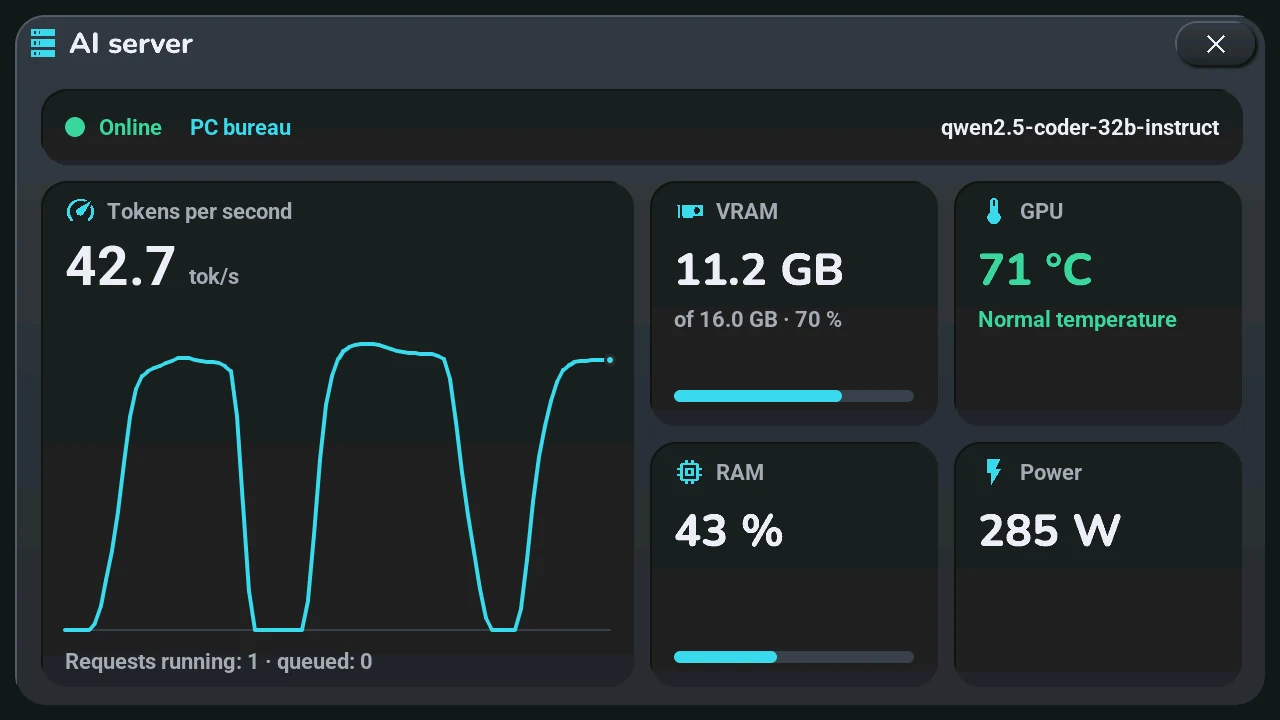
The window « Serveur IA » is the dashboard of a local LLM server (Ollama, llama.cpp, LM Studio, vLLM…):
- Top band: a dot, green when the server is online, grey when it is offline or unknown, with « En ligne », « Hors ligne » or « État inconnu »; the server's name (its device in Home Assistant); on the right, the loaded model, cut with « … » when it is too long, or « Aucun modèle chargé ».
- Tokens per second, large, and their curve: one point each time Home Assistant sends the server (two seconds apart at least), the last 24 — about the last minute while the server works. The curve is kept by the tablet and starts again after a restart. Below: requests running and queued.
- VRAM: used, « of » total and the percentage, with a bar.
- GPU: its temperature, in green when normal, orange when high, red when critical (thresholds in Home Assistant, 80 and 90 °C by default).
- RAM: in %, with a bar.
- Power: in W.
A value Home Assistant does not know shows « — », never a made-up 0.
Buttons in the top band, right of the model, when Home Assistant offers them (each one is set up in Home Assistant, see Local AI server):
- Décharger (eject icon): unloads the loaded model, which frees the VRAM. Ollama and LM Studio only; greyed when no model is loaded.
- Réveiller (power icon): wakes the PC by Wake-on-LAN. Greyed while the server answers.
- Redémarrer (restart icon): runs the script or presses the button you picked in Home Assistant to restart the AI service.
« Décharger » and « Redémarrer » cut an answer in progress, so they ask a second tap: the first turns the button orange with « Confirmer ? » for 4 s; tap again within that time to send, or do nothing and it comes back. « Réveiller » leaves at the first tap. Once sent, the button says « Envoyé » in green for 5 s, and no other button sends during that time. A greyed button does nothing. With nothing set up in Home Assistant, there is no button and the band is as before.
Setting up in Home Assistant: the tab5_serveur_ia.yaml package of this version, then a sensor in each list « Tab5 · serveur IA, … · AI server, … » (status, model, tokens per second, running and queued requests, VRAM used and total, GPU temperature, RAM, power). Each list offers only the sensors that fit (a temperature for the GPU, a power for the power…); leave « Aucun » for what you do not have. The sensors can come from anywhere: the tab5_llm.yaml package for the server itself, Glances or System Monitor for the machine, a metered plug for the power. With every list on « Aucun », the window says where to choose them.
Like every window, it closes with its ×, a tap on the dark area around it, or after 45 s without a touch.