Waveshare ESP32-P4 7B (experimental)
The same firmware also runs on a second board, the Waveshare ESP32-P4-WIFI6-Touch-LCD-7B: a 7-inch, 1024×600 touch screen built around the same chips as the Tab5 (an ESP32-P4, an ESP32-C6 for Wi-Fi, an ES7210 for the microphones). It is a cheaper and bigger screen, with less on board: no motion sensor, no clock chip, no battery gauge (it does have a battery connector, which this firmware does not use yet).
Status: experimental. The author's board has been the daily screen of their home since 2026-10-14: display, touch, backlight, sound and Wi-Fi work, and Home Assistant sees it like a Tab5. One board only, though, and one energy page is not adapted to its screen yet (what is left); the games are left out by default. If you try it, say how it went in Discussions → Hardware compatibility: it helps a lot.
The choice of the board is one line at build time (ADR-0061); on the Tab5, nothing changes.
What changes on screen
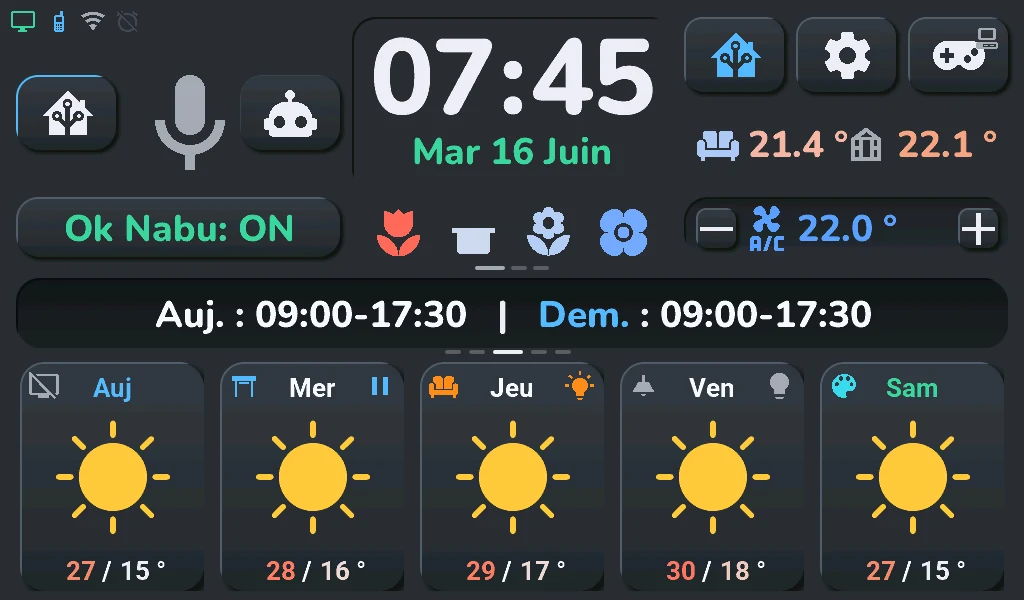
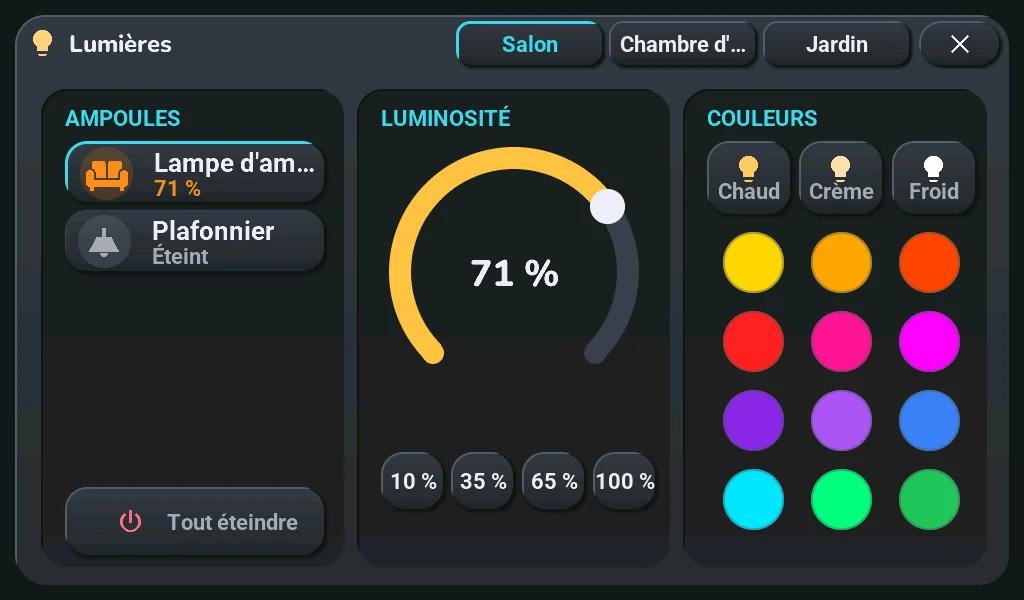
The home screen is the Tab5's layout brought to 1024×600: same places, same proportions, smaller. The large fonts are scaled by 0.82 (about 1024 / 1280 and 600 / 720), the small ones keep their size so they stay readable. The popups do the same: each keeps the Tab5's layout, smaller. Where a fixed-size text no longer fitted, it moves a little instead (the plant rows lose some margin, a rain amount drops its « mm » in a narrow weather column, the « On / Off » key of the remote wraps onto two lines); the camera pictures are asked at 720 × 405 instead of 960 × 540. The details are in ADR-0061.
| Home screen | Lights | Energy |
|---|---|---|
 |
 |
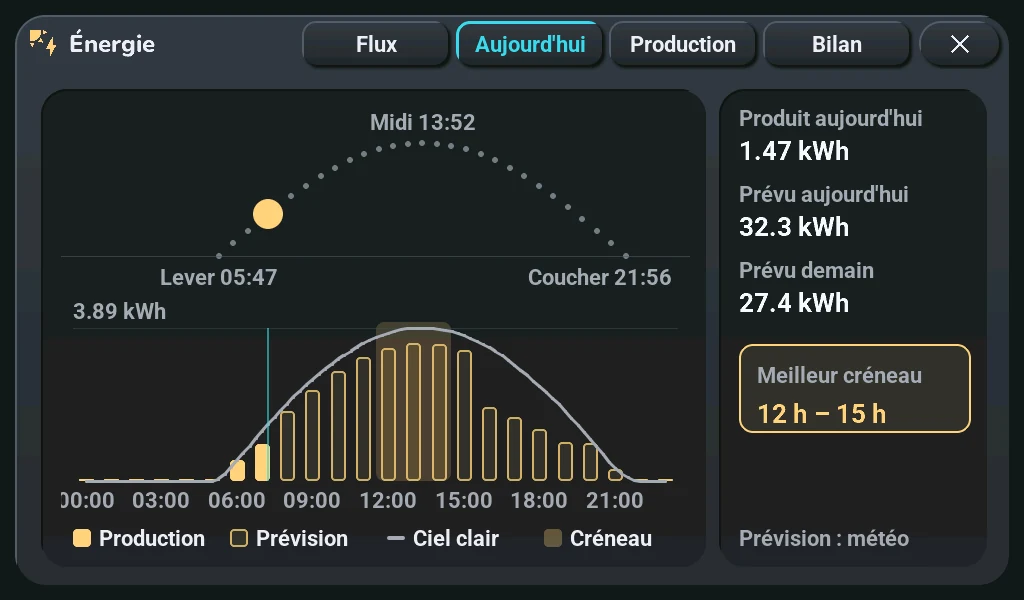 |
These pictures come from the off-device render (the firmware running on a PC, debugging), which draws every screen at 1024×600 on each firmware change; they are the same pixels as on the board, without the touch. The render of this board is in French only.
What the board does not have, and what it means on screen:
- No motion sensor (IMU), so no games by default: the firmware of this board is built without the eight consoles (ADR-0065): no Arcade, no « Games » in the navigation wheel; the gamepad button's tap opens the audio player (Music popup) and its long press the TV remote, both changeable in the blueprint. To build them in anyway, add
tab5_jeux: ouitoTab5/user_entities.yaml(or-s tab5_jeux oui); the games played by tilting (Fil d'Or, Arcanoïde, Coureur d'Or, Neon Apron) then get no input, and none is laid out for 1024×600. - A battery connector, but no battery gauge, and nothing read by this firmware: Waveshare's schematic shows a connector for a one-cell lithium battery (J4, MX1.25), a charger (ETA6098), a converter that raises the battery to 5 V and an ON/OFF switch. There is no gauge: the battery voltage only reaches the P4 through a divider (200 kΩ / 100 kΩ, a third of the voltage) on GPIO 20, and this firmware does not read it yet. So the battery icon, the charging settings and the battery entities stay, without effect (« Tab5 Batterie » stays unknown), and energy saving « on battery » never triggers. Nothing on this page was tried with a battery.
- No clock chip: the time comes from the network at each start. After a power cut, the alarm clock waits for Wi-Fi. (The board has a 1220 coin-cell holder for the P4's own clock; this firmware does not use it. The board charges that cell: fit only a rechargeable ML1220, never a CR1220, which is not made to be charged. Waveshare's wiki also says rechargeable cells only.)
- No headphone jack detection, no switchable power rails: their switches are kept so Home Assistant finds the same entities, and do nothing.
Install it
From the browser, since 3.9.0-rc.6 (in the beta channel until the next stable one): on the install page, pick « Waveshare ESP32-P4 7B » and plug in the USB-C port of the ESP32-P4; the steps are those of a Tab5 (install the firmware). This firmware is built and signed by the project with ESPHome 2026.9.1, for a board mounted either way (« Sens de l'écran », below) and without the games; its updates then come from Home Assistant, from this board's own folder of the site, never from the Tab5's. Not tried from the install page on a real board yet: the author's board runs a firmware built on a PC. The Home Assistant steps stay the same (files, adding the device, sources, the blueprint).
Or build it yourself, to add the games: the Build your own firmware page with three differences.
- ESPHome 2026.9.1 or newer. 2026.9.0 crashes while starting the display of this board's ESP32-P4 revision 3 (esphome#18984); the build stops with a clear message under 2026.9.1. The Tab5 itself still builds from 2026.9.0.
- One line in
Tab5/user_entities.yaml:tab5_carte: waveshare-7b(or-s tab5_carte waveshare-7bon the command line). - First flash over USB: plug the USB-C port marked for the ESP32-P4 into the computer, then
esphome run tab5-ha-hmi.yaml. Wi-Fi exactly as on the Tab5: the open « Tab5 Fallback AP » network with a phone, or Improv from ESPHome Web. Later updates go over Wi-Fi.
Before the first flash, if you care about the factory demo, back up the flash with esptool read-flash: on the author's board, each read restarts the board, and a 4 KB block at 0x37C000 could not be read (filled with zeros in the backup).
Board mounted the other way round? The panel is mounted upside down compared with its driver's default, so the firmware turns the picture by 180° in software, on every frame. If you mount the board upside down, pick Retourné in its « Sens de l'écran » setting in Home Assistant (device page, Configuration card; tablet settings): the picture turns at once, without a restart or a rebuild, and the choice is kept across restarts and updates, so the published firmware fits both mountings and the board keeps getting its updates. The picture then goes to the panel as LVGL draws it, without the 180° step: a full-screen redraw takes about 69 ms instead of 83 ms (4 runs each on the author's board, 2026-10-16, with the same code built for that angle). Nothing else to change: ESPHome turns the touch points with the picture, so the touch follows by itself, also on a new board that still shows the picture upside down. Up to 3.9.0-rc.6 it took carte_rotation: "0" at build time; building with -s carte_rotation 0 and picking « Retourné » would turn the picture twice (ADR-0069).
The board announces itself in Home Assistant with the Tab5's name and model (tab5-ha-hmi): the packages and the blueprint find it with nothing to change. Replacing a Tab5 in the same Home Assistant? Disable the Tab5's ESPHome entry first. Otherwise Home Assistant keeps both, gives the new board's entities a _2 suffix, and the pushes keep going to the old one.
Problems met, and how they were solved
What happened on the author's board when it arrived (2026-10-14), in order. Everything here is already in the firmware: you should not meet these again.
| What we saw | Cause | Fix |
|---|---|---|
| Boot loop, then safe mode | ESPHome 2026.9.0 aborts while setting up the display clock of a P4 revision 3 (mipi_dsi_ll_set_phy_pllref_clock_source) |
ESPHome 2026.9.1; the build of this board refuses an older ESPHome |
No Wi-Fi, sdmmc_card_init failed |
the reset of the ESP32-C6 was set active low | esp32_hosted: active_high: true, as on the Tab5 (same wiring) |
| About 30 « lcd.dsi underrun » per second (first trial firmware) | the PSRAM ran at its default speed | psram: speed: 200MHz |
| Touch almost dead: one touch recognised in 5 minutes, the brightness slider frozen | the panel is mounted upside down compared to the driver's default, and the touch controller was never reset (Waveshare's own code says its reset pin is not connected) | LVGL rotation: 180, the GT911 mirrored in X and Y, and its reset on GPIO 23, as in the other public configurations that work on this board: then every touch lands in the right place |
| The first sound was only a click | the microphone kept the I2S bus the speaker shares with it; the exact cause of the click was not established | the speaker at 48 kHz like the other configurations, the shared-bus rule of the Tab5 (ADR-0010): sound works since that evening |
| The speaker saturated completely at volume 100 % (2026-10-17) | ESPHome's ES8311 driver writes the volume as is to the DAC volume register: 0.75 is 0 dB, 1.0 is +32 dB of digital gain (the Tab5's ES8388 stops at 0 dB) | volume_max: 75% on the 7B's media player: 100 % on the screen or in Home Assistant is now 0 dB; by ear, 100 % and 80 % distorted, 75 % was clean |
| The volume was only heard in the last third of its slider (2026-10-18) | the ES8311 register gives 0.5 dB per step (volume × 255, 0xBF = 0 dB): with the default volume_min of 0, 20 % was ≈ −76 dB, silent while the player said « playing » |
volume_min: 40%: the bottom of the slider is ≈ −44 dB, the top stays 0 dB. Tested by ear on 2026-10-19 with the speaker from the official pack: crystal-clear sound, no distortion, well-balanced curve |
| Boot loop after a software reboot (2026-10-16, after a few reboots from Home Assistant), Wi-Fi never up, then safe mode; only a power cut helped | the SDIO link to the C6 failed and the bad state, on the P4 side, survived esp_restart(), which only resets the CPU cores |
every software reboot ends with a reset of the whole digital core (Tab5/ecran/tab5_lien_c6.cpp, troubleshooting) |
| The board restarted every 15 minutes before Home Assistant knew it | ESPHome's default reboot_timeout while no API client is connected (first trial firmware) |
the full firmware waits 60 minutes, like the Tab5 |
Two things learnt along the way:
- The backlight is dimmed in analog, not chopped. GPIO 32 does not switch the LED driver (AP3032) on and off: it goes through an RC filter (10 kΩ, 100 nF) into the driver's feedback pin, so the PWM becomes a steady voltage that shifts the LED current. A higher PWM frequency is smoother: the firmware uses 5 kHz, like Waveshare's code.
- Start from the configurations that already work. The three touch fixes were all in public ESPHome configurations of this board (agillis/esphome-modular-lvgl-buttons, Jordi1990/openamber, the Home Assistant forum), not in the manufacturer's code. Reading them first would have saved an evening.
What is not done yet
- Not checked on the board: the microphone and the wake word, the cameras popup (JPEG decoding), a power cut without network, the firmware published by the project (install page, then an update from Home Assistant).
- Not adapted to 1024×600 yet: in German and Turkish, « Close all » in the shutters popup (« Alle schließen », « Tümünü kapat »: 140 and 143 px in a font that does not shrink with the screen) runs past its 134-px button. The other popups follow the screen, the « Balance » page of the Energy popup included since 2026-10-18. For every screen, the render counts on each change what runs past its area: about as much as on the Tab5 itself, mostly the shutters, alarm clock and cameras popups, which do the same there.
- Reported by others on this board, then seen here too: a faint glow with the backlight at 0 % (the screen off is now a black panel, ADR-0064). The speaker distortion reported earlier was completely solved by setting
volume_max: 75%(0 dB unitary gain). - The firmware version of the C6 Wi-Fi chip cannot be read on this board (« Tab5 Version du C6 » stays unknown since 2026-10-14, while the Tab5 answers 1.4.1): its factory firmware may be older than the ESP-Hosted library of the P4 (2.12.12 with ESPHome 2026.9.1). Updating it is possible, from ESPHome (
update:withplatform: esp32_hosted, the firmware sent over the SDIO link) or over the C6's own serial port on the H4 connector (TXD, RXD, GND, IO9 = BOOT). Not done, by choice: a failed update would leave the screen without Wi-Fi, and Wi-Fi works as it is. Since the request went unanswered and froze the screen for 1 s each time (3 to 4 times after every boot, measured on 2026-10-16), the 7B no longer asks: the sensor says « inconnue » straight away (carte_c6_version: "false"inTab5/paquets/carte-waveshare-7b.yaml, to set back to"true"after a C6 update).
Measured on the board (2026-10-16)
Firmware main 46ad7f03, details and method in Power consumption.
- Start-up: first image at 5.6-5.8 s, Wi-Fi at 10.4-11.7 s, Home Assistant connected at 11.5-12.7 s (4 starts, read on the board's « Boot timeline » sensors). It used to be about 20 s before the first image, like the Tab5; #478 removed the cost of creating the labels.
- One second less at every start (2026-10-17): the boot waited 1 s before the display, a wait made for the Tab5, whose display reset goes through an I/O expander; the 7B has none, its panel reset is a pin of the P4 (ADR-0005,
carte_attente_ecran_ms: "0"). Over 10 restarts from the « Redémarrage Système » button, against the 10 of the night of 2026-10-16: backlight on at 0.97 s (2.02 s), first image at 4.78-4.84 s (5.84-5.90 s), Wi-Fi at 9.38-9.44 s (10.37-10.43 s); every other step keeps its length, and the screen comes back on with its picture (seen by the author). - The clock can show up late: the board has no real-time clock, so the time is only known once the Wi-Fi is up and the time is received (10 s or more after power-up); the first image comes before it.
- Power at the USB input: 1.96 W on the home screen at the usual brightness, 3.14 W at 100 %, 1.24 W with the backlight off. Popups and pages cost nothing measurable.
- Precise USB power measurement (2026-10-19, FNIRSI FNB-58): measured over USB HID at 100 samples/s on the home screen at default brightness (~60 %): 5.028 V (5.010–5.044 V), 309.8 mA (278.1–323.3 mA), average power 1.558 W (p95 1.569 W, max 1.626 W). Sound playback (TTS announcement) adds about 0.1 to 0.2 W peak.
Hardware
| Waveshare ESP32-P4-WIFI6-Touch-LCD-7B | |
|---|---|
| Main processor | ESP32-P4 (ESP32-P4NRW32), revision v3.2 on the author's board, run at 400 MHz, its normal speed (ESP-IDF offers 360 MHz only to chips older than v3: the 360 MHz asked until 2026-10-16 were ignored; ESPHome's « experimental » warning is about those older chips) |
| Memory | 32 MB PSRAM (hex mode, 200 MHz), 32 MB flash |
| Display | 7 inches, 1024×600, landscape panel, EK79007 controller over MIPI-DSI (2 lanes), ESPHome model WAVESHARE-ESP32-P4-WIFI6-TOUCH-LCD-7B |
| Touch | GT911, I2C at 0x5D, polled every 50 ms (no interrupt) |
| Backlight | AP3032 LED driver, analog dimming from GPIO 32 (LEDC, 5 kHz, inverted) |
| Sound out | ES8311 DAC (0x18), NS4150B amplifier enabled by GPIO 53, a two-pin speaker connector (validated with the official Waveshare pack speaker, clean playback up to 75% / 0 dB) |
| Microphones | two, through an ES7210 ADC (0x40), 16 kHz / 16-bit like the Tab5; the firmware reads MIC1 (left slot), like Waveshare's demo |
| Wi-Fi and Bluetooth | ESP32-C6-MINI-1 over SDIO (ESP-Hosted), reset on GPIO 54; Wi-Fi in 2.4 GHz only |
| ESP32-C6 serial connector | « C6-UART », 4 pins (TXD, RXD, GND, IO9; IO9 to ground = download mode), to flash the C6 directly |
| USB | USB-C « USB » (the P4's own USB Serial/JTAG), USB-C « USB TO UART » (CH343P bridge to the P4's UART0, GPIO 37 TX / GPIO 38 RX, with automatic reset and boot), USB-A host |
| Power | the two USB-C ports; a one-cell lithium battery connector (J4, MX1.25) with an ETA6098 charger, a 5 V boost converter and an ON/OFF switch; no gauge, the battery voltage divided by three on GPIO 20 (not read by this firmware) |
| Clock backup cell | 1220 holder on the P4's own clock, charged by the board: rechargeable ML1220 only, never a CR1220 (not used by this firmware) |
| Free GPIO | 17, on two 12-pin PH2.0 headers: GPIO 2-5, 28-31, 34 and 36 on P3, GPIO 46-52 on P1 |
| Not on this board | battery gauge, motion sensor, clock chip, I/O expanders, headphone jack |
| Also on the board, not used | microSD slot, MIPI-CSI camera connector, USB-A, I2C / UART / RS485 connectors, CAN bus (TJA1051T/3 transceiver on GPIO 21 RX / GPIO 22 TX with 120 Ω termination jumper H5), battery input |
The Wi-Fi band, the power, USB, coin-cell and free-pin rows come from Waveshare's schematic and wiki; they were not tried on the author's board.
Everything the firmware sets for this board is in Tab5/paquets/carte-waveshare-7b.yaml, its screen size in Tab5/paquets/geometrie-waveshare-7b.yaml. What does not depend on the board (logger, OTA, energy saving, media player…) is copied from the Tab5's file, and tests/test_carte_7b.py keeps both equal.
Pin map
Every pin the board's file configures. The display reset (GPIO 33) is set by ESPHome's display model, not in the YAML. As for the Tab5, tests/test_doc_broches.py checks every row, in both languages, against carte-waveshare-7b.yaml.
| Function | Pin | In the YAML |
|---|---|---|
| I2C bus, SDA (touch and codecs, 400 kHz) | GPIO 7 | bsp_bus · sda |
| I2C bus, SCL | GPIO 8 | bsp_bus · scl |
| Touch reset | GPIO 23 | touch · reset_pin |
| Backlight PWM (LEDC, 5 kHz, inverted) | GPIO 32 | backlight_pwm · pin |
| I2S word select (microphones and speaker) | GPIO 10 | mic_bus · i2s_lrclk_pin |
| I2S bit clock | GPIO 12 | mic_bus · i2s_bclk_pin |
| I2S master clock | GPIO 13 | mic_bus · i2s_mclk_pin |
| I2S data in, from the ES7210 (microphones) | GPIO 11 | tab5_microphone · i2s_din_pin |
| I2S data out, to the ES8311 (speaker) | GPIO 9 | tab5_speaker · i2s_dout_pin |
| Speaker amplifier enable | GPIO 53 | speaker_enable · pin |
| ESP32-C6 link (SDIO), clock | GPIO 18 | esp32_hosted · clk_pin |
| ESP32-C6 link (SDIO), command | GPIO 19 | esp32_hosted · cmd_pin |
| ESP32-C6 link (SDIO), data 0 | GPIO 14 | esp32_hosted · d0_pin |
| ESP32-C6 link (SDIO), data 1 | GPIO 15 | esp32_hosted · d1_pin |
| ESP32-C6 link (SDIO), data 2 | GPIO 16 | esp32_hosted · d2_pin |
| ESP32-C6 link (SDIO), data 3 | GPIO 17 | esp32_hosted · d3_pin |
| ESP32-C6 reset | GPIO 54 | esp32_hosted · reset_pin |
Sources: Waveshare's board support package and schematic, ESPHome's display model, and the public configurations named above. The pins of the C6 link are ESP-Hosted's defaults for the P4, which this board follows.